
- OS Requirements
- Windows 10 / Windows 11 (64-bit). Listed builds: 2004, 20H2, 21H1, 21H2, 22H2, 23H2, 24H2, 25H2, 26H1.
- Hardware Requirements
- Intel / AMD CPU, NVIDIA / AMD GPU. VT-x / SVM enabled, Hyper-V and Secure Boot disabled. USB drive not required.
- Type of Software
- External
MASON — ARC RAIDERS CHEAT
AIMBOT • PREDICTION • RCS • PLAYER ESP • LOOT ESP • RADAR
ADVANCED AIM ASSISTANCE & VISUAL SOFTWARE FOR ARC RAIDERS
MaSoN for ARC Raiders is a configurable game cheat featuring an advanced Aimbot, detailed Player ESP, item and drone visualization, an integrated Radar and additional combat and camera settings.
The software combines movement prediction, recoil compensation, customizable target selection, enemy information, loot tracking and configurable visual assistance in one interface.
Player ESP provides information about enemy health, armor, skeletons, equipped weapons and ammunition, while Loot ESP and Drone ESP help identify supported objects throughout the game world.
AIM PREDICTION • HUMANIZER • SAFE PRESET • VISIBILITY CHECK • BATTLE MODE
STARTING FROM ~€3.31 / 299 RUB
INSTANT DELIVERY • SETUP GUIDE • CUSTOMER SUPPORT
WINDOWS 10 / WINDOWS 11 x64 • STEAM VERSION
➜ BUY MASON CHEAT FOR ARC RAIDERS
━━━━━━━━━━━━━━━━━━━━━━━━━━━━
MAIN FEATURES
AIMBOT • PREDICTION • RCS • PLAYER ESP • LOOT ESP • RADAR
ADVANCED AIM ASSISTANCE & VISUAL SOFTWARE FOR ARC RAIDERS
MaSoN for ARC Raiders is a configurable game cheat featuring an advanced Aimbot, detailed Player ESP, item and drone visualization, an integrated Radar and additional combat and camera settings.
The software combines movement prediction, recoil compensation, customizable target selection, enemy information, loot tracking and configurable visual assistance in one interface.
Player ESP provides information about enemy health, armor, skeletons, equipped weapons and ammunition, while Loot ESP and Drone ESP help identify supported objects throughout the game world.
AIM PREDICTION • HUMANIZER • SAFE PRESET • VISIBILITY CHECK • BATTLE MODE
STARTING FROM ~€3.31 / 299 RUB
INSTANT DELIVERY • SETUP GUIDE • CUSTOMER SUPPORT
WINDOWS 10 / WINDOWS 11 x64 • STEAM VERSION
➜ BUY MASON CHEAT FOR ARC RAIDERS
━━━━━━━━━━━━━━━━━━━━━━━━━━━━
MAIN FEATURES
- Advanced Aimbot — Customizable activation key, targeting FOV, smoothing and hitbox selection.
- Aim Prediction — Movement prediction for tracking moving targets.
- Recoil Control System (RCS) — Adjustable recoil compensation settings.
- Safe Preset & Humanizer — Additional options for customizing aiming behavior.
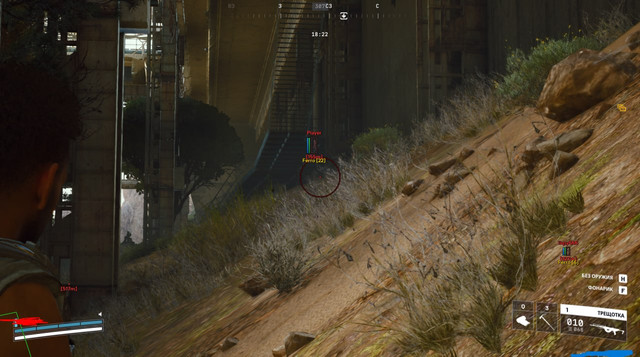
- Player ESP — Bounding boxes, health, armor, skeletons and information about knocked players.
- Visibility Check — Visibility information for supported targets.
- Weapon & Ammo ESP — Display enemy weapon names and ammunition remaining in their magazines.
- Local Skeleton — Skeleton visualization for the local player.
- Loot ESP — Display supported world items with configurable loot category selection.
- Drone ESP — Highlight drones and supported hostile creatures.
- Battle Mode — Configurable hotkey and options for hiding drone and item information during combat.
- Integrated Radar — Additional radar interface for supported gameplay information.
- FOV Changer — Adjust the field of view.
- Zoom Hack — Additional camera zoom functionality.
━━━━━━━━━━━━━━━━━━━━━━━━━━━━
DETAILED FEATURE OVERVIEW
━━━━━━━━━━━━━━━━━━━━━━━━━━━━
SCREENSHOTS


━━━━━━━━━━━━━━━━━━━━━━━━━━━━
SYSTEM REQUIREMENTS & COMPATIBILITY
DETAILED FEATURE OVERVIEW
ADVANCED AIMBOT — AUTOMATIC AIMING
Activation Key — Assign a custom key for activating aiming assistance.
Aim FOV — Configure the working field of view for target acquisition.
FOV Circle — Display the configured Aimbot targeting area.
Aim Smoothing — Adjust the smoothness of aiming movement.
Hitbox Selection — Select the preferred target body region.
Aim Prediction — Account for target movement when calculating aiming assistance.
RCS — Adjust the strength of recoil compensation.
Safe Preset — Additional preset for aiming behavior.
Humanizer — Customize aiming movement behavior.
AIMBOT CUSTOMIZATION
MaSoN provides multiple controls for adjusting the aiming system to individual preferences.
The activation key determines when aiming assistance is used.
Aim FOV configures the targeting area, while the FOV Circle provides a visual representation of its boundaries.
Smoothing controls how aiming movement behaves, and Hitbox Selection allows the user to choose the preferred target region.
PREDICTION & RECOIL CONTROL
Aim Prediction — Predict the movement of a selected target.
RCS Strength — Configure the amount of recoil compensation.
Safe Preset — Apply the available Safe Preset settings.
Humanizer Settings — Configure additional aiming behavior parameters.
PREDICTION OVERVIEW
Movement prediction is intended to help account for the position of moving targets.
The Recoil Control System provides an additional parameter for controlling recoil compensation.
Safe Preset and Humanizer allow further customization of the aiming system according to the options available in the software menu.
PLAYER ESP — ENEMY VISUALIZATION
Bounding Box — Display boxes around supported enemy players.
Armor ESP — Display enemy armor information.
Health ESP — Show player health information.
Skeleton ESP — Display character skeletons.
Knocked Players — Show knocked or downed player information.
Visibility Check — Provide visibility-related information about targets.
Weapon Name — Display the weapon equipped by an enemy.
Magazine Ammo — Show the available ammunition count in an enemy's magazine.
PLAYER ESP OVERVIEW
Player ESP provides additional visual information about opponents in ARC Raiders.
Bounding Box and Skeleton ESP highlight supported character models.
Health and Armor ESP display available defensive information, while Knocked Player indicators help distinguish different character states.
Weapon Name and Magazine Ammo provide information about an opponent's equipped weapon and ammunition.
Visibility Check adds information about whether a supported target is visible.
LOCAL SKELETON — PLAYER MODEL
Local Skeleton — Enable skeleton visualization for the local player.
LOCAL PLAYER VISUALIZATION
Unlike enemy Skeleton ESP, Local Skeleton is designed to display the skeleton structure of the player's own character.
This is a separate visual option within the software.
LOOT ESP — WORLD ITEMS
Item ESP — Display supported items in the game world.
Loot Categories — Choose which categories of items should be displayed.
Item Visualization — Configure the display of supported loot information.
LOOT TRACKING
Loot ESP provides an additional visual interface for locating supported items.
Category selection allows users to choose which types of loot should appear on screen.
The available categories and displayed objects depend on the current software version.
DRONE ESP — HOSTILE ENTITIES
Drone ESP — Display supported drones.
Hostile Creatures — Visualize supported hostile creatures and non-player threats.
DRONE VISUALIZATION
Drone ESP extends the visual information available in ARC Raiders by highlighting supported drones and hostile entities.
It works alongside Player ESP and Loot ESP to provide information about different categories of objects during gameplay.
BATTLE MODE — COMBAT DISPLAY
Battle Mode — Activate the dedicated combat display mode.
Battle Mode Key — Assign the activation hotkey.
Hide Drones — Hide drone visualization while Battle Mode is active.
Hide Items — Hide item visualization while Battle Mode is active.
BATTLE MODE OVERVIEW
Battle Mode is designed to simplify the information displayed during combat.
Users can assign a separate activation key and configure whether drone and item information should be hidden.
This allows the visual interface to focus on selected combat-related information.
RADAR & CAMERA SETTINGS
Radar — Enable the integrated radar.
FOV Changer — Modify the camera's field of view.
Zoom Hack — Use the available camera zoom functionality.
RADAR & CAMERA OVERVIEW
The integrated Radar provides an additional interface for supported gameplay information.
FOV Changer allows the adjustment of the camera's field of view.
Zoom Hack provides an additional camera magnification feature.
Available settings and compatibility may change after software or game updates.
Activation Key — Assign a custom key for activating aiming assistance.
Aim FOV — Configure the working field of view for target acquisition.
FOV Circle — Display the configured Aimbot targeting area.
Aim Smoothing — Adjust the smoothness of aiming movement.
Hitbox Selection — Select the preferred target body region.
Aim Prediction — Account for target movement when calculating aiming assistance.
RCS — Adjust the strength of recoil compensation.
Safe Preset — Additional preset for aiming behavior.
Humanizer — Customize aiming movement behavior.
AIMBOT CUSTOMIZATION
MaSoN provides multiple controls for adjusting the aiming system to individual preferences.
The activation key determines when aiming assistance is used.
Aim FOV configures the targeting area, while the FOV Circle provides a visual representation of its boundaries.
Smoothing controls how aiming movement behaves, and Hitbox Selection allows the user to choose the preferred target region.
PREDICTION & RECOIL CONTROL
Aim Prediction — Predict the movement of a selected target.
RCS Strength — Configure the amount of recoil compensation.
Safe Preset — Apply the available Safe Preset settings.
Humanizer Settings — Configure additional aiming behavior parameters.
PREDICTION OVERVIEW
Movement prediction is intended to help account for the position of moving targets.
The Recoil Control System provides an additional parameter for controlling recoil compensation.
Safe Preset and Humanizer allow further customization of the aiming system according to the options available in the software menu.
PLAYER ESP — ENEMY VISUALIZATION
Bounding Box — Display boxes around supported enemy players.
Armor ESP — Display enemy armor information.
Health ESP — Show player health information.
Skeleton ESP — Display character skeletons.
Knocked Players — Show knocked or downed player information.
Visibility Check — Provide visibility-related information about targets.
Weapon Name — Display the weapon equipped by an enemy.
Magazine Ammo — Show the available ammunition count in an enemy's magazine.
PLAYER ESP OVERVIEW
Player ESP provides additional visual information about opponents in ARC Raiders.
Bounding Box and Skeleton ESP highlight supported character models.
Health and Armor ESP display available defensive information, while Knocked Player indicators help distinguish different character states.
Weapon Name and Magazine Ammo provide information about an opponent's equipped weapon and ammunition.
Visibility Check adds information about whether a supported target is visible.
LOCAL SKELETON — PLAYER MODEL
Local Skeleton — Enable skeleton visualization for the local player.
LOCAL PLAYER VISUALIZATION
Unlike enemy Skeleton ESP, Local Skeleton is designed to display the skeleton structure of the player's own character.
This is a separate visual option within the software.
LOOT ESP — WORLD ITEMS
Item ESP — Display supported items in the game world.
Loot Categories — Choose which categories of items should be displayed.
Item Visualization — Configure the display of supported loot information.
LOOT TRACKING
Loot ESP provides an additional visual interface for locating supported items.
Category selection allows users to choose which types of loot should appear on screen.
The available categories and displayed objects depend on the current software version.
DRONE ESP — HOSTILE ENTITIES
Drone ESP — Display supported drones.
Hostile Creatures — Visualize supported hostile creatures and non-player threats.
DRONE VISUALIZATION
Drone ESP extends the visual information available in ARC Raiders by highlighting supported drones and hostile entities.
It works alongside Player ESP and Loot ESP to provide information about different categories of objects during gameplay.
BATTLE MODE — COMBAT DISPLAY
Battle Mode — Activate the dedicated combat display mode.
Battle Mode Key — Assign the activation hotkey.
Hide Drones — Hide drone visualization while Battle Mode is active.
Hide Items — Hide item visualization while Battle Mode is active.
BATTLE MODE OVERVIEW
Battle Mode is designed to simplify the information displayed during combat.
Users can assign a separate activation key and configure whether drone and item information should be hidden.
This allows the visual interface to focus on selected combat-related information.
RADAR & CAMERA SETTINGS
Radar — Enable the integrated radar.
FOV Changer — Modify the camera's field of view.
Zoom Hack — Use the available camera zoom functionality.
RADAR & CAMERA OVERVIEW
The integrated Radar provides an additional interface for supported gameplay information.
FOV Changer allows the adjustment of the camera's field of view.
Zoom Hack provides an additional camera magnification feature.
Available settings and compatibility may change after software or game updates.
━━━━━━━━━━━━━━━━━━━━━━━━━━━━
SCREENSHOTS
━━━━━━━━━━━━━━━━━━━━━━━━━━━━
SYSTEM REQUIREMENTS & COMPATIBILITY
- Game: ARC Raiders
- Product: MaSoN for ARC Raiders
- Developer: MaSoN
- Game Platform: Steam
- Operating System: Windows 10 / Windows 11 x64
- Listed Windows Builds: 2004 / 20H2 / 21H1 / 21H2 / 22H2 / 23H2 / 24H2 / 25H2 / 26H1
- Processor: Intel / AMD
- Xeon / AMD FX: Compatibility is not guaranteed
- Graphics Card: NVIDIA / AMD
- Game Window Mode: Windowed / Borderless Windowed
- Listed Protection Systems: Denuvo / Easy Anti-Cheat, as stated in the supplied product description
- USB Flash Drive: Not required
- Virtualization: VT-x / SVM enabled in BIOS
- Hyper-V: Disabled according to the listed requirements
- Secure Boot: Disabled according to the listed requirements
- Capture Protection: Not supported
- Built-in HWID Spoofer: Not included
- Product Status: Verify before purchasing and launching
IMPORTANT COMPATIBILITY INFORMATION
MaSoN for ARC Raiders is listed for Windows 10 and Windows 11 x64.
The supplied requirements specify enabled VT-x / SVM virtualization and disabled Hyper-V and Secure Boot.
Compatibility with Intel Xeon and AMD FX processors is not guaranteed.
A USB flash drive is not required for this product.
The software is not hidden from screenshots or video recordings.
A HWID Spoofer is not included.
Before purchasing, verify the current Windows compatibility, product status and required system configuration.
Follow the latest installation instructions supplied with your order.
━━━━━━━━━━━━━━━━━━━━━━━━━━━━
SUBSCRIPTION PRICES
1 DAY — ~€3.31 / 299 RUB
3 DAYS — ~€7.74 / 699 RUB
7 DAYS — ~€15.49 / 1,399 RUB
30 DAYS — ~€27.66 / 2,499 RUB
EUR amounts are approximate conversions based on the official reference exchange rate of November 22, 2026 (1 EUR = 90.3445 RUB). Final checkout totals may vary depending on the exchange rate, payment method and processing fees.
━━━━━━━━━━━━━━━━━━━━━━━━━━━━
PURCHASE & INSTANT DELIVERY
AUTOMATIC DELIVERY • SETUP INSTRUCTIONS • CUSTOMER SUPPORT
Choose your preferred subscription period and complete your purchase through ShopHackGames.
Before ordering, confirm the current product status, available features and compatibility with your PC.
After successful payment, license information and setup instructions are provided automatically.
Support is available for ordering, activation, installation and troubleshooting.
➜ BUY MASON CHEAT FOR ARC RAIDERS
━━━━━━━━━━━━━━━━━━━━━━━━━━━━
MORE ARC RAIDERS SOFTWARE
ShopHackGames offers additional ARC Raiders products from different developers.
Compare available features, subscription periods, compatibility requirements and prices before purchasing.
➜ BROWSE ALL ARC RAIDERS CHEATS
➜ FULL SHOPHACKGAMES CATALOG
━━━━━━━━━━━━━━━━━━━━━━━━━━━━
CONTACT & SUPPORT
Store: ShopHackGames
Telegram Support: @Creator_Mikhail
Store News: @shophackgames
Community: ShopHackGames Chat
Discord: ShopHackGames Server
Customer Reviews: ShopHackGames Reviews
━━━━━━━━━━━━━━━━━━━━━━━━━━━━
MaSoN for ARC Raiders is listed for Windows 10 and Windows 11 x64.
The supplied requirements specify enabled VT-x / SVM virtualization and disabled Hyper-V and Secure Boot.
Compatibility with Intel Xeon and AMD FX processors is not guaranteed.
A USB flash drive is not required for this product.
The software is not hidden from screenshots or video recordings.
A HWID Spoofer is not included.
Before purchasing, verify the current Windows compatibility, product status and required system configuration.
Follow the latest installation instructions supplied with your order.
━━━━━━━━━━━━━━━━━━━━━━━━━━━━
SUBSCRIPTION PRICES
1 DAY — ~€3.31 / 299 RUB
3 DAYS — ~€7.74 / 699 RUB
7 DAYS — ~€15.49 / 1,399 RUB
30 DAYS — ~€27.66 / 2,499 RUB
EUR amounts are approximate conversions based on the official reference exchange rate of November 22, 2026 (1 EUR = 90.3445 RUB). Final checkout totals may vary depending on the exchange rate, payment method and processing fees.
━━━━━━━━━━━━━━━━━━━━━━━━━━━━
PURCHASE & INSTANT DELIVERY
AUTOMATIC DELIVERY • SETUP INSTRUCTIONS • CUSTOMER SUPPORT
Choose your preferred subscription period and complete your purchase through ShopHackGames.
Before ordering, confirm the current product status, available features and compatibility with your PC.
After successful payment, license information and setup instructions are provided automatically.
Support is available for ordering, activation, installation and troubleshooting.
➜ BUY MASON CHEAT FOR ARC RAIDERS
━━━━━━━━━━━━━━━━━━━━━━━━━━━━
MORE ARC RAIDERS SOFTWARE
ShopHackGames offers additional ARC Raiders products from different developers.
Compare available features, subscription periods, compatibility requirements and prices before purchasing.
➜ BROWSE ALL ARC RAIDERS CHEATS
➜ FULL SHOPHACKGAMES CATALOG
━━━━━━━━━━━━━━━━━━━━━━━━━━━━
CONTACT & SUPPORT
Store: ShopHackGames
Telegram Support: @Creator_Mikhail
Store News: @shophackgames
Community: ShopHackGames Chat
Discord: ShopHackGames Server
Customer Reviews: ShopHackGames Reviews
━━━━━━━━━━━━━━━━━━━━━━━━━━━━


