
- OS Requirements
- Windows 10 / Windows 11 (64-bit)
- Hardware Requirements
- Intel / AMD CPU; UEFI/GPT, VT-x/VT-d and Hyper-V enabled, Secure Boot disabled — verify current requirements before purchase.
- Type of Software
- External
MASON — BODYCAM CHEAT
AIMBOT • PLAYER ESP • SKELETON ESP • RADAR • CUSTOM CROSSHAIR
ADVANCED AIM ASSISTANCE & PLAYER VISUALIZATION FOR BODYCAM
MaSoN for Bodycam is a customizable game cheat featuring Aimbot, detailed Player ESP, an integrated Radar, an additional Crosshair, performance settings and a convenient configuration system.
The software allows players to configure the aiming radius and target area, display player information including names, health, skeletons and distances, and customize the radar.
Additional features include a Panic Key for quickly disabling the software and clipboard-based configuration management.
AIM RADIUS • PLAYER BOXES • HEALTH ESP • SKELETONS • SNAPLINES • PANIC KEY
FLEXIBLE SUBSCRIPTION OPTIONS
INSTANT DELIVERY • SETUP GUIDE • CUSTOMER SUPPORT
WINDOWS 10 / WINDOWS 11 x64
➜ BUY MASON CHEAT FOR BODYCAM
━━━━━━━━━━━━━━━━━━━━━━━━━━━━
MAIN FEATURES
AIMBOT • PLAYER ESP • SKELETON ESP • RADAR • CUSTOM CROSSHAIR
ADVANCED AIM ASSISTANCE & PLAYER VISUALIZATION FOR BODYCAM
MaSoN for Bodycam is a customizable game cheat featuring Aimbot, detailed Player ESP, an integrated Radar, an additional Crosshair, performance settings and a convenient configuration system.
The software allows players to configure the aiming radius and target area, display player information including names, health, skeletons and distances, and customize the radar.
Additional features include a Panic Key for quickly disabling the software and clipboard-based configuration management.
AIM RADIUS • PLAYER BOXES • HEALTH ESP • SKELETONS • SNAPLINES • PANIC KEY
FLEXIBLE SUBSCRIPTION OPTIONS
INSTANT DELIVERY • SETUP GUIDE • CUSTOMER SUPPORT
WINDOWS 10 / WINDOWS 11 x64
➜ BUY MASON CHEAT FOR BODYCAM
━━━━━━━━━━━━━━━━━━━━━━━━━━━━
MAIN FEATURES
- Configurable Aimbot — Aiming assistance with a customizable activation key, adjustable aiming radius and selectable target area.
- Player ESP — Additional information about players, including names, health, skeletons and distances.
- Bounding Box ESP — Display boxes around supported player models.
- Skeleton ESP — Visualize player skeleton structures.
- Snapline ESP — Draw lines pointing toward players.
- Health & Name ESP — Display player health and names.
- Distance ESP — Display distances and limit the maximum ESP rendering range.
- Integrated Radar — Track supported player positions using a configurable radar with adjustable size and radius.
- Custom Crosshair — Display an additional aiming crosshair in the center of the screen.
- Aim Radius Indicator — Visualize the currently configured Aimbot radius.
- Panic Key — Quickly disable the software using a dedicated hotkey.
- Save CPU — Performance option intended to reduce software CPU usage.
- Configuration System — Save settings to the clipboard and load previously saved configurations.
━━━━━━━━━━━━━━━━━━━━━━━━━━━━
DETAILED FEATURE OVERVIEW
━━━━━━━━━━━━━━━━━━━━━━━━━━━━
PRODUCT SCREENSHOTS
━━━━━━━━━━━━━━━━━━━━━━━━━━━━
SYSTEM REQUIREMENTS & COMPATIBILITY
DETAILED FEATURE OVERVIEW
AIMBOT — AUTOMATIC AIMING
Enabled — Enable or disable Aimbot functionality.
Aim Key — Assign a custom activation key for aiming assistance.
Aim Radius — Configure the working radius of the Aimbot.
Aim Spot — Select the preferred target area.
AIMBOT CONFIGURATION
MaSoN provides independent controls for Aimbot activation and the targeting area.
The Aim Key allows users to activate aiming assistance using a selected keyboard or mouse button.
Aim Radius determines the available target acquisition area, while Aim Spot controls the selected aiming region.
PLAYER ESP — VISUALIZATION
Enabled — Activate player visualization features.
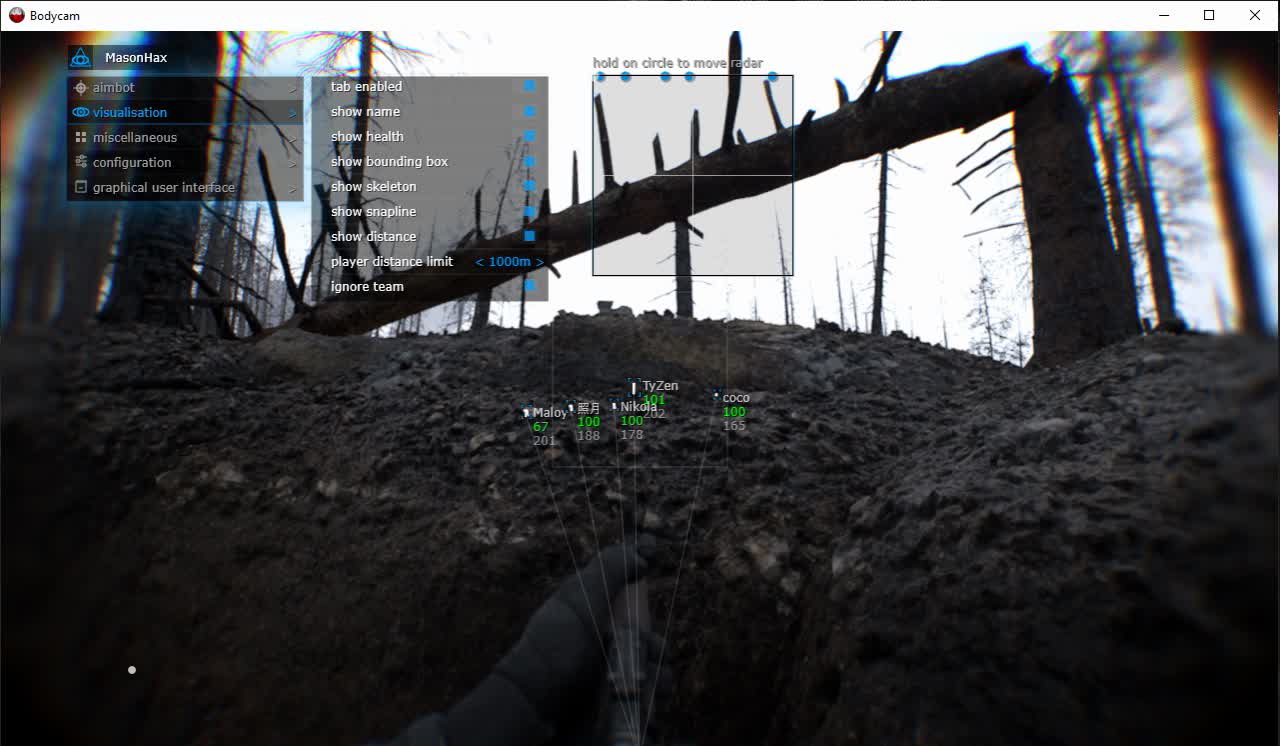
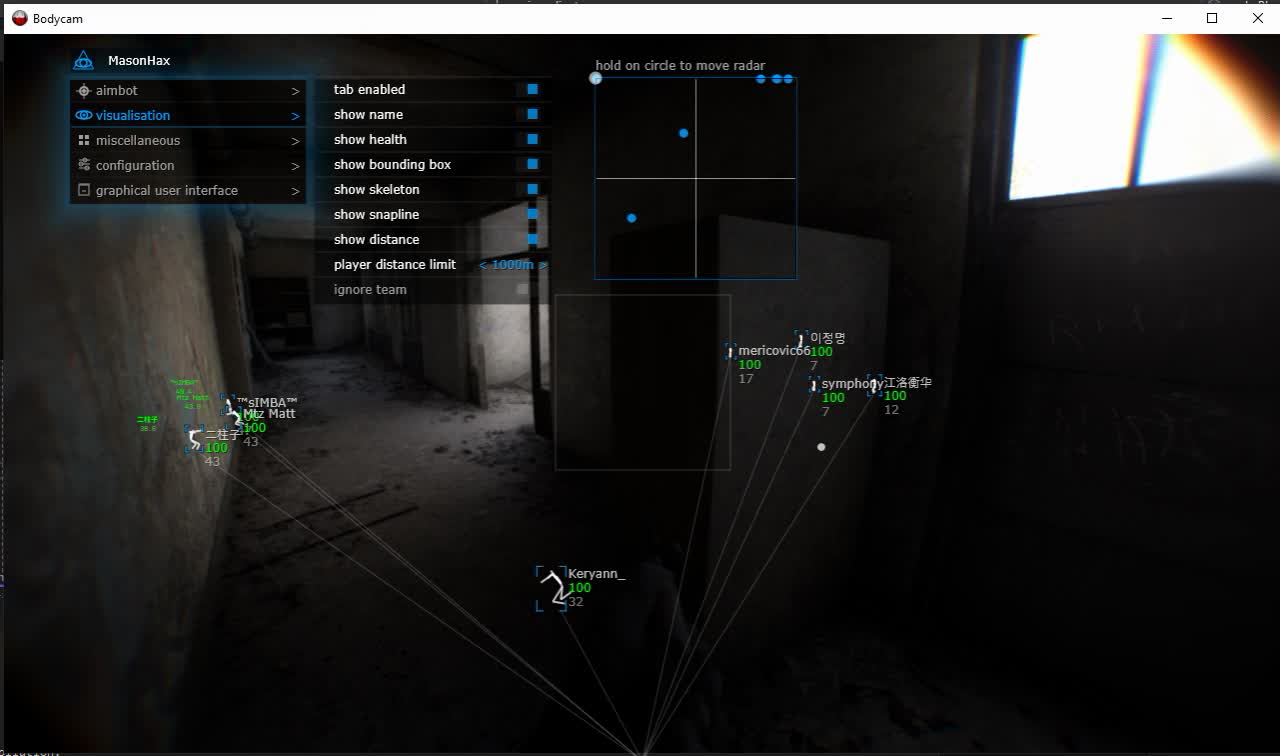
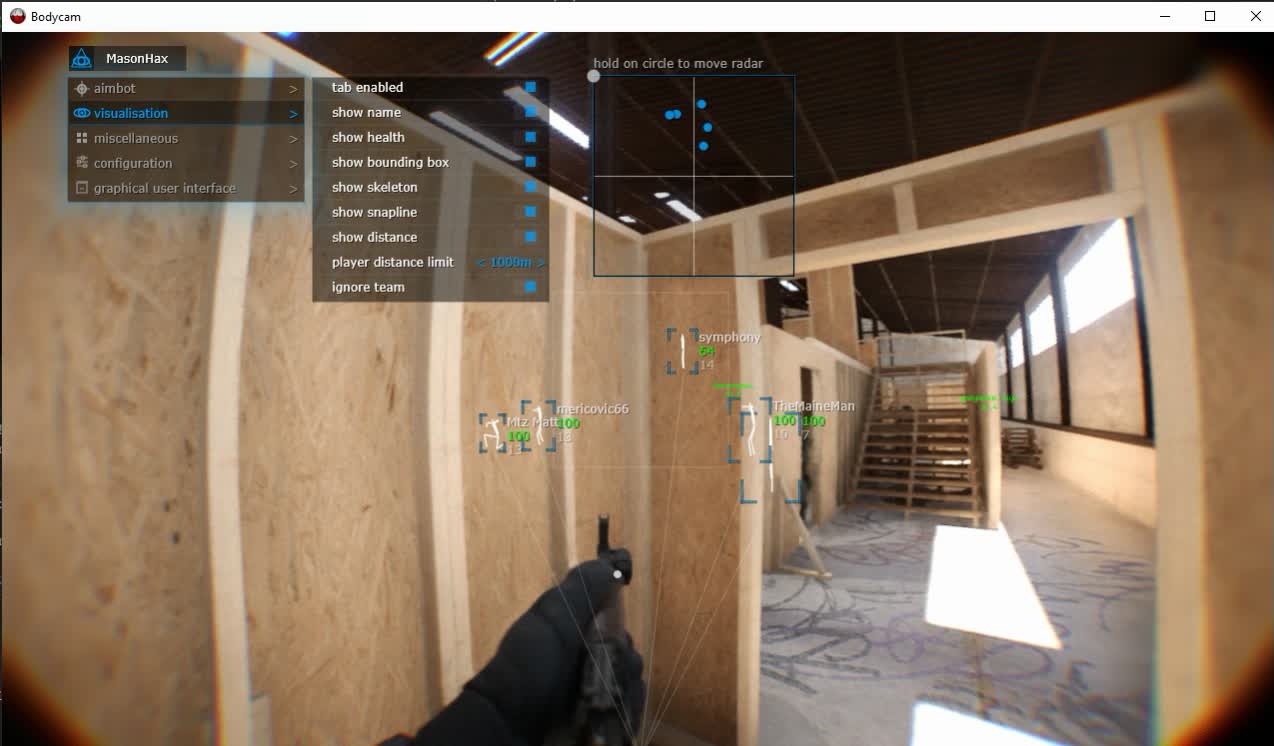
Show Bounding Box — Display bounding boxes around players.
Show Name — Display player names.
Show Health — Display player health information.
Show Skeleton — Render player skeletons.
Show Snapline — Draw lines pointing toward players.
Show Distance — Display distance to players.
Player Distance Limit — Configure the maximum distance for player ESP rendering.
PLAYER ESP CUSTOMIZATION
The visualization system offers multiple ways to display additional player information.
Bounding Box highlights character positions, while Skeleton ESP provides an outline of their body structure.
Name and Health ESP display supported player information.
Snaplines make it easier to locate displayed targets, and the distance limit helps reduce unnecessary visual information.
CONFIGURATION & PERFORMANCE
Save CPU — Reduce the software's CPU workload.
Menu Key — Assign the hotkey used to open the menu.
Panic Key — Quickly disable the software using a dedicated key.
Load Config from Clipboard — Load a previously saved configuration from the clipboard.
Save Config to Clipboard — Export current settings to the clipboard.
CONFIGURATION MANAGEMENT
The clipboard-based configuration system provides a convenient way to save and restore individual settings.
Users can configure their preferred aiming parameters, ESP elements, radar and interface controls, then save their settings for later use.
The Panic Key offers quick software deactivation when required.
GRAPHICAL USER INTERFACE
Show Aim Radius — Display the current Aimbot radius on screen.
Show Crosshair — Enable an additional crosshair.
Enable Radar — Display the integrated radar.
Radar Size — Adjust radar dimensions.
Radar Radius — Configure the radar's working radius.
RADAR & CUSTOM CROSSHAIR
The integrated radar adds a separate display for supported player positions.
Radar Size controls the dimensions of the radar interface, while Radar Radius adjusts its working area.
The Custom Crosshair can be enabled independently, and Show Aim Radius provides a visual indication of the Aimbot's targeting area.
Enabled — Enable or disable Aimbot functionality.
Aim Key — Assign a custom activation key for aiming assistance.
Aim Radius — Configure the working radius of the Aimbot.
Aim Spot — Select the preferred target area.
AIMBOT CONFIGURATION
MaSoN provides independent controls for Aimbot activation and the targeting area.
The Aim Key allows users to activate aiming assistance using a selected keyboard or mouse button.
Aim Radius determines the available target acquisition area, while Aim Spot controls the selected aiming region.
PLAYER ESP — VISUALIZATION
Enabled — Activate player visualization features.
Show Bounding Box — Display bounding boxes around players.
Show Name — Display player names.
Show Health — Display player health information.
Show Skeleton — Render player skeletons.
Show Snapline — Draw lines pointing toward players.
Show Distance — Display distance to players.
Player Distance Limit — Configure the maximum distance for player ESP rendering.
PLAYER ESP CUSTOMIZATION
The visualization system offers multiple ways to display additional player information.
Bounding Box highlights character positions, while Skeleton ESP provides an outline of their body structure.
Name and Health ESP display supported player information.
Snaplines make it easier to locate displayed targets, and the distance limit helps reduce unnecessary visual information.
CONFIGURATION & PERFORMANCE
Save CPU — Reduce the software's CPU workload.
Menu Key — Assign the hotkey used to open the menu.
Panic Key — Quickly disable the software using a dedicated key.
Load Config from Clipboard — Load a previously saved configuration from the clipboard.
Save Config to Clipboard — Export current settings to the clipboard.
CONFIGURATION MANAGEMENT
The clipboard-based configuration system provides a convenient way to save and restore individual settings.
Users can configure their preferred aiming parameters, ESP elements, radar and interface controls, then save their settings for later use.
The Panic Key offers quick software deactivation when required.
GRAPHICAL USER INTERFACE
Show Aim Radius — Display the current Aimbot radius on screen.
Show Crosshair — Enable an additional crosshair.
Enable Radar — Display the integrated radar.
Radar Size — Adjust radar dimensions.
Radar Radius — Configure the radar's working radius.
RADAR & CUSTOM CROSSHAIR
The integrated radar adds a separate display for supported player positions.
Radar Size controls the dimensions of the radar interface, while Radar Radius adjusts its working area.
The Custom Crosshair can be enabled independently, and Show Aim Radius provides a visual indication of the Aimbot's targeting area.
━━━━━━━━━━━━━━━━━━━━━━━━━━━━
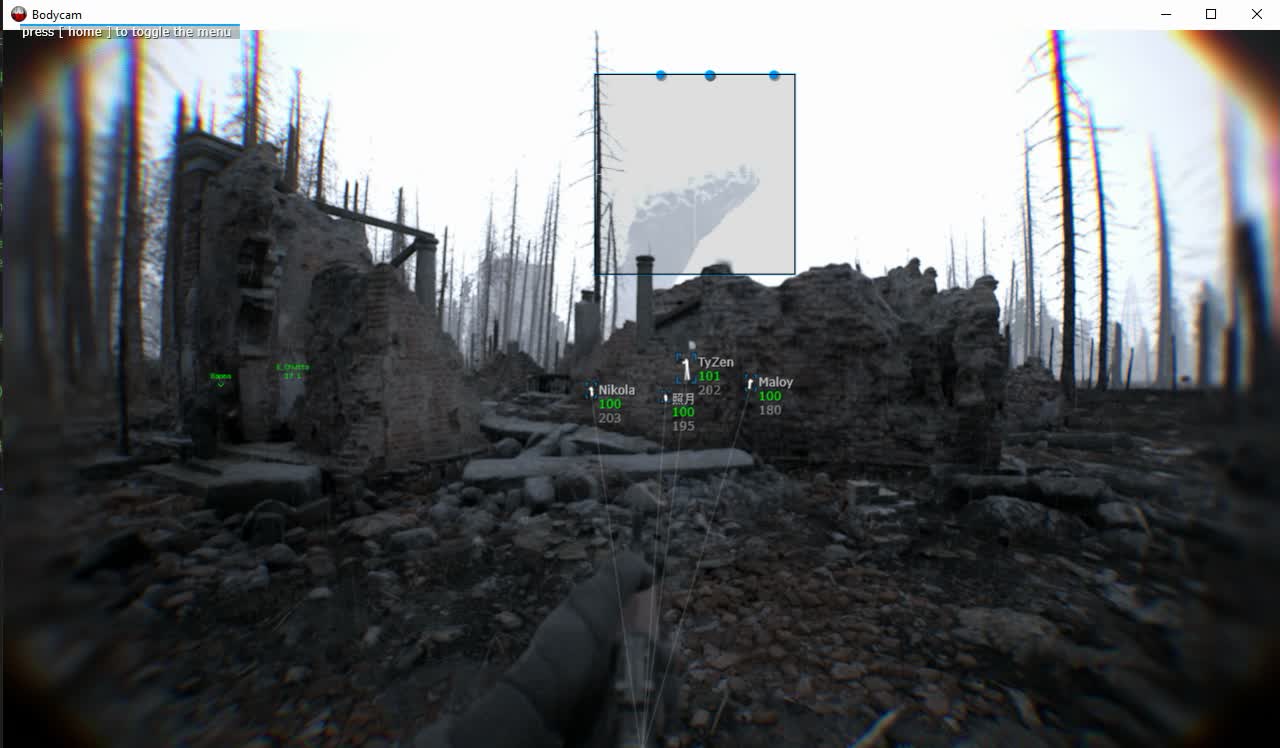
PRODUCT SCREENSHOTS
MASON INTERFACE & GAMEPLAY
━━━━━━━━━━━━━━━━━━━━━━━━━━━━
SYSTEM REQUIREMENTS & COMPATIBILITY
- Game: Bodycam
- Product: MaSoN for Bodycam
- Developer: MaSoN
- Game Platform: Steam
- Operating System: Windows 10 / Windows 11 x64
- CPU: Intel / AMD
- Game Window Mode: Windowed / Borderless Windowed
- Anti-Cheat: BattlEye (reported product compatibility)
- BIOS Boot Mode: UEFI (reported requirement)
- System Disk Partition Style: GPT (reported requirement)
- Virtualization: VT-x / VT-d enabled (reported requirement)
- Hyper-V: Enabled (reported requirement)
- Secure Boot: Disabled (reported requirement)
- Product Status: Verify before purchasing and launching
IMPORTANT COMPATIBILITY INFORMATION
The requirements above are based on published MaSoN Bodycam specifications. Verify the current supported Windows builds, system configuration and launch requirements with ShopHackGames before placing an order.
Use the supported Steam version of Bodycam and follow the latest product-specific setup instructions.
Compatibility may change after game, anti-cheat, Windows or software updates.
━━━━━━━━━━━━━━━━━━━━━━━━━━━━
SUBSCRIPTION PRICES
AVAILABLE SUBSCRIPTIONS & CURRENT PRICES
Choose your preferred license duration on the ShopHackGames product page.
Available subscription options, exact prices and payment methods are displayed during checkout.
➜ VIEW CURRENT MASON BODYCAM PRICES
━━━━━━━━━━━━━━━━━━━━━━━━━━━━
PURCHASE & INSTANT DELIVERY
AUTOMATIC DELIVERY • SETUP INSTRUCTIONS • CUSTOMER SUPPORT
Purchase MaSoN for Bodycam directly through ShopHackGames.
Choose an available subscription period and confirm the current product status and compatibility requirements.
Complete the checkout using one of the supported payment methods.
After successful payment, the license information and setup instructions are provided automatically.
Support is available for ordering, installation, activation and troubleshooting.
➜ BUY MASON CHEAT FOR BODYCAM
━━━━━━━━━━━━━━━━━━━━━━━━━━━━
MORE BODYCAM SOFTWARE
ShopHackGames offers multiple Bodycam products from different developers.
Compare functionality, compatibility and subscription options before purchasing.
➜ BROWSE ALL BODYCAM CHEATS
➜ FULL GAME CHEAT CATALOG
━━━━━━━━━━━━━━━━━━━━━━━━━━━━
FREQUENTLY ASKED QUESTIONS
━━━━━━━━━━━━━━━━━━━━━━━━━━━━
CONTACT & SUPPORT
Store: ShopHackGames
Telegram Support: @Creator_Mikhail
Store News: @shophackgames
Community: ShopHackGames Chat
Discord: ShopHackGames Server
Customer Reviews: ShopHackGames Reviews
━━━━━━━━━━━━━━━━━━━━━━━━━━━━
The requirements above are based on published MaSoN Bodycam specifications. Verify the current supported Windows builds, system configuration and launch requirements with ShopHackGames before placing an order.
Use the supported Steam version of Bodycam and follow the latest product-specific setup instructions.
Compatibility may change after game, anti-cheat, Windows or software updates.
━━━━━━━━━━━━━━━━━━━━━━━━━━━━
SUBSCRIPTION PRICES
AVAILABLE SUBSCRIPTIONS & CURRENT PRICES
Choose your preferred license duration on the ShopHackGames product page.
Available subscription options, exact prices and payment methods are displayed during checkout.
➜ VIEW CURRENT MASON BODYCAM PRICES
━━━━━━━━━━━━━━━━━━━━━━━━━━━━
PURCHASE & INSTANT DELIVERY
AUTOMATIC DELIVERY • SETUP INSTRUCTIONS • CUSTOMER SUPPORT
Purchase MaSoN for Bodycam directly through ShopHackGames.
Choose an available subscription period and confirm the current product status and compatibility requirements.
Complete the checkout using one of the supported payment methods.
After successful payment, the license information and setup instructions are provided automatically.
Support is available for ordering, installation, activation and troubleshooting.
➜ BUY MASON CHEAT FOR BODYCAM
━━━━━━━━━━━━━━━━━━━━━━━━━━━━
MORE BODYCAM SOFTWARE
ShopHackGames offers multiple Bodycam products from different developers.
Compare functionality, compatibility and subscription options before purchasing.
➜ BROWSE ALL BODYCAM CHEATS
➜ FULL GAME CHEAT CATALOG
━━━━━━━━━━━━━━━━━━━━━━━━━━━━
FREQUENTLY ASKED QUESTIONS
What features does MaSoN for Bodycam include?
The software includes Aimbot, Player ESP, an integrated Radar, Custom Crosshair, Panic Key, performance settings and clipboard-based configurations.
Can I customize the Aimbot?
Yes. Users can select an activation key, configure the targeting radius and adjust the preferred aiming area.
What information does Player ESP display?
Supported information includes bounding boxes, player names, health, skeletons, snaplines and distances.
Can I limit the distance of Player ESP?
Yes. Player Distance Limit controls the maximum range for ESP rendering.
Does MaSoN include a radar?
Yes. The radar can be enabled and customized using Radar Size and Radar Radius.
Is there a custom crosshair?
Yes. Show Crosshair enables an additional aiming crosshair.
What does Panic Key do?
It provides a dedicated hotkey for quickly disabling the software.
Can I save my configuration?
Yes. You can save settings to the clipboard and load saved settings from it.
What is the Save CPU option?
It is intended to reduce the CPU resources consumed by the software.
How do I receive the product?
After successful payment, product information and setup instructions are delivered automatically.
Can I get banned for using third-party software?
Yes. Using third-party software may violate game rules and result in account restrictions or bans.
The software includes Aimbot, Player ESP, an integrated Radar, Custom Crosshair, Panic Key, performance settings and clipboard-based configurations.
Can I customize the Aimbot?
Yes. Users can select an activation key, configure the targeting radius and adjust the preferred aiming area.
What information does Player ESP display?
Supported information includes bounding boxes, player names, health, skeletons, snaplines and distances.
Can I limit the distance of Player ESP?
Yes. Player Distance Limit controls the maximum range for ESP rendering.
Does MaSoN include a radar?
Yes. The radar can be enabled and customized using Radar Size and Radar Radius.
Is there a custom crosshair?
Yes. Show Crosshair enables an additional aiming crosshair.
What does Panic Key do?
It provides a dedicated hotkey for quickly disabling the software.
Can I save my configuration?
Yes. You can save settings to the clipboard and load saved settings from it.
What is the Save CPU option?
It is intended to reduce the CPU resources consumed by the software.
How do I receive the product?
After successful payment, product information and setup instructions are delivered automatically.
Can I get banned for using third-party software?
Yes. Using third-party software may violate game rules and result in account restrictions or bans.
━━━━━━━━━━━━━━━━━━━━━━━━━━━━
CONTACT & SUPPORT
Store: ShopHackGames
Telegram Support: @Creator_Mikhail
Store News: @shophackgames
Community: ShopHackGames Chat
Discord: ShopHackGames Server
Customer Reviews: ShopHackGames Reviews
━━━━━━━━━━━━━━━━━━━━━━━━━━━━


