Best DLL Injector: 4 Tools Ranked by Usability, Manual Map & Crash Triage
Four DLL injectors evaluated across usability, error diagnostics, manual map architecture, and open source trust. Find the best tool for your setup.
Four DLL injectors evaluated across usability, error diagnostics, manual map architecture, and open source trust. Find the best tool for your setup.
Finding the best DLL injector today is no longer about which utility has the most obscure settings or the longest list of legacy tricks. Modern 64-bit games and Windows operating system security updates have broken the majority of older injection tools. To establish an authoritative, fact-based ranking, we audited the four most prominent injectors across four standardized engineering pillars: Usability, Error Handling & Diagnostics, Manual Map Architecture, and Project Health & Trust.
Quick Comparison & Top Recommendations
• Best Overall & Best for Modern Games: BlackBox Injector (All four tools were tested on modern 64-bit targets, and BlackBox was the only injector where manual mapping successfully worked with static TLS on new threads, C++ exception unwinding, and automated post-mortem crash triage).
• Best for Advanced Hooking Experiments: GH Injector (Most expansive execution toolbox and PDB symbol downloads, though its manual mapper returns an error on modern protected targets).
• Best for Quick 3-Click Setup on Permissive Apps: Extreme Injector (Simplest single-window interface, though abandoned and obfuscated).
• Legacy Tool for Older Operating Systems: Xenos (Granular historical BlackBone manual map options, but blocked by modern Windows Core Isolation and fails on modern targets).
The 4-Pillar Evaluation Matrix
| Injector | Usability & Workflow | Error Handling & Diagnostics | Manual Map & Modern OS Support | Project Health & Trust | Primary Verdict |
|---|---|---|---|---|---|
| BlackBox Injector | Effortless 3-click flow or advanced multi-DLL batch queue with custom delays; headless scriptable CLI | Automated Windows Error Reporting triage, NTSTATUS decoding, and RVA fault translation | Verified working on modern 64-bit games with future-thread TLS and C++ exceptions | Pure Rust, 100% open source, zero runtime bloat, actively maintained | Rank #1: Best overall utility for modern 64-bit targets and developers |
| GH Injector 4.8 | Confusing multi-tab Qt5 interface with cluttered settings; requires 5 MB symbol download on first manual map | Logs API return codes from GetLastError to text log; no post-crash analysis | PDB symbol resolution; manual map fails on modern protected targets like CS2 | Open source C++ on GitHub; large binary detection signature | Rank #2: Best secondary toolbox for experimental hooking methods |
| Extreme Injector 3.7.3 | Clean, minimalist single-window WinForms interface; 3-click injection with drag-and-drop | Catch-all .NET exception dialogs; silent failures with zero crash diagnostics | Legacy manual mapper; unreliable on modern Windows; Standard mode works with launch flag | Closed source, Babel obfuscated, abandoned project; built-in OS runtime | Rank #3: Best accessible tool for novices injecting permissive targets |
| Xenos 2.3.2 | Clean, compact single-dialog layout with profile presets (.xpr); classic Windows design | Status bar text and basic status codes; no crash diagnostics or RVA triage | Advanced legacy options; kernel driver blocked by HVCI; manual map fails on modern targets | Open source on GitHub, dormant project; statically linked C++ (/MT) | Rank #4: Retired classic; ineffective on modern protected environments |
The 4 Core Evaluation Pillars Explained
Pillar 1: Usability & Workflow Simplicity
An injector must balance intuitive process targeting with workflow efficiency. A well-designed tool allows beginners to complete an injection in three simple clicks (select process, choose DLL, click Inject), while still giving advanced users the power to queue multiple DLLs with custom delays and module-wait triggers. Clean, straightforward layouts like those found in Extreme Injector, Xenos, and BlackBox minimize user error and keep essential controls visible, whereas overly complex, cluttered multi-tab layouts (such as GH Injector) create unnecessary confusion. For developers and automation pipelines, the availability of a headless command-line interface (CLI) is another decisive usability differentiator.
Pillar 2: Error Handling & Diagnostic Reporting
The single greatest failure point of public injectors is silent failure. When a game closes immediately after injection, users are left guessing whether the injector failed, the payload crashed in
DllMain, or an anti-cheat exited the process. A modern injector must hold surviving process query handles after target termination, read Windows Error Reporting (WER) logs, decode raw NTSTATUS error codes (0xC0000005, 0xC0000409), and translate memory offsets into Relative Virtual Addresses (ImageBase + RVA) so developers can jump directly to the crashing instruction in disassemblers.Pillar 3: Manual Map Injection & Modern OS Compatibility
Standard injection (
CreateRemoteThread + LoadLibraryW) registers the module in the Process Environment Block (PEB) module lists (InLoadOrderModuleList), making it trivial to enumerate. A true manual mapper must write the image without OS loader registration while solving three difficult technical problems:1. Static Thread Local Storage (TLS): Modules using
__declspec(thread) or thread_local require allocated TLS slots across all threads. If an injector does not properly seed TLS, worker threads created after injection immediately segfault upon reading thread-local memory.2. C++ Exception Unwinding: On 64-bit Windows, table-based exception unwinding requires registering
.pdata and inserting the image into ntdll!KiUserInvertedFunctionTable. Missing this step causes any C++ throw/catch inside the DLL to abort the process.3. Windows Security Mitigations: Kernel drivers must comply with modern Windows Memory Integrity (HVCI) and the Microsoft Vulnerable Driver Blocklist.
Pillar 4: Project Health, Trust & Extensibility
Because DLL injection operates on memory allocation and thread creation APIs identical to malware behaviors, trust is critical. Open-source tools allow independent auditing to guarantee no backdoors or data-stealing payloads exist. Projects actively maintained for modern Windows releases ensure compatibility with updated memory allocators and kernel mitigations.
1. BlackBox Injector
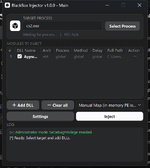
BlackBox Injector is a native x64 Windows injection and diagnostic utility written in pure Rust with zero external runtime dependencies. Built from the ground up to solve the failure points of modern 64-bit memory loaders, it ships as a unified executable featuring both an interactive graphical interface and a complete headless command-line interface.
1. Usability & Workflow
BlackBox provides a clean, responsive graphical interface alongside a scriptable CLI:
• Effortless Dual-Tier Usability: Functions as a simple 3-click injector for beginners (pick process, add DLL, select Manual Map, click Inject), matching the straightforward simplicity of Extreme Injector. At the same time, it scales effortlessly to complex power-user tasks: users can queue multiple DLLs into the same target process, set custom per-module execution delays, and configure module-wait triggers that wait for specific game components to finish loading.
• Interactive GUI: Features an instant search process selector filtering by process name, PID, and architecture. Modules are managed in an execution queue supporting drag-and-drop, individual injection delays, per-file method selection, and real-time status tracking.
• Integrated Console Stream: Displays a color-coded activity stream directly in the main window (
[+] success, [*] informational, [-] warning, [!] error) with clipboard export.• Headless Scriptable CLI: Fully automates injection workflows via console commands (
--proc, --pid, --method 0-5, --add, --inject, --validate, --ps), enabling automated batch runs and developer tooling without GUI overhead.2. Error Handling & Diagnostic Reporting
BlackBox contains the most advanced diagnostic engine available in a public injector:
• Surviving Process Monitoring: Retains an independent process query handle (
PROCESS_QUERY_LIMITED_INFORMATION | SYNCHRONIZE) across target termination to capture exit codes even after the game window closes.• Automated WER Crash Analysis: Automatically inspects the Windows Application Event Log (
Event ID 1000 Application Error and 1001 Windows Error Reporting) to generate structured crash reports in %TEMP%\BlackBoxInjector\reports\.• Disassembly Triage Hints (ImageBase + RVA): Translates raw fault addresses into Relative Virtual Addresses (
Fault Offset = ImageBase + RVA), allowing developers to paste the address directly into IDA Pro, Ghidra, or x64dbg to inspect the exact failing instruction.• Actionable NTSTATUS Decoding: Decodes raw crash codes into human-readable engineering explanations:
-
0xC0000005 (Access Violation): Identifies invalid memory read/writes and flags offsets under 0x1000 as NULL pointer dereferences.-
0xC0000409 (STATUS_STACK_BUFFER_OVERRUN): Identifies Control Flow Guard (CFG) check failures, corrupted /GS security cookies, or __fastfail() invocations.-
0xC0000142 (STATUS_DLL_INIT_FAILED): Flags DllMain returning FALSE or unhandled exceptions thrown during TLS callbacks.• Missing Runtime Auto-Detection: Inspects both 64-bit and WOW64 registry views for Microsoft Visual C++ Redistributable runtimes, offering an interactive 1-click official installer or a headless
--install-redist switch.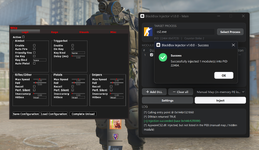
3. Manual Map & Modern OS Compatibility
BlackBox's manual mapping engine is specifically designed for modern 64-bit operating systems:
• Pre-Allocation Bounds Validation: Validates section raw ranges, image size, entry points, and directory structures before writing a single byte to the target, preventing remote memory corruption.
• Modern ApiSetMap Resolution: Resolves forwarded exports and Windows
api-ms-win-* contracts against schema version 6.• Full C++ Exception Handling: Registers
.pdata function tables via RtlAddFunctionTable and inserts the mapped image into ntdll!KiUserInvertedFunctionTable, ensuring __try/__except and MSVC C++ throw/catch unwind cleanly without crashing.• Static TLS on Future Worker Threads: Uses an embedded seed helper module (
tls_seed.dll) to establish a legitimate OS-assigned _tls_index. The Windows loader automatically manages TLS memory blocks for existing threads and all worker threads created after injection.• Verified Modern Game Compatibility: Verified on live 64-bit Counter-Strike 2 with complex 194-import payloads containing static TLS, SEH, and C++ exceptions while keeping the module unlisted in the PEB.
4. Project Health, Trust & Extensibility
• Pure Rust Architecture: Written in modern native Rust with zero external crates, guaranteeing memory safety at the injector level and instant startup with no runtime bloat.
• Open Source Auditability: 100% open-source codebase, allowing security researchers and developers to audit every memory write, handle acquisition, and thread manipulation routine.
• Active Maintenance: Fully verified on modern Windows 11 builds with Memory Integrity (HVCI) and Core Isolation active.
Verified Pros & Cons
• Usability:
- Pro: Flexible dual-tier workflow: operates as an effortless 3-click injector while scaling to complex multi-DLL batch queues with custom per-file delays and module-wait triggers.
- Pro: Modern GUI with process search alongside a fully scriptable headless CLI.
• Error Handling: - Pro: Unmatched crash triage: automated WER log parsing, NTSTATUS decoding, and
ImageBase + RVA disassembly hints. - Pro: Built-in dual-registry Visual C++ detection with 1-click installer.
• Manual Map: - Pro: Fully verified on demanding modern 64-bit games; solves both the future-thread static TLS trap and the C++ exception unwinding trap.
- Con: Manual map on 32-bit (WOW64) targets intentionally refuses payloads with static TLS or exception directories due to 32-bit kernel dispatcher constraints.
• Project Health: - Pro: Pure Rust codebase, 100% open source, zero runtime dependencies, active modern maintenance.
- Con: Newer project with a shorter public history than older legacy utilities.
Best Use Case Verdict
The definitive #1 choice for modern 64-bit Windows gaming, protected targets, and software developers who need reliable manual mapping, proper exception handling, and deep crash debugging.
• BlackBox Official Release Thread

BlackBox DLL Injector 1.0.3
High-Performance Pure Rust DLL Loader with In-Memory Manual Mapping & Crash Triage
BlackBox Injector is a modern, lightweight Windows DLL injector engineered entirely in pure Rust with zero third-party dependencies. Built directly on top of native Win32 and undocumented NTAPI syscalls, it offers rock-solid stability on modern Windows 11 and Windows 10 systems across both native x64 and 32-bit (WOW64) architectures.High-Performance Pure Rust DLL Loader with In-Memory Manual Mapping & Crash Triage
Supported Injection Methods
BlackBox gives you 6...

•
You must be registered for see links
You must be registered for see links
2. GH Injector
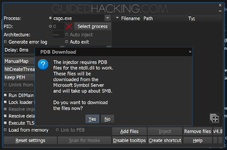
GH Injector (version 4.8) is a native x64 injection suite developed by Guided Hacking. Featuring a modular architecture, it separates its Qt5 frontend interface from its core native injection engine (
GH Injector - x64.dll).1. Usability & Workflow
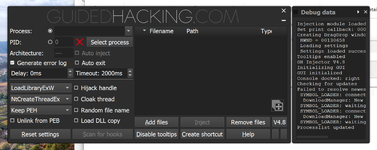
• Confusing Multi-Tab Layout: Built using Qt5, GH Injector spreads its configuration across five separate tabs (Basic, Advanced, Cloaking, Hijacking, Timeout). The interface is cluttered, confusing, and hard to understand, overwhelming users with scattered technical checkboxes where a simple workflow should suffice.
• Process Selection: Includes a searchable process picker, window title filtering, and architecture identification.
• Workflow Friction: On its initial manual map run, GH Injector displays a mandatory modal dialog to download approximately 5 MB of PDB symbols from Microsoft symbol servers. This process can stall on restricted or proxied network connections.
• No Unified CLI: Command-line operations require using separate helper executables (
GH Injector SM - x64.exe) rather than a single unified console utility.2. Error Handling & Diagnostic Reporting
• API Log Generation: When enabled, GH Injector outputs API error codes from
GetLastError() to gh_error.log (e.g. Resolving imports failed: %08X, VirtualAllocEx failed: %08X).• Lack of Post-Mortem Crash Triage: GH Injector only captures errors that occur during the remote injection call itself. If the game terminates 1 second after injection due to unhandled exceptions or TLS starvation, GH Injector reports success or nothing, offering no crash log or fault offset analysis.
3. Manual Map & Modern OS Compatibility
• PDB Symbol Resolution: Rather than hardcoding loader offsets, GH Injector imports
dbghelp.dll and downloads official Microsoft PDB symbols to resolve internal unexported ntdll loader routines.• Modern Protected Target Limitation: In practice on current protected 64-bit titles (such as Counter-Strike 2), GH Injector's manual mapping routine fails to complete and returns an error. Users must fall back to Standard
LoadLibrary injection, leaving the module exposed in OS loader lists.• Broadest Execution Method Variety: When injecting open processes, GH supports methods unavailable elsewhere, including
SetWindowsHookEx and WOW64 kernel callbacks.4. Project Health, Trust & Extensibility
• Open Source Codebase: The project source code is publicly hosted and auditable on GitHub (
guidedhacking/GuidedHacking-Injector).• High Signature Footprint: Due to its massive historical popularity, precompiled binaries have widespread static and dynamic signatures across security engines.
• Runtime Dependencies: Requires bundling Qt5 DLLs (
Qt5Core.dll, Qt5Gui.dll, Qt5Widgets.dll) and depends dynamically on Microsoft Visual C++ redistributables.Verified Pros & Cons
• Usability:
- Pro: Extensive configuration options for customizing injection timeouts and staging folders.
- Con: Cluttered, confusing multi-tab interface that is hard to understand; mandatory 5 MB symbol download on first manual map.
• Error Handling: - Pro: Detailed hex error code logging for failed Win32 API calls during injection.
- Con: Zero post-injection crash diagnosis; cannot detect why a game closes after injection.
• Manual Map: - Pro: Sophisticated symbol-based loader resolution; supports
SetWindowsHookEx and WOW64 callbacks. - Con: Manual map fails with an error on primary modern protected targets like CS2.
• Project Health: - Pro: Open-source C++ codebase backed by an active reverse-engineering community.
- Con: Requires multiple runtime DLLs; heavily signatured across anti-cheat engines.
Best Use Case Verdict
An outstanding secondary toolkit for reverse engineers and security researchers who need experimental hook methods (like SetWindowsHookEx) on open or custom targets, but not ideal for modern protected games.
• GH Injector Forum Thread & Download (User Upload)

Precompiled version of the GH Injector, arguably the best injector out there.
This is a fixed version of the GH injector that i made to share to you guys.
It's essentially a very powerful DLL injector that has standard injectioon (LoadLibraryExW), Manual map (ManualMap), Thread hijacking, delay, and much more.
Screenshot:
Supported Injection Methods
GH Injector supports advanced injection routines for both 32-bit and 64-bit processes:
This is a fixed version of the GH injector that i made to share to you guys.
It's essentially a very powerful DLL injector that has standard injectioon (LoadLibraryExW), Manual map (ManualMap), Thread hijacking, delay, and much more.
Screenshot:
Supported Injection Methods
GH Injector supports advanced injection routines for both 32-bit and 64-bit processes:
- LoadLibraryExW (Standard): The default Windows dynamic linking method. Best for...
•
You must be registered for see links
You must be registered for see links
3. Extreme Injector
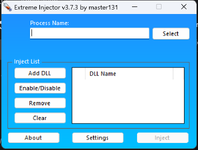
Extreme Injector (version 3.7.3) is an established .NET WinForms injector designed around a streamlined, single-window workflow.
1. Usability & Workflow
• Clean Single-Window Layout: While built on older WinForms technology, Extreme Injector features an interface that is remarkably clean and focused. It avoids the confusing multi-tab clutter of tools like GH Injector by presenting everything essential in a single, uncluttered view.
• The Easiest Interface for Beginners: Provides a minimal, 3-click interface: select the target process, add DLLs to the list, and click Inject.
• Convenience Automation: Includes built-in drag-and-drop file loading, an Auto-Inject toggle that monitors for process startup, and an option to close the injector automatically after injection.
• Workflow Friction: Extremely low onboarding friction; any user can perform an injection in under a minute without reading documentation.
2. Error Handling & Diagnostic Reporting
• Basic Catch-All Exceptions: Extreme Injector catches internal .NET exceptions and displays generic message boxes (such as
System.Exception: The injection method used returned NULL).• No Diagnostic Insights: Offers no error logs, no crash post-mortems, no memory inspection, and no ability to pinpoint missing DLL dependencies.
3. Manual Map & Modern OS Compatibility
• The 32-Bit Myth Debunked: While the PE machine header indicates x86, the CLR header confirms
CorFlags = 0x00000001 (AnyCPU compilation with no 32-bit requirement). On 64-bit Windows, it executes natively as a 64-bit process capable of acquiring 64-bit handles.• Obsolete Manual Mapper: Its manual mapping routine was built for earlier Windows 10 releases and fails under modern memory protections and API set schemas.
• Standard Mode Operability: Standard
LoadLibrary injection functions cleanly on modern targets like CS2 provided the game is launched with -allow_third_party_software.4. Project Health, Trust & Extensibility
• Zero Runtime Setup on Modern Windows: Because .NET Framework 4.8 is pre-installed as an operating system component in Windows 10 and Windows 11, Extreme Injector runs out of the box without requiring extra runtimes.
• Heavy Obfuscation & Abandoned Status: The binary is heavily packed with Babel Obfuscator, preventing security audits and instruction-level analysis. The project has been abandoned for years with no active development.
Verified Pros & Cons
• Usability:
- Pro: Clean, minimalist single-window layout; easiest 3-click flow with drag-and-drop and Auto-Inject.
- Con: Classic WinForms visual styling with advanced options relegated to modal popups.
• Error Handling: - Pro: Basic exception handling prevents sudden injector crashes.
- Con: Generic error messages with zero diagnostic value; silent game crashes cannot be triaged.
• Manual Map: - Pro: Dispels the 32-bit myth by running natively as 64-bit on 64-bit operating systems.
- Con: Manual mapper is obsolete and unstable on modern 64-bit titles; requires launch flags for Standard mode.
• Project Health: - Pro: Runs natively on modern Windows without extra runtime installers.
- Con: Closed-source, heavily obfuscated binary; completely abandoned project with no security updates.
Best Use Case Verdict
A convenient, zero-setup option for beginners testing basic Standard injection on older or permissive applications, but unsuited for modern protected games requiring manual mapping.
• Extreme Injector Forum Thread & Download (User Upload)

About Extreme Injector:
- Have alot of options.
- Working for all games.
- Super easy to use.
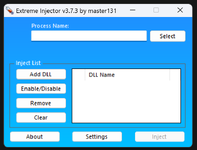
Screenshot:
VirusTotal.com Link:
- Have alot of options.
- Working for all games.
- Super easy to use.
Screenshot:
VirusTotal.com Link:
You must be registered for see links
Analyze suspicious files to detect types of malware.- That One Buddy
- csgo inject
- Replies: 44
- Forum: Software
4. Xenos
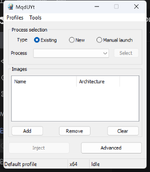
Xenos (version 2.3.2) is a native C++ injection tool built on top of DarthTon's open-source BlackBone memory hacking library. Widely known during the Windows 7 and early Windows 10 era, Xenos represents an advanced historical tool.
1. Usability & Workflow
• Clean, Compact Single-Dialog Design: Although its visual aesthetics reflect classic Windows development, Xenos features an interface that is clean, compact, and logically arranged. By keeping process targeting and image selection visible in a single dialog, it avoids the confusing multi-tab sprawl found in GH Injector.
• Process Selection Modes: Supports flexible attachment via Existing process, New process creation, or Manual process wait.
• Profile System: Features a dedicated profile manager (
.xpr) allowing users to save and load complete configuration presets for different targets.• Workflow Friction: Advanced terminology is developer-centric (e.g.
LdrpModuleBaseAddressIndex), requiring knowledge of internal Windows loader structures for manual map tuning.2. Error Handling & Diagnostic Reporting
• Status Bar & Log File: Outputs basic injection state text to the main window status bar and writes internal status codes to
Xenos.log.• No Post-Injection Triage: Cannot monitor target process lifecycle after injection, cannot query Windows Error Reporting, and provides no RVA offset calculations for crashed payloads.
3. Manual Map & Modern OS Compatibility
• Granular Historical Options: Features the deepest manual mapping configuration menu among public tools: custom loader reference insertion (
InMemoryOrderModuleList, HashLinks, LdrpModuleBaseAddressIndex), manual import mapping, and memory concealment (PAGE_NOACCESS).• Kernel Driver Blocked by HVCI: Includes three kernel-level injection modes via
BlackBoneDrv.sys. However, on modern Windows 11 with Core Isolation and Memory Integrity (HVCI) enabled, the vulnerable driver is blocked outright by operating system security policies.• Modern Target Rejection: Manual mapping fails on modern protected titles like CS2, returning injection errors. Standard injection still functions when launch flags permit third-party modules.
4. Project Health, Trust & Extensibility
• Statically Linked Native Build: Compiled with static C runtime (
/MT) linking only to standard Windows system DLLs (KERNEL32, USER32, SHELL32), running natively with zero runtime installs.• Open Source Repository on GitHub: The full project and GUI source code are publicly accessible on the
You must be registered for see links
. However, the repository has been dormant and unmaintained since earlier Windows 10 updates, leaving it without updates for modern Windows 11 kernel driver blocklists, HVCI, or recent PE loader changes.Verified Pros & Cons
• Usability:
- Pro: Clean, compact single-dialog layout with built-in profile manager (
.xpr) for saving game presets. - Con: Low-level loader terminology can be technical for non-developers.
• Error Handling: - Pro: Logs internal NTSTATUS error codes to file.
- Con: Provides no crash post-mortem or disassembly hints when targets terminate.
• Manual Map: - Pro: Granular loader reference insertion enabling
GetModuleHandle on mapped modules. - Con: Manual map fails on modern 64-bit protected games; kernel modes are completely blocked by Windows 11 HVCI.
• Project Health: - Pro: Statically linked C++ with zero external runtime dependencies and public source code on GitHub.
- Con: Abandoned codebase with zero active maintenance since early Windows 10 updates.
Best Use Case Verdict
A historically significant utility that remains interesting for educational analysis on older, unprotected Windows 7 or legacy Windows 10 test environments, but obsolete on modern Windows 11 systems.
•
You must be registered for see links
You must be registered for see links
• Xenos Forum Thread & Download (User Upload)

VirusTotal.com Link:
SS:
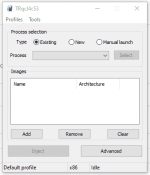
Xenos is very powerful Dll injector, with many types of injection,
including features to delay dll injection and more...
Original Source, source code c++ included:
You must be registered for see links
Analyze suspicious files to detect types of malware.SS:
Xenos is very powerful Dll injector, with many types of injection,
including features to delay dll injection and more...
Original Source, source code c++ included:
You must be registered for see links
- Pickle Rick
- dll injector kernel manual map natival injection xenos
- Replies: 0
- Forum: Software
Frequently Asked Questions
Which DLL injector is the best overall?
BlackBox Injector is the best overall. While all four injectors were rigorously tested against modern 64-bit targets, BlackBox is the only tool where manual mapping successfully works with static TLS and C++ exception unwinding in live games while remaining fully open source. Built in native Rust with zero runtime bloat, it also provides an automated crash diagnostic engine that decodes NTSTATUS errors and outputs
ImageBase + RVA fault offsets for instant debugging in IDA Pro or x64dbg.Why does my game crash immediately after injecting a DLL?
Post-injection crashes are most commonly caused by an outdated or incompatible DLL. Always check that you're using the latest version first, as this accounts for the vast majority of cases. If the DLL is up to date, the issue may lie with an outdated manual mapper lacking support for certain Windows loading features. Blackbox Injector uses an updated manual mapping implementation that supports these features.
Common causes include:
- Missing Runtime Libraries: Required Visual C++ libraries, such as vcruntime140.dll or msvcp140.dll, are missing.
- Unhandled C++ Exceptions: Older mappers may fail to properly register exception-handling information, causing crashes when exceptions occur.
- Static TLS: Some mappers don't properly handle static TLS, potentially causing crashes when DLLs use thread_local on newly created threads.
Why is Extreme Injector not working on Windows 11?
While Extreme Injector runs out of the box because modern Windows 11 includes .NET Framework 4.8, its manual mapping engine was designed for earlier operating system builds. On modern Windows with Core Isolation (HVCI) and updated memory protections, its legacy manual mapper causes access violations. If you choose to use Extreme Injector on modern Windows, use Standard injection rather than manual map, and ensure the target application allows third-party modules.
What is manual map injection, and does it prevent bans?
Manual mapping copies the DLL into target memory and manually performs relocations, import resolution, and memory protections without registering the module in the operating system's Process Environment Block (PEB). This prevents basic module enumeration checks. However, manual mapping alone does not guarantee a cheat will be undetected. Modern anti-cheat systems scan memory pages for anomalous executable permissions, inspect thread call stacks, and monitor system hooks.
What injector settings are required for CS2?
For Standard injection (
LoadLibrary), CS2 requires the -allow_third_party_software launch parameter because its Trusted Mode blocks unverified third-party modules from loading through normal OS APIs. For Manual Map injection, a properly configured mapper can load the image without that launch parameter because the module is never added to the OS loader lists. In all cases, inject only after the game has finished loading to the main menu, and ensure the injector is run with administrator privileges.Are free DLL injectors safe, or are they flagged as viruses?
Almost all DLL injectors trigger antivirus alerts as "HackTool" or "Trojan" because the techniques used to write into remote process memory (
VirtualAllocEx, WriteProcessMemory, CreateRemoteThread) are identical to behaviors used by malware. Closed-source injectors that are packed or obfuscated (such as Extreme Injector) cannot be inspected for hidden payloads. Open-source injectors written in native code (such as BlackBox, GH Injector, and Xenos) allow users and developers to inspect the source code and compile the binary themselves, ensuring the tool is safe.Can you inject a 32-bit DLL into a 64-bit game process?
No. Windows enforces a strict architectural boundary between 32-bit and 64-bit virtual address spaces. A 64-bit game process cannot execute 32-bit instructions or resolve 32-bit pointers directly. Standard injection methods will immediately fail with error codes such as
ERROR_ACCESS_DENIED or ERROR_BAD_EXE_FORMAT (0xC000007B). The rule is absolute: 64-bit games require a 64-bit DLL and a 64-bit injector, while 32-bit games require a 32-bit DLL and a 32-bit injector.Why does Windows 11 Core Isolation or Memory Integrity block DLL injectors?
Windows 11 enables Hypervisor-Protected Code Integrity (HVCI) and the Microsoft Vulnerable Driver Blocklist by default. Older injectors that rely on vulnerable third-party kernel drivers (such as Xenos and its bundled
BlackBoneDrv.sys) are blocked at the operating system level from loading into Ring 0. Modern injectors like BlackBox and GH Injector operate cleanly in user-mode using documented Windows memory APIs with administrator privileges, ensuring full compatibility without requiring users to turn off essential Windows 11 security protections.Why does the injector report success, but the DLL does nothing and does not appear in-game?
An injector reports success when its remote thread creation API call finishes without returning an error code. However, the DLL can still fail silently immediately after starting. The most common causes are unhandled exceptions during
DllMain initialization, missing Microsoft Visual C++ redistributables, or deadlocks caused by calling loader-unsafe functions inside DllMain. Advanced injectors like BlackBox address this silent failure trap by querying Windows Error Reporting to confirm whether the injected thread survived or terminated in a crash.What is the difference between LoadLibrary, CreateRemoteThread, and Manual Map injection?
LoadLibrary is the official Windows API for loading DLLs from disk, which automatically registers the module in the operating system loader lists (PEB) where anti-cheat systems can easily detect it. CreateRemoteThread is merely an execution trigger: it spawns a thread inside the target process to execute a memory address (such as LoadLibrary or an entry point). In contrast, Manual Map completely bypasses the Windows operating system loader. The injector allocates target memory, writes the raw PE sections, manually resolves import tables, and applies base relocations by hand. This hides the module from standard operating system lists, but requires the injector to properly initialize static TLS and register C++ exception tables to prevent crashes.Final Verdict
The hierarchy among modern Windows DLL injectors is defined by verifiable engineering capability:
1. BlackBox Injector stands alone at the top as the only utility verified to manual-map complex 64-bit payloads with static TLS and C++ exception unwinding into live modern games, backed by open-source Rust code, scriptable CLI automation, and automated crash triage.
2. GH Injector remains the most feature-complete execution toolbox with PDB symbol support and an open-source GitHub repository, but is held back by its manual map failure on primary modern targets.
3. Extreme Injector remains usable for basic Standard injection with launch flags, debunking the 32-bit myth while showing its age through heavy obfuscation and an undependable manual mapper.
4. Xenos is a retired classic whose advanced manual map and kernel driver modes are rendered obsolete by modern Windows 11 HVCI security policies.
For users and developers requiring reliable injection, comprehensive error logging, and verified 64-bit stability on modern Windows, BlackBox Injector is the clear choice.
Last edited:


