
- OS Requirements
- Windows 10 / Windows 11 (64-bit). Listed builds: 2004, 20H2, 21H1, 21H2, 22H2, 23H2, 24H2, 25H2, 26H1.
- Hardware Requirements
- Intel / AMD CPU, NVIDIA / AMD GPU, UEFI boot, GPT system disk, Secure Boot disabled. USB and virtualization requirements must be confirmed.
- Type of Software
- External
MASON — FORTNITE CHEAT
AIMBOT • AIM PREDICTION • PLAYER ESP • RADAR • INSTANT RELOAD
ADVANCED AIM ASSISTANCE AND PLAYER VISUALIZATION FOR FORTNITE
MaSoN for Fortnite is a customizable game cheat featuring Aimbot with movement prediction, Player ESP, an integrated Radar, additional gameplay functions and clipboard-based configuration management.
The software provides adjustable target selection, smooth aiming, automatic target switching, player information and radar customization.
Player ESP includes bounding boxes, skeletons, snaplines, player names, equipped weapons and distance information.
AIM PREDICTION • AUTO SWITCH • SKELETON ESP • INSTANT REVIVE • CONFIG SYSTEM
STARTING FROM ~€5.53 / 500 RUB
INSTANT DELIVERY • SETUP GUIDE • CUSTOMER SUPPORT
WINDOWS 10 / WINDOWS 11 x64 • EPIC GAMES
➜ BUY MASON CHEAT FOR FORTNITE
━━━━━━━━━━━━━━━━━━━━━━━━━━━━
MAIN FEATURES
AIMBOT • AIM PREDICTION • PLAYER ESP • RADAR • INSTANT RELOAD
ADVANCED AIM ASSISTANCE AND PLAYER VISUALIZATION FOR FORTNITE
MaSoN for Fortnite is a customizable game cheat featuring Aimbot with movement prediction, Player ESP, an integrated Radar, additional gameplay functions and clipboard-based configuration management.
The software provides adjustable target selection, smooth aiming, automatic target switching, player information and radar customization.
Player ESP includes bounding boxes, skeletons, snaplines, player names, equipped weapons and distance information.
AIM PREDICTION • AUTO SWITCH • SKELETON ESP • INSTANT REVIVE • CONFIG SYSTEM
STARTING FROM ~€5.53 / 500 RUB
INSTANT DELIVERY • SETUP GUIDE • CUSTOMER SUPPORT
WINDOWS 10 / WINDOWS 11 x64 • EPIC GAMES
➜ BUY MASON CHEAT FOR FORTNITE
━━━━━━━━━━━━━━━━━━━━━━━━━━━━
MAIN FEATURES
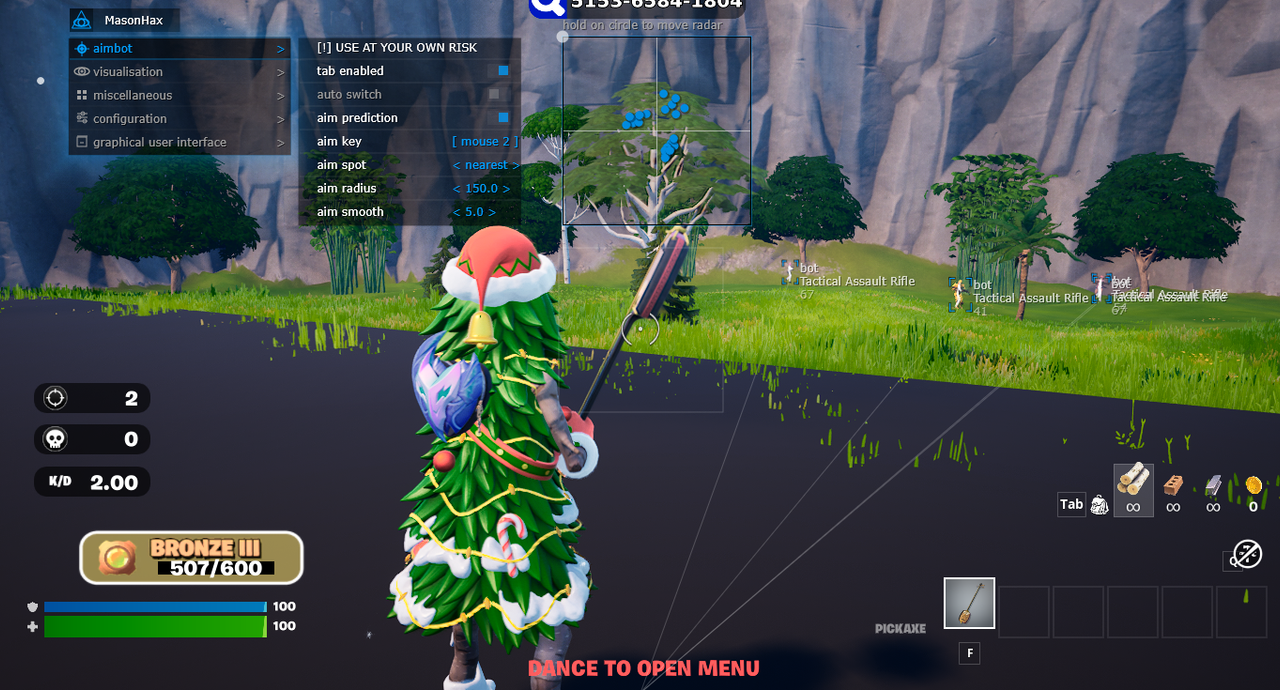
- Advanced Aimbot — Adjustable aiming radius, smoothness, activation key, target body area and automatic target switching.
- Aim Prediction — Target movement prediction to adjust aiming assistance for moving players.
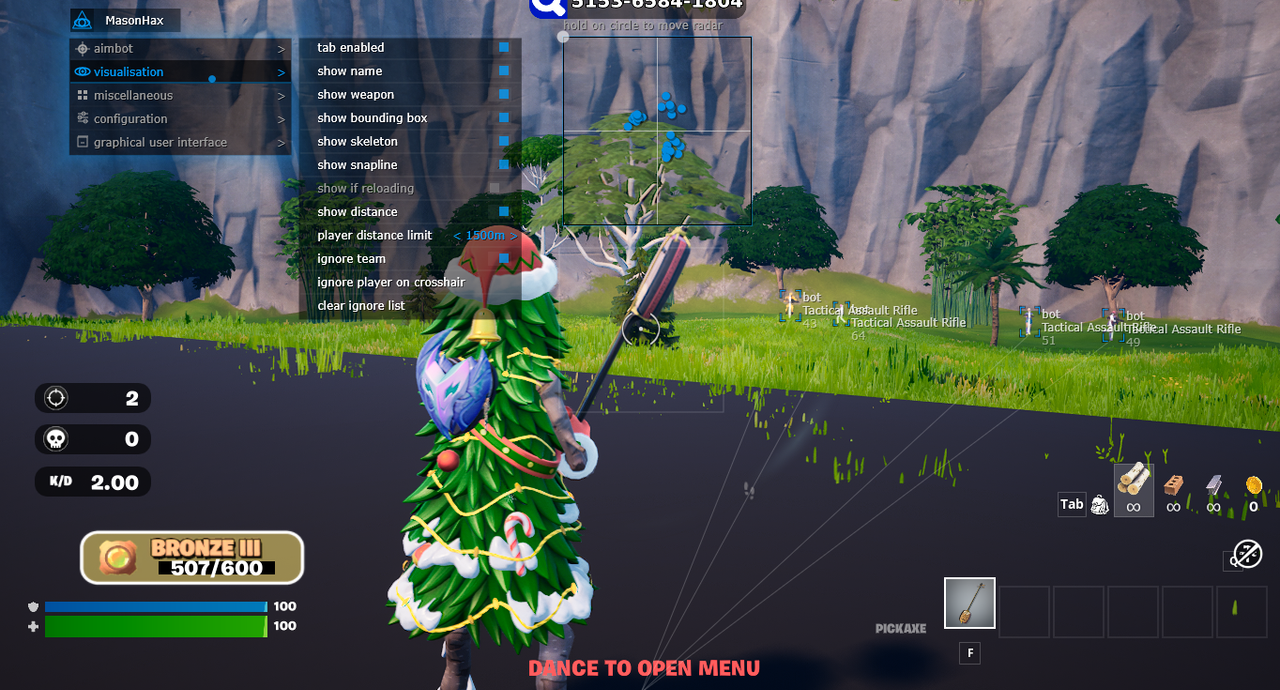
- Player ESP — Player boxes, skeletons, snaplines, names, weapons and distance information.
- Reload Indicator — Display information about enemies who are currently reloading.
- Team Filter — Ignore teammates when displaying supported player information.
- Custom Radar — Integrated radar with adjustable size and working radius.
- Instant Reload — Additional reload-related feature listed for the product.
- Instant Revive — Additional teammate revival feature listed for the product.
- Custom Crosshair — Display an additional aiming crosshair.
- Aim Radius Indicator — Visualize the current Aimbot radius.
- Panic Key — Quickly disable the software using a dedicated hotkey.
- Battle Mode — Switch to a simplified player-focused display.
- Configuration System — Save and load individual settings using the clipboard.
- Save CPU — Performance option intended to reduce software CPU usage.
━━━━━━━━━━━━━━━━━━━━━━━━━━━━
DETAILED FEATURE OVERVIEW
━━━━━━━━━━━━━━━━━━━━━━━━━━━━
PRODUCT SCREENSHOTS
━━━━━━━━━━━━━━━━━━━━━━━━━━━━
SYSTEM REQUIREMENTS & COMPATIBILITY
DETAILED FEATURE OVERVIEW
ADVANCED AIMBOT — AIMING ASSISTANCE
Tab Enabled — Enable or disable Aimbot functionality.
Aim Key — Assign a custom activation key for automatic aiming.
Aim Radius — Configure the working radius of the Aimbot.
Aim Smooth — Adjust the smoothness of aiming movements.
Aim Prediction — Predict target movement for aiming assistance.
Aim Spot — Select the preferred body region or bone for targeting.
Auto Switch — Automatically switch to another eligible target within the configured aiming radius.
AIMBOT CONFIGURATION
MaSoN provides individual controls for aiming activation, target selection and movement smoothness.
Aim Radius determines the targeting area, while Aim Spot allows the selection of a preferred body region.
Aim Prediction is intended to account for moving targets.
The Auto Switch option automatically selects another available target within the working radius according to the software's settings.
PLAYER ESP — VISUALIZATION
Bounding Box — Display bounding boxes around players.
Skeleton — Render player skeleton structures.
Snapline — Draw lines pointing toward players.
Name — Display player names.
Weapon — Show the weapon held by a player.
Distance — Display distance information.
Show If Reloading — Display an indicator when a player is reloading.
Ignore Team — Exclude friendly players from the selected display options.
Player Distance Limit — Configure the maximum Player ESP rendering distance.
PLAYER ESP OVERVIEW
Player ESP provides additional visual information about supported players in Fortnite.
Bounding Box and Skeleton ESP display character positions, while Snaplines indicate their on-screen direction.
Name, Weapon and Distance settings provide information about individual targets.
Show If Reloading adds a separate reload indicator.
The Player Distance Limit helps control the number of objects displayed at longer distances.
MISC — ADDITIONAL FEATURES
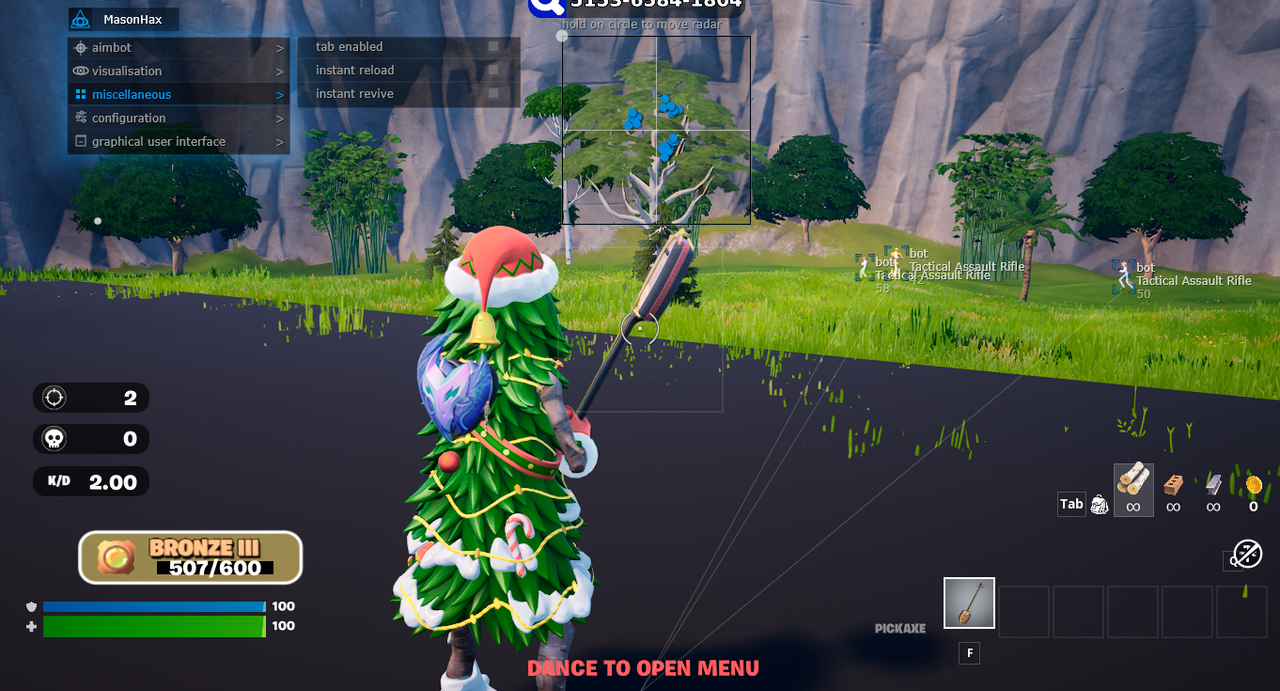
Instant Reload — Instant weapon reload functionality listed for the product.
Instant Revive — Instant teammate revival functionality listed for the product.
FEATURE AVAILABILITY NOTICE
Availability of gameplay-related features may change after Fortnite updates.
Confirm the current availability of Instant Reload, Instant Revive and other gameplay functions with the seller before purchasing.
RADAR & GRAPHICAL INTERFACE
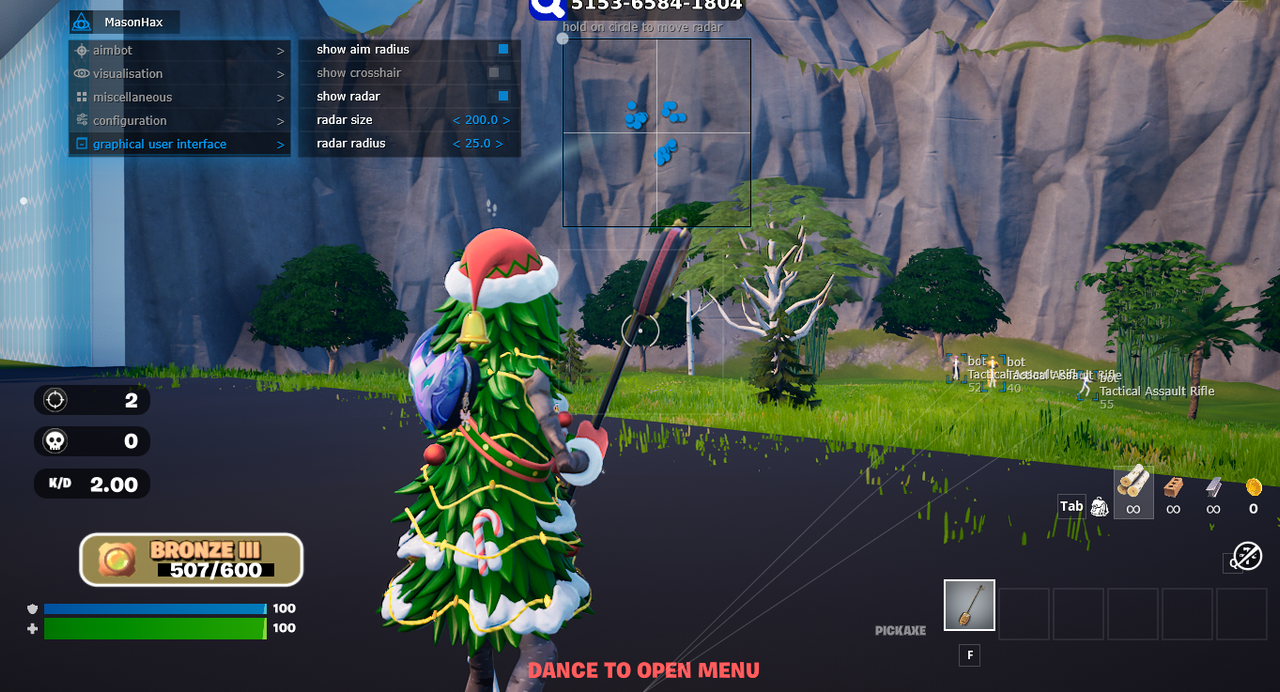
Show Radar — Enable the integrated radar.
Radar Size — Adjust the radar dimensions.
Radar Radius — Configure the radar's working radius.
Show Aim Radius — Display the Aimbot targeting area.
Show Crosshair — Enable an additional crosshair.
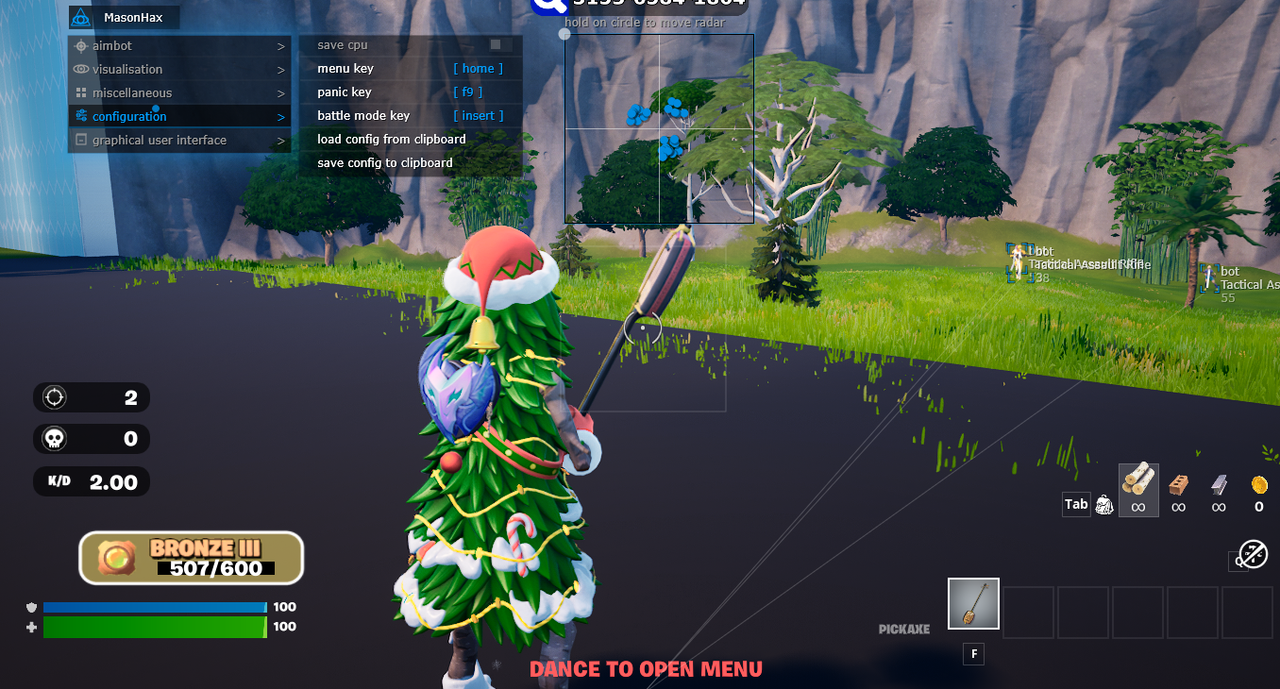
Menu Key — Assign the software menu hotkey.
Panic Key — Quickly disable the program.
Battle Mode Key — Activate the player-focused display mode.
Save CPU — Reduce the software's CPU workload.
CUSTOM RADAR
The integrated radar provides a separate visual representation of supported player information.
Users can configure the radar's dimensions and working radius.
The radar can be combined with Player ESP to customize the information displayed during gameplay.
CONFIGURATION SYSTEM
Load Config from Clipboard — Load previously saved settings from the clipboard.
Save Config to Clipboard — Export the current configuration to the clipboard.
CONFIGURATION MANAGEMENT
The clipboard-based configuration system allows users to save preferred settings and restore them when needed.
Aiming parameters, ESP settings and interface options can be configured according to personal preferences.
Tab Enabled — Enable or disable Aimbot functionality.
Aim Key — Assign a custom activation key for automatic aiming.
Aim Radius — Configure the working radius of the Aimbot.
Aim Smooth — Adjust the smoothness of aiming movements.
Aim Prediction — Predict target movement for aiming assistance.
Aim Spot — Select the preferred body region or bone for targeting.
Auto Switch — Automatically switch to another eligible target within the configured aiming radius.
AIMBOT CONFIGURATION
MaSoN provides individual controls for aiming activation, target selection and movement smoothness.
Aim Radius determines the targeting area, while Aim Spot allows the selection of a preferred body region.
Aim Prediction is intended to account for moving targets.
The Auto Switch option automatically selects another available target within the working radius according to the software's settings.
PLAYER ESP — VISUALIZATION
Bounding Box — Display bounding boxes around players.
Skeleton — Render player skeleton structures.
Snapline — Draw lines pointing toward players.
Name — Display player names.
Weapon — Show the weapon held by a player.
Distance — Display distance information.
Show If Reloading — Display an indicator when a player is reloading.
Ignore Team — Exclude friendly players from the selected display options.
Player Distance Limit — Configure the maximum Player ESP rendering distance.
PLAYER ESP OVERVIEW
Player ESP provides additional visual information about supported players in Fortnite.
Bounding Box and Skeleton ESP display character positions, while Snaplines indicate their on-screen direction.
Name, Weapon and Distance settings provide information about individual targets.
Show If Reloading adds a separate reload indicator.
The Player Distance Limit helps control the number of objects displayed at longer distances.
MISC — ADDITIONAL FEATURES
Instant Reload — Instant weapon reload functionality listed for the product.
Instant Revive — Instant teammate revival functionality listed for the product.
FEATURE AVAILABILITY NOTICE
Availability of gameplay-related features may change after Fortnite updates.
Confirm the current availability of Instant Reload, Instant Revive and other gameplay functions with the seller before purchasing.
RADAR & GRAPHICAL INTERFACE
Show Radar — Enable the integrated radar.
Radar Size — Adjust the radar dimensions.
Radar Radius — Configure the radar's working radius.
Show Aim Radius — Display the Aimbot targeting area.
Show Crosshair — Enable an additional crosshair.
Menu Key — Assign the software menu hotkey.
Panic Key — Quickly disable the program.
Battle Mode Key — Activate the player-focused display mode.
Save CPU — Reduce the software's CPU workload.
CUSTOM RADAR
The integrated radar provides a separate visual representation of supported player information.
Users can configure the radar's dimensions and working radius.
The radar can be combined with Player ESP to customize the information displayed during gameplay.
CONFIGURATION SYSTEM
Load Config from Clipboard — Load previously saved settings from the clipboard.
Save Config to Clipboard — Export the current configuration to the clipboard.
CONFIGURATION MANAGEMENT
The clipboard-based configuration system allows users to save preferred settings and restore them when needed.
Aiming parameters, ESP settings and interface options can be configured according to personal preferences.
━━━━━━━━━━━━━━━━━━━━━━━━━━━━
PRODUCT SCREENSHOTS
SOFTWARE INTERFACE & GAMEPLAY
━━━━━━━━━━━━━━━━━━━━━━━━━━━━
SYSTEM REQUIREMENTS & COMPATIBILITY
- Game: Fortnite
- Game Platform: Epic Games
- Product: MaSoN for Fortnite
- Developer: MaSoN
- Operating System: Windows 10 / Windows 11 x64
- Listed Windows Builds: 2004, 20H2, 21H1, 21H2, 22H2, 23H2, 24H2, 25H2, 26H1
- CPU: Intel / AMD
- GPU: NVIDIA / AMD
- Game Window Mode: Windowed / Borderless Windowed
- Listed Anti-Cheat: Easy Anti-Cheat
- BIOS Boot Mode: UEFI
- System Disk Partition Style: GPT
- Secure Boot: Disabled according to the supplied requirements
- Capture Protection: Claimed in the supplied product description
- Built-in HWID Spoofer: Not included
- USB Flash Drive: Confirm the current requirement before purchasing
- Virtualization / Hyper-V: Confirm the current required configuration with support
- Product Status: Verify before purchasing and launching
IMPORTANT COMPATIBILITY INFORMATION
MaSoN for Fortnite is listed for Windows 10 and Windows 11 x64.
The product requires a compatible system configuration, including the specified boot mode and partition layout.
The supplied requirements specify UEFI, GPT and disabled Secure Boot.
USB flash drive, virtualization and Hyper-V requirements must be confirmed with customer support before purchasing.
Capture protection is claimed in the supplied product description but should be verified for the current release.
Compatibility may change after Fortnite, anti-cheat, Windows or software updates.
Follow the latest product-specific setup instructions provided with your order.
━━━━━━━━━━━━━━━━━━━━━━━━━━━━
SUBSCRIPTION PRICES
1 DAY — ~€5.53 / 500 RUB
7 DAYS — ~€22.14 / 2,000 RUB
30 DAYS — ~€44.27 / 4,000 RUB
EUR prices are approximate conversions based on the reference exchange rate of November 22, 2026 (1 EUR = 90.3445 RUB). Actual checkout prices may vary due to exchange rates, payment methods and processing fees.
━━━━━━━━━━━━━━━━━━━━━━━━━━━━
PURCHASE & INSTANT DELIVERY
AUTOMATIC DELIVERY • SETUP INSTRUCTIONS • CUSTOMER SUPPORT
Purchase MaSoN for Fortnite directly through ShopHackGames.
Choose your preferred subscription duration and check the current product status and compatibility requirements.
Complete the purchase using one of the supported payment methods.
After successful payment, the license information and installation instructions are provided automatically.
Customer support is available for ordering, activation, installation and troubleshooting.
➜ BUY MASON CHEAT FOR FORTNITE
━━━━━━━━━━━━━━━━━━━━━━━━━━━━
MORE FORTNITE SOFTWARE
ShopHackGames offers additional Fortnite products from different developers.
Compare available features, subscription periods, compatibility and system requirements before purchasing.
➜ BROWSE ALL FORTNITE CHEATS
➜ FULL SHOPHACKGAMES CATALOG
━━━━━━━━━━━━━━━━━━━━━━━━━━━━
FREQUENTLY ASKED QUESTIONS
What features does MaSoN for Fortnite include?
MaSoN includes Aimbot, Aim Prediction, Player ESP, Radar, Custom Crosshair, configuration management and additional gameplay features.
Can I customize the Aimbot?
Yes. Users can select the activation key, targeting radius, smoothness and preferred aiming region.
What is Aim Prediction?
Aim Prediction is designed to account for moving targets when calculating aiming assistance.
Does the software support automatic target switching?
Yes. The listed Auto Switch feature selects another eligible target within the configured aiming radius.
What information does Player ESP display?
Player ESP supports bounding boxes, skeletons, snaplines, names, weapons, distance information and reload indicators.
Is there an integrated radar?
Yes. The radar includes adjustable size and radius settings.
Are Instant Reload and Instant Revive included?
Both functions are listed in the supplied product specifications. Confirm their current availability before purchasing.
Can I save my settings?
Yes. Configurations can be saved to the clipboard and loaded when needed.
Is there a Panic Key?
Yes. Panic Key allows quick software deactivation using a dedicated hotkey.
Does the product include a HWID Spoofer?
No. A HWID Spoofer is not included.
How do I receive the product?
After successful payment, product access information and setup instructions are delivered automatically.
Can using third-party software result in a ban?
Yes. Using third-party software may violate game rules and result in account restrictions or permanent bans.
MaSoN includes Aimbot, Aim Prediction, Player ESP, Radar, Custom Crosshair, configuration management and additional gameplay features.
Can I customize the Aimbot?
Yes. Users can select the activation key, targeting radius, smoothness and preferred aiming region.
What is Aim Prediction?
Aim Prediction is designed to account for moving targets when calculating aiming assistance.
Does the software support automatic target switching?
Yes. The listed Auto Switch feature selects another eligible target within the configured aiming radius.
What information does Player ESP display?
Player ESP supports bounding boxes, skeletons, snaplines, names, weapons, distance information and reload indicators.
Is there an integrated radar?
Yes. The radar includes adjustable size and radius settings.
Are Instant Reload and Instant Revive included?
Both functions are listed in the supplied product specifications. Confirm their current availability before purchasing.
Can I save my settings?
Yes. Configurations can be saved to the clipboard and loaded when needed.
Is there a Panic Key?
Yes. Panic Key allows quick software deactivation using a dedicated hotkey.
Does the product include a HWID Spoofer?
No. A HWID Spoofer is not included.
How do I receive the product?
After successful payment, product access information and setup instructions are delivered automatically.
Can using third-party software result in a ban?
Yes. Using third-party software may violate game rules and result in account restrictions or permanent bans.
━━━━━━━━━━━━━━━━━━━━━━━━━━━━
CONTACT & SUPPORT
Store: ShopHackGames
Telegram Support: @Creator_Mikhail
Store News: @shophackgames
Community: ShopHackGames Chat
Discord: ShopHackGames Server
Customer Reviews: ShopHackGames Reviews
━━━━━━━━━━━━━━━━━━━━━━━━━━━━


