
- OS Requirements
- Windows 10 / Windows 11 (64-bit)
- Hardware Requirements
- Intel / AMD CPU. Game Launcher / Steam. Confirm current GPU, display mode and system requirements before purchase.
- Type of Software
- Internal
MASON INTERNAL — WAR THUNDER CHEAT
AIMBOT • AUTO LEAD • CHAMS • MODULE ESP • ADVANCED HUD • MAP FINDER
ADVANCED INTERNAL SOFTWARE FOR WAR THUNDER
MaSoN Internal for War Thunder is a feature-rich internal cheat combining ground vehicle Aimbot, automatic lead calculation for aircraft, detailed Vehicle ESP, Chams, internal Module ESP, Projectile ESP and an advanced customizable HUD.
The software provides extensive battlefield information, including enemy vehicle positions, internal components, crew members, projectile trajectories, reload timers and repair status.
Additional features include Map Finder, Auto Scout, Auto Artillery, camera customization, world visual settings and configuration profiles.
GROUND VEHICLE AIMBOT • AIRCRAFT AUTO LEAD • INTERNAL MODULES • PROJECTILE TRACKING • CUSTOM HUD
STARTING FROM ~€5.52 / 499 RUB
INSTANT DELIVERY • SETUP GUIDE • CUSTOMER SUPPORT
WINDOWS 10 / WINDOWS 11 x64 • GAME LAUNCHER / STEAM
➜ BUY MASON INTERNAL FOR WAR THUNDER
━━━━━━━━━━━━━━━━━━━━━━━━━━━━
MAIN FEATURES
AIMBOT • AUTO LEAD • CHAMS • MODULE ESP • ADVANCED HUD • MAP FINDER
ADVANCED INTERNAL SOFTWARE FOR WAR THUNDER
MaSoN Internal for War Thunder is a feature-rich internal cheat combining ground vehicle Aimbot, automatic lead calculation for aircraft, detailed Vehicle ESP, Chams, internal Module ESP, Projectile ESP and an advanced customizable HUD.
The software provides extensive battlefield information, including enemy vehicle positions, internal components, crew members, projectile trajectories, reload timers and repair status.
Additional features include Map Finder, Auto Scout, Auto Artillery, camera customization, world visual settings and configuration profiles.
GROUND VEHICLE AIMBOT • AIRCRAFT AUTO LEAD • INTERNAL MODULES • PROJECTILE TRACKING • CUSTOM HUD
STARTING FROM ~€5.52 / 499 RUB
INSTANT DELIVERY • SETUP GUIDE • CUSTOMER SUPPORT
WINDOWS 10 / WINDOWS 11 x64 • GAME LAUNCHER / STEAM
➜ BUY MASON INTERNAL FOR WAR THUNDER
━━━━━━━━━━━━━━━━━━━━━━━━━━━━
MAIN FEATURES
- Ground Vehicle Aimbot — Aimpoint, Silent Aim to Point, configurable activation key, FOV and Dynamic FOV.
- Aircraft Auto Lead — Automatic lead-point calculation with a separate FOV setting and an option to disable Auto Lead for aircraft.
- Vehicle ESP — Player and bot visualization, 2D / 3D / Corner Boxes, vehicle names, distances and target highlighting.
- Reload & Repair Information — Vehicle reload timers, repair timers and separate indicators for repairing vehicles.
- Chams — Multiple highlighting styles with independent model and outline colors.
- Module ESP — Visualize ammunition storage, crew positions, engines, transmissions, barrels and gun breeches.
- Projectile ESP — Rockets, bombs, bullets, torpedoes, payloads and supported projectile trajectories.
- Advanced HUD — Arcade, Realistic, Hardcore and Custom HUD modes with ballistic markers, radar and damage indicators.
- Map Finder — Preferred and excluded map lists, automatic match cancellation and configurable matchmaking retries.
- Auto Scout & Auto Artillery — Additional scouting and artillery automation functions.
- World Visual Settings — Remove Trees, Remove Smoke, fog, water and world color adjustments.
- Camera Features — Zoom Changer, Free Camera, Third Person and Artillery Camera.
- Enemy Aim Warning — Additional indications of enemy aiming behavior and target points.
- Additional Gameplay Features — Fog of War Bypass, Nuke Progress and removal of selected blackout or overload effects.
- Configurations & Languages — Save and load personal settings with Russian, English and Chinese interface options.
━━━━━━━━━━━━━━━━━━━━━━━━━━━━
DETAILED FEATURE OVERVIEW
━━━━━━━━━━━━━━━━━━━━━━━━━━━━
SCREENSHOTS
━━━━━━━━━━━━━━━━━━━━━━━━━━━━
SYSTEM REQUIREMENTS & COMPATIBILITY
DETAILED FEATURE OVERVIEW
AIMBOT — GROUND VEHICLE TARGETING
Aimpoint — Display or configure the selected aiming point on a target.
Silent Aim to Point — Dedicated silent-aiming option for the selected point.
Activation Key — Assign a custom hotkey for aiming assistance.
Aimbot FOV — Configure the targeting field of view.
Dynamic FOV — Adjust the active aiming area dynamically.
GROUND AIMBOT OVERVIEW
MaSoN Internal includes a dedicated aiming system for ground vehicles in War Thunder.
Aimpoint provides an aiming reference for the selected target, while Silent Aim to Point offers the corresponding targeting mode.
The activation key determines when aiming assistance is used.
FOV settings control the acquisition area, and Dynamic FOV provides additional control over that area.
AUTO LEAD — AIRCRAFT AIMING ASSISTANCE
Auto Lead — Calculate an automatic lead point for supported targets.
Auto Lead FOV — Configure a separate targeting area for Auto Lead.
Aircraft Auto Lead Toggle — Disable Auto Lead for aircraft when desired.
AIRCRAFT AUTO LEAD OVERVIEW
Auto Lead provides additional lead-point calculations for supported aircraft targeting scenarios.
It has a separate FOV configuration and can be disabled for aircraft.
IMPORTANT AIMBOT DIFFERENCE
The full Aimbot is intended for ground vehicles.
For aircraft, the product provides lead-point calculation rather than the same full ground-vehicle Aimbot functionality.
VEHICLE ESP — PLAYERS & BOTS
Player ESP — Display supported player vehicles.
Bot ESP — Display supported bot vehicles.
2D Box — Draw two-dimensional boxes around vehicles.
3D Box — Display three-dimensional vehicle boxes.
Corner Box — Highlight vehicles using corner-style boxes.
Vehicle Name — Display vehicle identification.
Distance — Show the distance to supported vehicles.
Reload Timer — Display available reload timing information.
Repair Timer — Display available repair timing information.
Repairing Vehicle Indicator — Highlight vehicles undergoing repairs.
Selected Target Highlight — Visually distinguish the selected vehicle.
VEHICLE ESP OVERVIEW
Vehicle ESP provides additional information about supported player and bot vehicles during gameplay.
Users can choose between different box rendering styles, including 2D, 3D and Corner Box.
Vehicle names and distances provide identification and positional information.
Reload and repair timers display supported vehicle activity information.
Selected Target Highlight helps distinguish the currently selected target.
CHAMS — VEHICLE HIGHLIGHTING
Chams — Enable supported vehicle model highlighting.
Chams Styles — Choose between available visual highlighting styles.
Model Colors — Customize vehicle model colors.
Outline Colors — Configure outline colors separately.
Target Highlight — Highlight the selected vehicle.
CHAMS CUSTOMIZATION
Chams provides an alternative way to display supported vehicle models.
Multiple styles allow customization of the visual appearance.
Independent model and outline colors provide additional control over highlighting.
The selected target can be displayed using a separate visual indicator.
MODULE ESP — INTERNAL VEHICLE COMPONENTS
Hull Ammunition — Highlight ammunition storage inside the vehicle hull.
Turret Ammunition — Display ammunition storage inside the turret.
Commander — Highlight the commander position.
Gunner — Display the gunner position.
Loader — Highlight the loader position.
Driver — Display the driver position.
Engine — Highlight the engine.
Transmission — Display the transmission.
Barrel — Highlight the gun barrel.
Gun Breech — Display the gun breech.
MODULE ESP OVERVIEW
Module ESP provides detailed visual information about supported internal vehicle components.
The system can display ammunition storage located in the hull and turret, as well as crew positions.
Supported mechanical components include the engine, transmission, barrel and gun breech.
This information complements regular Vehicle ESP by providing a more detailed view of supported vehicle structures.
PROJECTILE ESP — PROJECTILE TRACKING
Rocket ESP — Display supported rockets.
Rocket Trajectory — Visualize rocket flight paths.
Bomb ESP — Display supported bombs.
Bullet ESP — Visualize supported bullets and projectiles.
Projectile Trajectory — Display projectile flight paths.
Torpedo ESP — Highlight supported torpedoes.
Payload ESP — Display available payload information.
PROJECTILE ESP OVERVIEW
Projectile ESP adds visual information about supported projectiles and weapon systems.
Rocket ESP provides rocket-related information and trajectory visualization.
Bomb ESP and Bullet ESP display supported bombs and projectiles.
Torpedo ESP and Payload ESP extend the available visualization to additional weapon categories.
ADVANCED HUD — INTERFACE PRESETS
Arcade HUD — Arcade-style interface preset.
Realistic HUD — Realistic-style interface preset.
Hardcore HUD — Hardcore-style interface preset.
Custom HUD — Configurable interface mode.
ADVANCED HUD — BATTLEFIELD INFORMATION
Ballistics — Display supported ballistic information.
Impact Point — Show calculated impact-point information.
Vehicle Markers — Highlight supported vehicles.
Target Distance — Display distance to the target.
Vehicle Outlines — Display vehicle contours.
Aircraft Map Markers — Highlight supported aircraft on the map.
Ground Vehicle Map Markers — Display supported ground vehicles on the map.
Bomb Sight — Additional bomb aiming interface.
Aim Prediction — Display predicted aiming information.
Radar — Integrated radar functionality.
Damage Indicators — Display supported damage information.
Third Person — Third-person viewing option.
Artillery Camera — Additional artillery camera interface.
ADVANCED HUD OVERVIEW
The Advanced HUD provides additional battlefield information through several selectable interface presets.
Arcade, Realistic, Hardcore and Custom modes allow users to choose different display configurations.
Available HUD elements include vehicle markers, ballistic information, impact-point indicators and map markers for ground and air targets.
Radar, Bomb Sight, Aim Prediction and Damage Indicators provide additional information depending on the selected settings.
MAP FINDER — MATCHMAKING SETTINGS
Automatic Map Check — Check the selected map during matchmaking.
Preferred Maps — Configure a list of preferred maps.
Excluded Maps — Configure a list of unwanted maps.
Automatic Match Cancellation — Cancel a match that does not meet the configured map preferences.
Automatic Matchmaking Retry — Start a new matchmaking search.
Retry Delay — Configure the delay before another search attempt.
MAP FINDER OVERVIEW
Map Finder provides additional controls over the matchmaking process.
The system checks map information against user-defined preferences.
Users can maintain separate lists of preferred and unwanted maps.
When a selected map does not match the configured preferences, the available automation can cancel the matchmaking attempt and start another search after a configurable delay.
AUTO SCOUT & AUTO ARTILLERY
Auto Scout — Dedicated automatic scouting function.
Auto Artillery — Dedicated automatic artillery function.
SCOUTING & ARTILLERY
MaSoN Internal includes additional automated functions for supported scouting and artillery interactions.
Their availability and behavior may depend on the current software version and game mode.
WORLD VISUAL SETTINGS
Remove Trees — Adjust the rendering of supported tree objects.
Remove Smoke — Adjust the display of supported smoke effects.
Fog Settings — Customize available fog parameters.
Water Settings — Adjust supported water rendering options.
World Colors — Customize available world color settings.
WORLD CUSTOMIZATION
World settings allow users to modify selected visual elements of the game environment.
Available options include tree and smoke adjustments, fog parameters, water rendering and world colors.
CAMERA & VIEW SETTINGS
Zoom Changer — Adjust the available camera zoom.
Free Camera — Enable the supported free-camera mode.
Simulator Third Person — Additional third-person viewing option for simulator gameplay.
Artillery Camera — Additional camera view associated with artillery functions.
CAMERA CUSTOMIZATION
MaSoN Internal provides additional options for changing the available camera view and zoom.
The software includes Zoom Changer, Free Camera and Simulator Third Person.
Artillery Camera is also available among the supported viewing features.
ENEMY AIM & COMBAT INFORMATION
Enemy Aim Warning — Display warning information related to enemy aiming.
Enemy Aim Point — Show supported enemy aiming-point information.
Blackout Removal — Remove supported blackout visual effects.
Overload Effect Removal — Remove supported overload visual effects.
Fog of War Bypass — Dedicated Fog of War-related option.
Nuke Progress — Display supported nuclear strike progress information.
ADDITIONAL GAMEPLAY SETTINGS
The additional gameplay section includes enemy aiming warnings, camera-effect adjustments and selected battlefield indicators.
Blackout and Overload options affect the corresponding supported visual effects.
Fog of War Bypass and Nuke Progress provide additional gameplay-related functionality according to the current software version.
CONFIGURATIONS & INTERFACE LANGUAGES
Save Configuration — Save the current settings.
Load Configuration — Restore a saved profile.
Russian Language — Russian interface option.
English Language — English interface option.
Chinese Language — Chinese interface option.
CONFIGURATION MANAGEMENT
MaSoN Internal supports saving and loading user configurations.
This allows preferred aiming, visualization and interface settings to be restored when needed.
The software interface includes Russian, English and Chinese language options.
Aimpoint — Display or configure the selected aiming point on a target.
Silent Aim to Point — Dedicated silent-aiming option for the selected point.
Activation Key — Assign a custom hotkey for aiming assistance.
Aimbot FOV — Configure the targeting field of view.
Dynamic FOV — Adjust the active aiming area dynamically.
GROUND AIMBOT OVERVIEW
MaSoN Internal includes a dedicated aiming system for ground vehicles in War Thunder.
Aimpoint provides an aiming reference for the selected target, while Silent Aim to Point offers the corresponding targeting mode.
The activation key determines when aiming assistance is used.
FOV settings control the acquisition area, and Dynamic FOV provides additional control over that area.
AUTO LEAD — AIRCRAFT AIMING ASSISTANCE
Auto Lead — Calculate an automatic lead point for supported targets.
Auto Lead FOV — Configure a separate targeting area for Auto Lead.
Aircraft Auto Lead Toggle — Disable Auto Lead for aircraft when desired.
AIRCRAFT AUTO LEAD OVERVIEW
Auto Lead provides additional lead-point calculations for supported aircraft targeting scenarios.
It has a separate FOV configuration and can be disabled for aircraft.
IMPORTANT AIMBOT DIFFERENCE
The full Aimbot is intended for ground vehicles.
For aircraft, the product provides lead-point calculation rather than the same full ground-vehicle Aimbot functionality.
VEHICLE ESP — PLAYERS & BOTS
Player ESP — Display supported player vehicles.
Bot ESP — Display supported bot vehicles.
2D Box — Draw two-dimensional boxes around vehicles.
3D Box — Display three-dimensional vehicle boxes.
Corner Box — Highlight vehicles using corner-style boxes.
Vehicle Name — Display vehicle identification.
Distance — Show the distance to supported vehicles.
Reload Timer — Display available reload timing information.
Repair Timer — Display available repair timing information.
Repairing Vehicle Indicator — Highlight vehicles undergoing repairs.
Selected Target Highlight — Visually distinguish the selected vehicle.
VEHICLE ESP OVERVIEW
Vehicle ESP provides additional information about supported player and bot vehicles during gameplay.
Users can choose between different box rendering styles, including 2D, 3D and Corner Box.
Vehicle names and distances provide identification and positional information.
Reload and repair timers display supported vehicle activity information.
Selected Target Highlight helps distinguish the currently selected target.
CHAMS — VEHICLE HIGHLIGHTING
Chams — Enable supported vehicle model highlighting.
Chams Styles — Choose between available visual highlighting styles.
Model Colors — Customize vehicle model colors.
Outline Colors — Configure outline colors separately.
Target Highlight — Highlight the selected vehicle.
CHAMS CUSTOMIZATION
Chams provides an alternative way to display supported vehicle models.
Multiple styles allow customization of the visual appearance.
Independent model and outline colors provide additional control over highlighting.
The selected target can be displayed using a separate visual indicator.
MODULE ESP — INTERNAL VEHICLE COMPONENTS
Hull Ammunition — Highlight ammunition storage inside the vehicle hull.
Turret Ammunition — Display ammunition storage inside the turret.
Commander — Highlight the commander position.
Gunner — Display the gunner position.
Loader — Highlight the loader position.
Driver — Display the driver position.
Engine — Highlight the engine.
Transmission — Display the transmission.
Barrel — Highlight the gun barrel.
Gun Breech — Display the gun breech.
MODULE ESP OVERVIEW
Module ESP provides detailed visual information about supported internal vehicle components.
The system can display ammunition storage located in the hull and turret, as well as crew positions.
Supported mechanical components include the engine, transmission, barrel and gun breech.
This information complements regular Vehicle ESP by providing a more detailed view of supported vehicle structures.
PROJECTILE ESP — PROJECTILE TRACKING
Rocket ESP — Display supported rockets.
Rocket Trajectory — Visualize rocket flight paths.
Bomb ESP — Display supported bombs.
Bullet ESP — Visualize supported bullets and projectiles.
Projectile Trajectory — Display projectile flight paths.
Torpedo ESP — Highlight supported torpedoes.
Payload ESP — Display available payload information.
PROJECTILE ESP OVERVIEW
Projectile ESP adds visual information about supported projectiles and weapon systems.
Rocket ESP provides rocket-related information and trajectory visualization.
Bomb ESP and Bullet ESP display supported bombs and projectiles.
Torpedo ESP and Payload ESP extend the available visualization to additional weapon categories.
ADVANCED HUD — INTERFACE PRESETS
Arcade HUD — Arcade-style interface preset.
Realistic HUD — Realistic-style interface preset.
Hardcore HUD — Hardcore-style interface preset.
Custom HUD — Configurable interface mode.
ADVANCED HUD — BATTLEFIELD INFORMATION
Ballistics — Display supported ballistic information.
Impact Point — Show calculated impact-point information.
Vehicle Markers — Highlight supported vehicles.
Target Distance — Display distance to the target.
Vehicle Outlines — Display vehicle contours.
Aircraft Map Markers — Highlight supported aircraft on the map.
Ground Vehicle Map Markers — Display supported ground vehicles on the map.
Bomb Sight — Additional bomb aiming interface.
Aim Prediction — Display predicted aiming information.
Radar — Integrated radar functionality.
Damage Indicators — Display supported damage information.
Third Person — Third-person viewing option.
Artillery Camera — Additional artillery camera interface.
ADVANCED HUD OVERVIEW
The Advanced HUD provides additional battlefield information through several selectable interface presets.
Arcade, Realistic, Hardcore and Custom modes allow users to choose different display configurations.
Available HUD elements include vehicle markers, ballistic information, impact-point indicators and map markers for ground and air targets.
Radar, Bomb Sight, Aim Prediction and Damage Indicators provide additional information depending on the selected settings.
MAP FINDER — MATCHMAKING SETTINGS
Automatic Map Check — Check the selected map during matchmaking.
Preferred Maps — Configure a list of preferred maps.
Excluded Maps — Configure a list of unwanted maps.
Automatic Match Cancellation — Cancel a match that does not meet the configured map preferences.
Automatic Matchmaking Retry — Start a new matchmaking search.
Retry Delay — Configure the delay before another search attempt.
MAP FINDER OVERVIEW
Map Finder provides additional controls over the matchmaking process.
The system checks map information against user-defined preferences.
Users can maintain separate lists of preferred and unwanted maps.
When a selected map does not match the configured preferences, the available automation can cancel the matchmaking attempt and start another search after a configurable delay.
AUTO SCOUT & AUTO ARTILLERY
Auto Scout — Dedicated automatic scouting function.
Auto Artillery — Dedicated automatic artillery function.
SCOUTING & ARTILLERY
MaSoN Internal includes additional automated functions for supported scouting and artillery interactions.
Their availability and behavior may depend on the current software version and game mode.
WORLD VISUAL SETTINGS
Remove Trees — Adjust the rendering of supported tree objects.
Remove Smoke — Adjust the display of supported smoke effects.
Fog Settings — Customize available fog parameters.
Water Settings — Adjust supported water rendering options.
World Colors — Customize available world color settings.
WORLD CUSTOMIZATION
World settings allow users to modify selected visual elements of the game environment.
Available options include tree and smoke adjustments, fog parameters, water rendering and world colors.
CAMERA & VIEW SETTINGS
Zoom Changer — Adjust the available camera zoom.
Free Camera — Enable the supported free-camera mode.
Simulator Third Person — Additional third-person viewing option for simulator gameplay.
Artillery Camera — Additional camera view associated with artillery functions.
CAMERA CUSTOMIZATION
MaSoN Internal provides additional options for changing the available camera view and zoom.
The software includes Zoom Changer, Free Camera and Simulator Third Person.
Artillery Camera is also available among the supported viewing features.
ENEMY AIM & COMBAT INFORMATION
Enemy Aim Warning — Display warning information related to enemy aiming.
Enemy Aim Point — Show supported enemy aiming-point information.
Blackout Removal — Remove supported blackout visual effects.
Overload Effect Removal — Remove supported overload visual effects.
Fog of War Bypass — Dedicated Fog of War-related option.
Nuke Progress — Display supported nuclear strike progress information.
ADDITIONAL GAMEPLAY SETTINGS
The additional gameplay section includes enemy aiming warnings, camera-effect adjustments and selected battlefield indicators.
Blackout and Overload options affect the corresponding supported visual effects.
Fog of War Bypass and Nuke Progress provide additional gameplay-related functionality according to the current software version.
CONFIGURATIONS & INTERFACE LANGUAGES
Save Configuration — Save the current settings.
Load Configuration — Restore a saved profile.
Russian Language — Russian interface option.
English Language — English interface option.
Chinese Language — Chinese interface option.
CONFIGURATION MANAGEMENT
MaSoN Internal supports saving and loading user configurations.
This allows preferred aiming, visualization and interface settings to be restored when needed.
The software interface includes Russian, English and Chinese language options.
━━━━━━━━━━━━━━━━━━━━━━━━━━━━
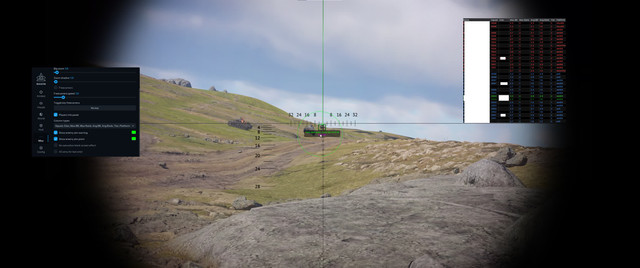
SCREENSHOTS
SOFTWARE INTERFACE, CHAMS, MODULE ESP & GAMEPLAY


━━━━━━━━━━━━━━━━━━━━━━━━━━━━
SYSTEM REQUIREMENTS & COMPATIBILITY
- Game: War Thunder
- Product: MaSoN Internal
- Developer: MaSoN
- Software Type: Internal
- Game Platform: Game Launcher / Steam
- Operating System: Windows 10 / Windows 11 x64
- Supported Windows Builds: Verify the current compatible builds before purchasing
- Processor: Intel / AMD
- Graphics Card: Confirm supported GPU and driver requirements before purchasing
- Game Window Mode: Verify supported display modes
- Anti-Cheat Compatibility: Check the current product specifications
- USB Flash Drive: Not required according to the published seller listing
- Virtualization / Hyper-V: Verify current requirements
- Secure Boot: Verify current requirements
- HWID Spoofer: Not specified in the supplied product description
- Product Status: Verify before purchasing and launching
IMPORTANT COMPATIBILITY INFORMATION
MaSoN Internal is designed for War Thunder and supports the listed Game Launcher and Steam versions.
The product is intended for Windows 10 and Windows 11 x64.
Confirm your exact Windows build, graphics compatibility, game display mode and required system configuration before purchasing.
A USB flash drive is not required according to the published seller specifications.
GROUND VEHICLES & AIRCRAFT
The full Aimbot is intended for ground vehicles.
Aircraft functionality includes automatic lead-point calculation.
Do not assume that identical aiming functionality is available for both ground and air vehicles.
Follow the latest installation and activation instructions provided with your order.
━━━━━━━━━━━━━━━━━━━━━━━━━━━━
SUBSCRIPTION PRICES
1 DAY — ~€5.52 / 499 RUB
7 DAYS — ~€22.13 / 1,999 RUB
30 DAYS — ~€44.26 / 3,999 RUB
EUR amounts are approximate conversions based on the reference exchange rate of November 22, 2026 (1 EUR = 90.3445 RUB). Subscription prices are based on published seller listings. Verify current checkout prices before ordering. Currency conversion and payment fees may affect the final amount.
━━━━━━━━━━━━━━━━━━━━━━━━━━━━
PURCHASE & INSTANT DELIVERY
AUTOMATIC DELIVERY • SETUP INSTRUCTIONS • CUSTOMER SUPPORT
Purchase MaSoN Internal for War Thunder directly through ShopHackGames.
Choose your preferred subscription duration and verify the current product status, available features and system compatibility.
Complete the checkout using one of the supported payment methods.
After successful payment, license information and setup instructions are delivered automatically.
Support is available for ordering, activation, installation and troubleshooting.
➜ BUY MASON INTERNAL FOR WAR THUNDER
━━━━━━━━━━━━━━━━━━━━━━━━━━━━
MORE WAR THUNDER SOFTWARE
ShopHackGames offers additional War Thunder products from different developers and product lines.
Compare features, subscription periods, compatibility and system requirements before purchasing.
➜ BROWSE ALL WAR THUNDER CHEATS
➜ FULL SHOPHACKGAMES CATALOG
━━━━━━━━━━━━━━━━━━━━━━━━━━━━
CONTACT & SUPPORT
Store: ShopHackGames
Telegram Support: @Creator_Mikhail
Store News: @shophackgames
Community: ShopHackGames Chat
Discord: ShopHackGames Server
Customer Reviews: ShopHackGames Reviews
━━━━━━━━━━━━━━━━━━━━━━━━━━━━
MaSoN Internal is designed for War Thunder and supports the listed Game Launcher and Steam versions.
The product is intended for Windows 10 and Windows 11 x64.
Confirm your exact Windows build, graphics compatibility, game display mode and required system configuration before purchasing.
A USB flash drive is not required according to the published seller specifications.
GROUND VEHICLES & AIRCRAFT
The full Aimbot is intended for ground vehicles.
Aircraft functionality includes automatic lead-point calculation.
Do not assume that identical aiming functionality is available for both ground and air vehicles.
Follow the latest installation and activation instructions provided with your order.
━━━━━━━━━━━━━━━━━━━━━━━━━━━━
SUBSCRIPTION PRICES
1 DAY — ~€5.52 / 499 RUB
7 DAYS — ~€22.13 / 1,999 RUB
30 DAYS — ~€44.26 / 3,999 RUB
EUR amounts are approximate conversions based on the reference exchange rate of November 22, 2026 (1 EUR = 90.3445 RUB). Subscription prices are based on published seller listings. Verify current checkout prices before ordering. Currency conversion and payment fees may affect the final amount.
━━━━━━━━━━━━━━━━━━━━━━━━━━━━
PURCHASE & INSTANT DELIVERY
AUTOMATIC DELIVERY • SETUP INSTRUCTIONS • CUSTOMER SUPPORT
Purchase MaSoN Internal for War Thunder directly through ShopHackGames.
Choose your preferred subscription duration and verify the current product status, available features and system compatibility.
Complete the checkout using one of the supported payment methods.
After successful payment, license information and setup instructions are delivered automatically.
Support is available for ordering, activation, installation and troubleshooting.
➜ BUY MASON INTERNAL FOR WAR THUNDER
━━━━━━━━━━━━━━━━━━━━━━━━━━━━
MORE WAR THUNDER SOFTWARE
ShopHackGames offers additional War Thunder products from different developers and product lines.
Compare features, subscription periods, compatibility and system requirements before purchasing.
➜ BROWSE ALL WAR THUNDER CHEATS
➜ FULL SHOPHACKGAMES CATALOG
━━━━━━━━━━━━━━━━━━━━━━━━━━━━
CONTACT & SUPPORT
Store: ShopHackGames
Telegram Support: @Creator_Mikhail
Store News: @shophackgames
Community: ShopHackGames Chat
Discord: ShopHackGames Server
Customer Reviews: ShopHackGames Reviews
━━━━━━━━━━━━━━━━━━━━━━━━━━━━


