
- OS Requirements
- Windows 10 / Windows 11 (64-bit)
- Hardware Requirements
- Intel or AMD 64-bit processor. USB flash drive not required.
- Type of Software
- External
PUSSYCAT — WARDOGS CHEAT
AIMBOT • PLAYER ESP • OBJECT ESP • VEHICLE ESP • RADAR • BATTLE MODE
ADVANCED AIMBOT & ESP SOFTWARE FOR WARDOGS
PussyCAT for WARDOGS is a feature-rich software solution combining customizable Aimbot, detailed Player ESP, Object ESP, Vehicle ESP, an integrated Radar and additional gameplay visualization features.
The software provides automatic targeting with adjustable hitboxes, Smoothness, Visible Check, maximum distance and customizable FOV settings.
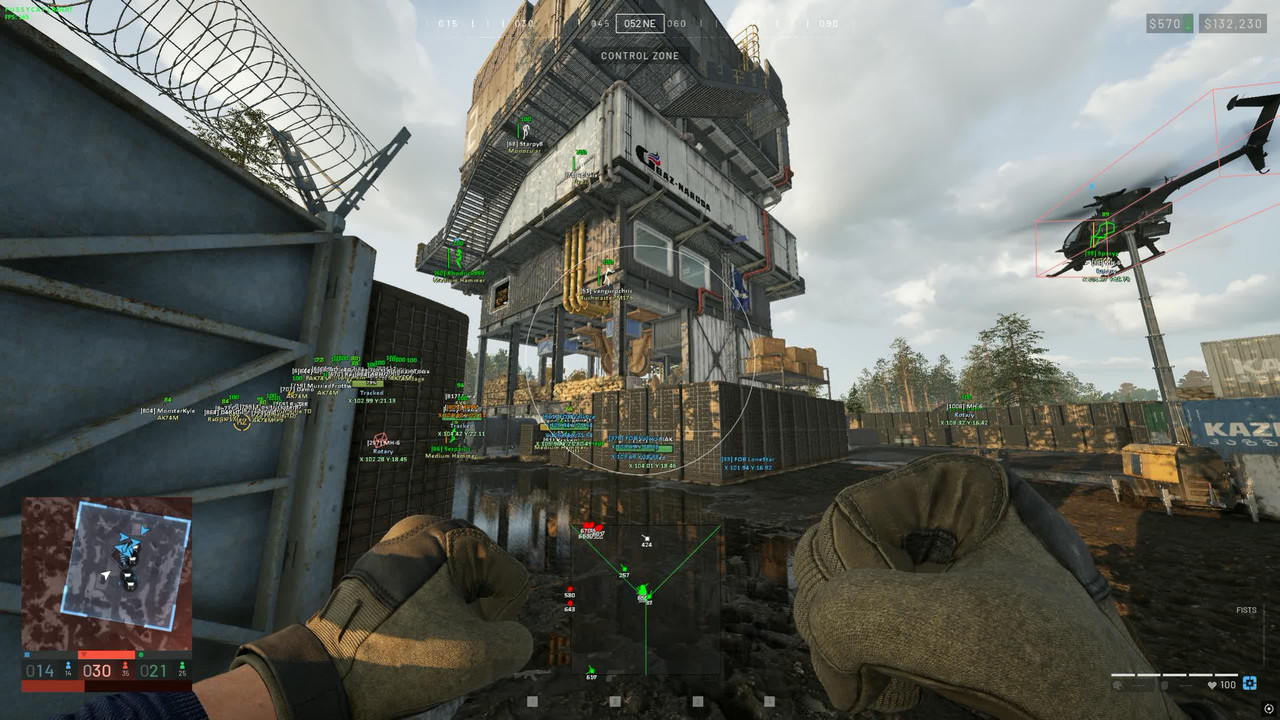
Player ESP displays supported character information, including boxes, skeletons, snaplines, names, equipped weapons, health values and team-related indicators.
Object ESP highlights important in-game objects such as FOBs, Claymores, anti-tank mines, explosive devices, player bags and buildable structures.
Vehicle ESP provides visualization of wheeled, tracked and airborne vehicles, including names, health, distance and map coordinates.
Additional features include Battle Mode, customizable Crosshair, Fullbright, Radar, color settings and configuration management.
VISIBILITY CHECK • VEHICLE TRACKING • FOB ESP • CUSTOM COLORS • FULLBRIGHT
STARTING FROM ~€3.34 / 300 RUB
INSTANT DELIVERY • SETUP GUIDE • CUSTOMER SUPPORT
➜ BUY PUSSYCAT FOR WARDOGS
━━━━━━━━━━━━━━━━━━━━━━━━━━━━
MAIN FEATURES
AIMBOT • PLAYER ESP • OBJECT ESP • VEHICLE ESP • RADAR • BATTLE MODE
ADVANCED AIMBOT & ESP SOFTWARE FOR WARDOGS
PussyCAT for WARDOGS is a feature-rich software solution combining customizable Aimbot, detailed Player ESP, Object ESP, Vehicle ESP, an integrated Radar and additional gameplay visualization features.
The software provides automatic targeting with adjustable hitboxes, Smoothness, Visible Check, maximum distance and customizable FOV settings.
Player ESP displays supported character information, including boxes, skeletons, snaplines, names, equipped weapons, health values and team-related indicators.
Object ESP highlights important in-game objects such as FOBs, Claymores, anti-tank mines, explosive devices, player bags and buildable structures.
Vehicle ESP provides visualization of wheeled, tracked and airborne vehicles, including names, health, distance and map coordinates.
Additional features include Battle Mode, customizable Crosshair, Fullbright, Radar, color settings and configuration management.
VISIBILITY CHECK • VEHICLE TRACKING • FOB ESP • CUSTOM COLORS • FULLBRIGHT
STARTING FROM ~€3.34 / 300 RUB
INSTANT DELIVERY • SETUP GUIDE • CUSTOMER SUPPORT
➜ BUY PUSSYCAT FOR WARDOGS
━━━━━━━━━━━━━━━━━━━━━━━━━━━━
MAIN FEATURES
- Advanced Aimbot — Customizable aiming with hitbox selection, Smoothness, maximum distance and activation hotkey.
- Visibility Check — Supported target visibility verification for Aimbot and Player ESP.
- Aimbot FOV — Adjustable targeting area with FOV color and optional filled visualization.
- Player ESP — Boxes, Skeleton, Snaplines, Names, equipped Weapons and Health information.
- Player Filters — Ignore Team, Show Knocked and adjustable visualization distance.
- Battle Mode — Dedicated combat mode with a customizable activation key.
- Player Color Settings — Individual colors for allies, enemies, knocked players, Skeleton, Names and Weapons.
- Object ESP — Corpse / Bags, SPW, Claymore, AT Mine, Explosive Device and Buildable Drill.
- FOB ESP — Forward operating base visualization with health indicators and friendly structure filters.
- Vehicle ESP — 3D Boxes, vehicle names, health, distance and map coordinates.
- Vehicle Categories — Wheeled, Tracked, Rotary, Airplane, Stationary and Other.
- Vehicle Filters — Ignore Team Vehicle and individual vehicle visualization settings.
- Custom Object Colors — Individual marker colors for supported explosives, bags, FOBs and other objects.
- Integrated Radar — Adjustable position and visualization distance.
- Custom Crosshair — Configurable size, thickness and color.
- Fullbright — Additional environment brightness functionality activated with F3.
- Font Customization — Adjustable text sizes for enemies and objects.
- Configuration Management — Save and load settings, customize menu hotkeys and configure Overlay FPS.
━━━━━━━━━━━━━━━━━━━━━━━━━━━━
DETAILED FEATURE OVERVIEW
━━━━━━━━━━━━━━━━━━━━━━━━━━━━
SCREENSHOTS
━━━━━━━━━━━━━━━━━━━━━━━━━━━━
SYSTEM REQUIREMENTS & COMPATIBILITY
DETAILED FEATURE OVERVIEW
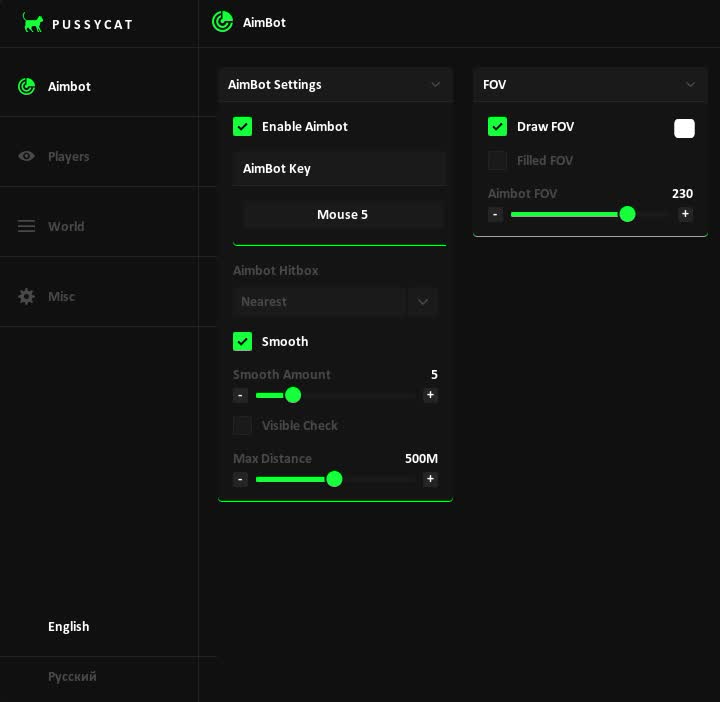
ADVANCED AIMBOT — AUTOMATIC AIMING
Enable Aimbot — Activate the automatic targeting system.
Aimbot Key — Configure the preferred activation hotkey.
Aimbot Hitbox — Select the target body region.
Smooth — Enable supported aiming movement smoothing.
Smooth Amount — Configure the smoothing strength.
Visible Check — Check supported target visibility conditions.
Max Distance — Set the maximum targeting distance.
AIMBOT OVERVIEW
PussyCAT includes a configurable Aimbot designed for WARDOGS.
The aiming system provides several options for customizing target acquisition and aiming movement.
Aimbot Hitbox allows the preferred target region to be selected.
Smooth and Smooth Amount control the available aiming movement behavior.
Visible Check adds a target visibility condition.
Maximum Distance limits the available targeting range.
Aimbot Key provides control over when the automatic targeting system is activated.
AIMBOT FOV — TARGETING AREA
Draw FOV — Display the active targeting field of view.
FOV Color — Customize the FOV indicator color.
Filled FOV — Enable filled targeting area visualization.
Aimbot FOV — Adjust the targeting area size.
FOV CUSTOMIZATION
The FOV system allows the Aimbot targeting area to be customized.
Draw FOV displays the configured aiming region.
Filled FOV provides an alternative filled visualization.
FOV Color allows the indicator appearance to be changed.
Aimbot FOV controls the size of the supported target acquisition area.
These options operate alongside the available Aimbot distance and smoothing settings.
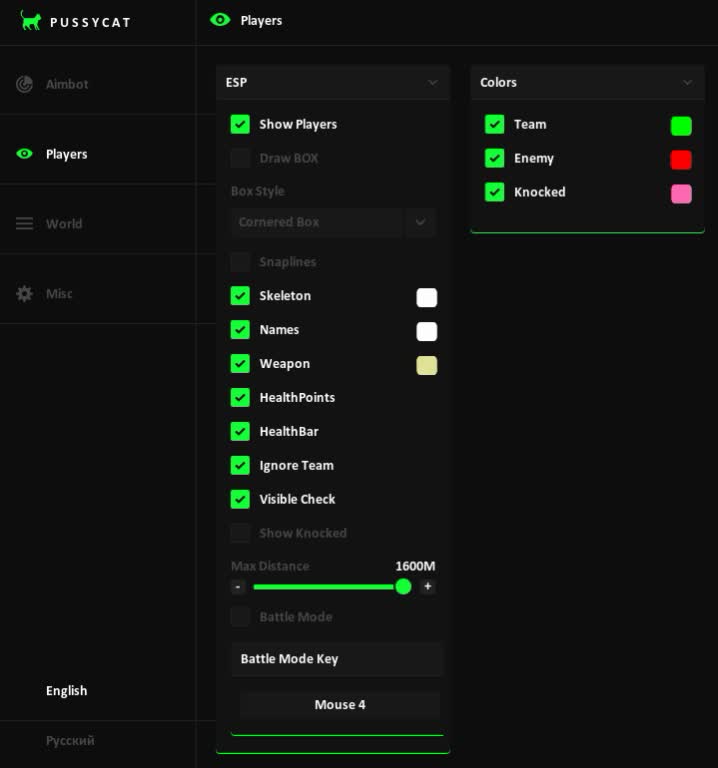
PLAYER ESP — CHARACTER VISUALIZATION
Show Players — Enable visualization of supported players.
Draw BOX — Display bounding boxes around players.
Box Style — Select the available box appearance.
Snaplines — Draw directional lines to supported players.
Snaplines Style — Customize snapline visualization.
Skeleton — Display the player skeleton structure.
Names — Show player names.
Weapon — Display equipped weapons.
HealthPoints — Show numerical player health values.
HealthBar — Display health bars.
Ignore Team — Exclude supported teammates.
Visible Check — Check player visibility.
Show Knocked — Display knocked or incapacitated players.
Max Distance — Configure the maximum ESP distance.
PLAYER ESP OVERVIEW
Player ESP provides detailed visual information about supported characters in WARDOGS.
Draw BOX highlights player positions with configurable bounding boxes.
Snaplines provide directional references to supported players.
Skeleton displays the available character bone structure.
Names and Weapon indicators provide additional identification and equipment information.
HealthPoints and HealthBar show supported health information.
Visible Check adds information related to player visibility.
Ignore Team allows compatible friendly characters to be excluded.
Show Knocked provides visualization of supported incapacitated characters.
Max Distance limits the available Player ESP visualization range.
BATTLE MODE — COMBAT CONFIGURATION
Battle Mode — Enable the dedicated combat mode.
Battle Mode Key — Select the preferred activation hotkey.
BATTLE MODE OVERVIEW
PussyCAT includes Battle Mode among its available gameplay features.
The mode provides a separate combat-related setting with a configurable activation key.
The exact behavior of Battle Mode depends on the current software version.
PLAYER ESP — COLOR CUSTOMIZATION
Team — Configure the color of supported teammates.
Enemy — Configure enemy player colors.
Knocked — Select the color for knocked players.
Skeleton — Customize skeleton visualization colors.
Names — Adjust player name colors.
Weapon — Configure equipped weapon text colors.
PLAYER COLOR SETTINGS
Player ESP includes individual color settings for different visualization categories.
Team and Enemy colors help distinguish supported friendly and opposing characters.
Knocked provides a separate color for incapacitated players.
Skeleton, Names and Weapon can also be customized independently.
These settings allow the supported ESP display to be adapted to individual visual preferences.
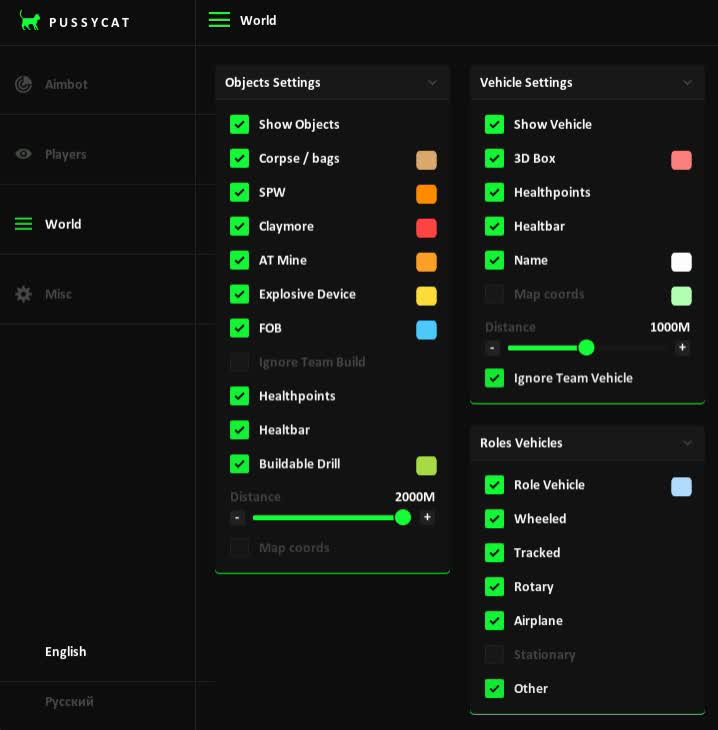
OBJECT ESP — WORLD OBJECT TRACKING
Show Objects — Enable visualization of supported objects.
Debug Items — Display available debug-related items.
Corpse / Bags — Highlight supported corpses and bags.
SPW — Display supported SPW objects.
Claymore — Show compatible Claymore mines.
AT Mine — Display anti-tank mines.
Explosive Device — Highlight supported explosive devices.
Buildable Drill — Show available buildable drill objects.
Distance — Display distances to supported objects.
Map Coords — Show supported object coordinates.
OBJECT ESP OVERVIEW
Object ESP provides additional visualization of supported world objects in WARDOGS.
Corpse / Bags highlights available bodies and storage objects.
SPW provides a separate category for supported SPW objects.
Claymore and AT Mine display compatible mine-related objects.
Explosive Device adds visualization of supported explosive devices.
Buildable Drill highlights available buildable structures.
Distance and Map Coords provide additional positional information.
FOB ESP — FORWARD OPERATING BASES
FOB — Enable visualization of supported forward operating bases.
Ignore Team Build — Exclude compatible friendly structures.
HealthPoints — Display available FOB health values.
HealthBar — Show supported FOB health bars.
FOB VISUALIZATION OVERVIEW
PussyCAT includes dedicated visualization options for supported FOB structures.
FOB ESP highlights compatible forward operating bases.
Ignore Team Build allows supported friendly constructions to be excluded.
HealthPoints and HealthBar display available structure health information.
These functions provide additional object-specific information alongside the main Object ESP system.
VEHICLE ESP — TRANSPORT VISUALIZATION
Show Vehicle — Enable supported vehicle visualization.
3D Box — Display three-dimensional vehicle boxes.
HealthPoints — Show available vehicle health values.
HealthBar — Display supported vehicle health bars.
Name — Show vehicle names.
Map Coords — Display vehicle coordinates.
Distance — Show the distance to supported vehicles.
Ignore Team Vehicle — Exclude compatible friendly vehicles.
VEHICLE ESP OVERVIEW
Vehicle ESP provides additional information about supported military transport in WARDOGS.
3D Box highlights vehicle positions using three-dimensional bounding boxes.
Name identifies supported vehicle objects.
HealthPoints and HealthBar provide information about vehicle conditions.
Map Coords and Distance add positional information.
Ignore Team Vehicle allows compatible friendly vehicles to be hidden.
VEHICLE CATEGORIES — TRANSPORT TYPES
Wheeled — Display supported wheeled vehicles.
Tracked — Display tracked military vehicles.
Rotary — Show compatible rotary-wing aircraft.
Airplane — Display supported airplanes.
Stationary — Visualize stationary vehicle categories.
Other — Show additional supported transport types.
VEHICLE TYPE FILTERS
PussyCAT includes separate filters for supported military vehicle categories.
Wheeled and Tracked distinguish different types of ground vehicles.
Rotary and Airplane provide visualization of supported aircraft.
Stationary covers compatible stationary vehicle-related objects.
Other allows additional supported transport categories to be displayed.
These options provide more control over vehicle-related information.
VEHICLE ESP — COLOR SETTINGS
3D Box — Customize the vehicle box color.
Name — Configure vehicle name colors.
Role Vehicle — Adjust vehicle category colors.
Map Coords — Customize coordinate text colors.
VEHICLE COLOR CUSTOMIZATION
Vehicle ESP includes individual color settings for different visualization elements.
3D Box allows vehicle bounding box colors to be changed.
Name controls the appearance of vehicle labels.
Role Vehicle provides separate category coloring.
Map Coords customizes the coordinate information display.
OBJECT ESP — COLOR CUSTOMIZATION
Corpse / Bags — Configure corpse and bag marker colors.
SPW — Customize supported SPW colors.
Claymore — Select Claymore mine colors.
AT Mine — Configure anti-tank mine colors.
Explosive Device — Set explosive device marker colors.
FOB — Customize forward operating base colors.
Buildable Drill — Adjust supported drill object colors.
OBJECT COLOR SETTINGS
Object ESP provides separate color customization for supported object categories.
Corpse / Bags, SPW, Claymore, AT Mine and Explosive Device can use individual colors.
FOB and Buildable Drill also include corresponding marker color settings.
This allows supported world objects to be visually distinguished.
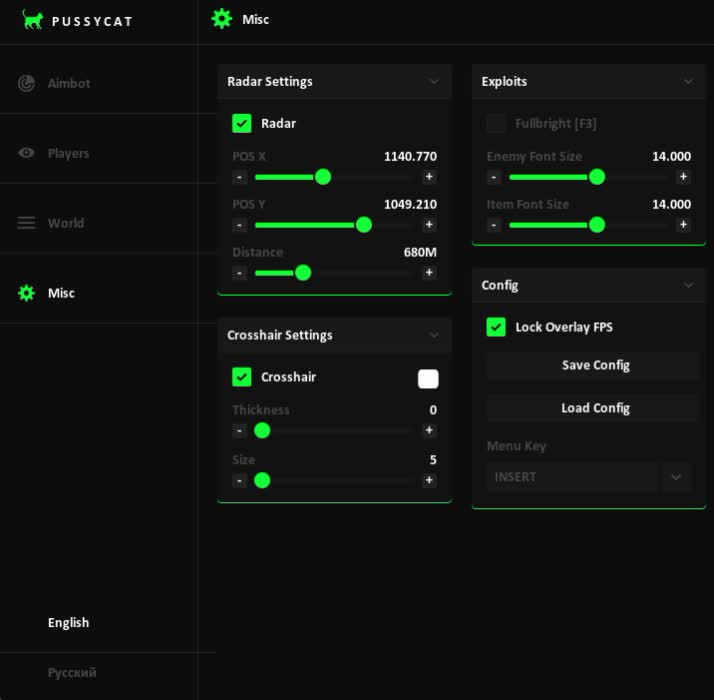
RADAR — POSITIONAL INFORMATION
Radar — Integrated radar interface.
Position X — Configure horizontal radar position.
Position Y — Configure vertical radar position.
Distance — Adjust the maximum radar visualization range.
RADAR CUSTOMIZATION
PussyCAT includes an integrated Radar for additional positional information.
Position X and Position Y control the location of the radar interface on screen.
Distance determines the supported radar display range.
The available settings allow the interface to be adjusted according to individual display preferences.
CROSSHAIR — AIMING INTERFACE
Crosshair — Additional customizable on-screen aiming reference.
Thickness — Adjust crosshair line thickness.
Size — Configure crosshair dimensions.
Color — Customize crosshair color.
CROSSHAIR CUSTOMIZATION
PussyCAT includes an additional Crosshair with visual customization options.
Thickness controls the supported line thickness.
Size adjusts the dimensions of the aiming indicator.
Color allows the displayed crosshair appearance to be customized.
The Crosshair is configured separately from the Aimbot FOV visualization.
FULLBRIGHT — ENVIRONMENT VISUALIZATION
Fullbright [F3] — Enable the supported maximum environment brightness feature.
FULLBRIGHT OVERVIEW
Fullbright is included among the available additional visual features.
The function provides increased brightness for supported game environments.
F3 is listed as the activation key.
The exact visual behavior depends on the current WARDOGS and software version.
FONT SETTINGS — INTERFACE CUSTOMIZATION
Enemy Font Size — Adjust supported enemy-related text size.
Item Font Size — Configure supported object label dimensions.
FONT CUSTOMIZATION OVERVIEW
PussyCAT includes separate font size settings for different ESP categories.
Enemy Font Size controls the available player-related labels.
Item Font Size adjusts supported world object text.
These settings help adapt the display to different resolutions and preferences.
CONFIGURATION — MENU & OVERLAY SETTINGS
Lock Overlay FPS — Limit the supported overlay frame rate.
Save Config — Save current software settings.
Load Config — Load previously saved configurations.
Menu Key — Configure the menu activation hotkey.
CONFIGURATION MANAGEMENT
PussyCAT includes a configuration system for managing supported software preferences.
Save Config allows available settings to be stored.
Load Config restores previously saved configurations.
Menu Key allows the menu activation hotkey to be customized.
Lock Overlay FPS provides additional control over the supported overlay frame rate.
Enable Aimbot — Activate the automatic targeting system.
Aimbot Key — Configure the preferred activation hotkey.
Aimbot Hitbox — Select the target body region.
Smooth — Enable supported aiming movement smoothing.
Smooth Amount — Configure the smoothing strength.
Visible Check — Check supported target visibility conditions.
Max Distance — Set the maximum targeting distance.
AIMBOT OVERVIEW
PussyCAT includes a configurable Aimbot designed for WARDOGS.
The aiming system provides several options for customizing target acquisition and aiming movement.
Aimbot Hitbox allows the preferred target region to be selected.
Smooth and Smooth Amount control the available aiming movement behavior.
Visible Check adds a target visibility condition.
Maximum Distance limits the available targeting range.
Aimbot Key provides control over when the automatic targeting system is activated.
AIMBOT FOV — TARGETING AREA
Draw FOV — Display the active targeting field of view.
FOV Color — Customize the FOV indicator color.
Filled FOV — Enable filled targeting area visualization.
Aimbot FOV — Adjust the targeting area size.
FOV CUSTOMIZATION
The FOV system allows the Aimbot targeting area to be customized.
Draw FOV displays the configured aiming region.
Filled FOV provides an alternative filled visualization.
FOV Color allows the indicator appearance to be changed.
Aimbot FOV controls the size of the supported target acquisition area.
These options operate alongside the available Aimbot distance and smoothing settings.
PLAYER ESP — CHARACTER VISUALIZATION
Show Players — Enable visualization of supported players.
Draw BOX — Display bounding boxes around players.
Box Style — Select the available box appearance.
Snaplines — Draw directional lines to supported players.
Snaplines Style — Customize snapline visualization.
Skeleton — Display the player skeleton structure.
Names — Show player names.
Weapon — Display equipped weapons.
HealthPoints — Show numerical player health values.
HealthBar — Display health bars.
Ignore Team — Exclude supported teammates.
Visible Check — Check player visibility.
Show Knocked — Display knocked or incapacitated players.
Max Distance — Configure the maximum ESP distance.
PLAYER ESP OVERVIEW
Player ESP provides detailed visual information about supported characters in WARDOGS.
Draw BOX highlights player positions with configurable bounding boxes.
Snaplines provide directional references to supported players.
Skeleton displays the available character bone structure.
Names and Weapon indicators provide additional identification and equipment information.
HealthPoints and HealthBar show supported health information.
Visible Check adds information related to player visibility.
Ignore Team allows compatible friendly characters to be excluded.
Show Knocked provides visualization of supported incapacitated characters.
Max Distance limits the available Player ESP visualization range.
BATTLE MODE — COMBAT CONFIGURATION
Battle Mode — Enable the dedicated combat mode.
Battle Mode Key — Select the preferred activation hotkey.
BATTLE MODE OVERVIEW
PussyCAT includes Battle Mode among its available gameplay features.
The mode provides a separate combat-related setting with a configurable activation key.
The exact behavior of Battle Mode depends on the current software version.
PLAYER ESP — COLOR CUSTOMIZATION
Team — Configure the color of supported teammates.
Enemy — Configure enemy player colors.
Knocked — Select the color for knocked players.
Skeleton — Customize skeleton visualization colors.
Names — Adjust player name colors.
Weapon — Configure equipped weapon text colors.
PLAYER COLOR SETTINGS
Player ESP includes individual color settings for different visualization categories.
Team and Enemy colors help distinguish supported friendly and opposing characters.
Knocked provides a separate color for incapacitated players.
Skeleton, Names and Weapon can also be customized independently.
These settings allow the supported ESP display to be adapted to individual visual preferences.
OBJECT ESP — WORLD OBJECT TRACKING
Show Objects — Enable visualization of supported objects.
Debug Items — Display available debug-related items.
Corpse / Bags — Highlight supported corpses and bags.
SPW — Display supported SPW objects.
Claymore — Show compatible Claymore mines.
AT Mine — Display anti-tank mines.
Explosive Device — Highlight supported explosive devices.
Buildable Drill — Show available buildable drill objects.
Distance — Display distances to supported objects.
Map Coords — Show supported object coordinates.
OBJECT ESP OVERVIEW
Object ESP provides additional visualization of supported world objects in WARDOGS.
Corpse / Bags highlights available bodies and storage objects.
SPW provides a separate category for supported SPW objects.
Claymore and AT Mine display compatible mine-related objects.
Explosive Device adds visualization of supported explosive devices.
Buildable Drill highlights available buildable structures.
Distance and Map Coords provide additional positional information.
FOB ESP — FORWARD OPERATING BASES
FOB — Enable visualization of supported forward operating bases.
Ignore Team Build — Exclude compatible friendly structures.
HealthPoints — Display available FOB health values.
HealthBar — Show supported FOB health bars.
FOB VISUALIZATION OVERVIEW
PussyCAT includes dedicated visualization options for supported FOB structures.
FOB ESP highlights compatible forward operating bases.
Ignore Team Build allows supported friendly constructions to be excluded.
HealthPoints and HealthBar display available structure health information.
These functions provide additional object-specific information alongside the main Object ESP system.
VEHICLE ESP — TRANSPORT VISUALIZATION
Show Vehicle — Enable supported vehicle visualization.
3D Box — Display three-dimensional vehicle boxes.
HealthPoints — Show available vehicle health values.
HealthBar — Display supported vehicle health bars.
Name — Show vehicle names.
Map Coords — Display vehicle coordinates.
Distance — Show the distance to supported vehicles.
Ignore Team Vehicle — Exclude compatible friendly vehicles.
VEHICLE ESP OVERVIEW
Vehicle ESP provides additional information about supported military transport in WARDOGS.
3D Box highlights vehicle positions using three-dimensional bounding boxes.
Name identifies supported vehicle objects.
HealthPoints and HealthBar provide information about vehicle conditions.
Map Coords and Distance add positional information.
Ignore Team Vehicle allows compatible friendly vehicles to be hidden.
VEHICLE CATEGORIES — TRANSPORT TYPES
Wheeled — Display supported wheeled vehicles.
Tracked — Display tracked military vehicles.
Rotary — Show compatible rotary-wing aircraft.
Airplane — Display supported airplanes.
Stationary — Visualize stationary vehicle categories.
Other — Show additional supported transport types.
VEHICLE TYPE FILTERS
PussyCAT includes separate filters for supported military vehicle categories.
Wheeled and Tracked distinguish different types of ground vehicles.
Rotary and Airplane provide visualization of supported aircraft.
Stationary covers compatible stationary vehicle-related objects.
Other allows additional supported transport categories to be displayed.
These options provide more control over vehicle-related information.
VEHICLE ESP — COLOR SETTINGS
3D Box — Customize the vehicle box color.
Name — Configure vehicle name colors.
Role Vehicle — Adjust vehicle category colors.
Map Coords — Customize coordinate text colors.
VEHICLE COLOR CUSTOMIZATION
Vehicle ESP includes individual color settings for different visualization elements.
3D Box allows vehicle bounding box colors to be changed.
Name controls the appearance of vehicle labels.
Role Vehicle provides separate category coloring.
Map Coords customizes the coordinate information display.
OBJECT ESP — COLOR CUSTOMIZATION
Corpse / Bags — Configure corpse and bag marker colors.
SPW — Customize supported SPW colors.
Claymore — Select Claymore mine colors.
AT Mine — Configure anti-tank mine colors.
Explosive Device — Set explosive device marker colors.
FOB — Customize forward operating base colors.
Buildable Drill — Adjust supported drill object colors.
OBJECT COLOR SETTINGS
Object ESP provides separate color customization for supported object categories.
Corpse / Bags, SPW, Claymore, AT Mine and Explosive Device can use individual colors.
FOB and Buildable Drill also include corresponding marker color settings.
This allows supported world objects to be visually distinguished.
RADAR — POSITIONAL INFORMATION
Radar — Integrated radar interface.
Position X — Configure horizontal radar position.
Position Y — Configure vertical radar position.
Distance — Adjust the maximum radar visualization range.
RADAR CUSTOMIZATION
PussyCAT includes an integrated Radar for additional positional information.
Position X and Position Y control the location of the radar interface on screen.
Distance determines the supported radar display range.
The available settings allow the interface to be adjusted according to individual display preferences.
CROSSHAIR — AIMING INTERFACE
Crosshair — Additional customizable on-screen aiming reference.
Thickness — Adjust crosshair line thickness.
Size — Configure crosshair dimensions.
Color — Customize crosshair color.
CROSSHAIR CUSTOMIZATION
PussyCAT includes an additional Crosshair with visual customization options.
Thickness controls the supported line thickness.
Size adjusts the dimensions of the aiming indicator.
Color allows the displayed crosshair appearance to be customized.
The Crosshair is configured separately from the Aimbot FOV visualization.
FULLBRIGHT — ENVIRONMENT VISUALIZATION
Fullbright [F3] — Enable the supported maximum environment brightness feature.
FULLBRIGHT OVERVIEW
Fullbright is included among the available additional visual features.
The function provides increased brightness for supported game environments.
F3 is listed as the activation key.
The exact visual behavior depends on the current WARDOGS and software version.
FONT SETTINGS — INTERFACE CUSTOMIZATION
Enemy Font Size — Adjust supported enemy-related text size.
Item Font Size — Configure supported object label dimensions.
FONT CUSTOMIZATION OVERVIEW
PussyCAT includes separate font size settings for different ESP categories.
Enemy Font Size controls the available player-related labels.
Item Font Size adjusts supported world object text.
These settings help adapt the display to different resolutions and preferences.
CONFIGURATION — MENU & OVERLAY SETTINGS
Lock Overlay FPS — Limit the supported overlay frame rate.
Save Config — Save current software settings.
Load Config — Load previously saved configurations.
Menu Key — Configure the menu activation hotkey.
CONFIGURATION MANAGEMENT
PussyCAT includes a configuration system for managing supported software preferences.
Save Config allows available settings to be stored.
Load Config restores previously saved configurations.
Menu Key allows the menu activation hotkey to be customized.
Lock Overlay FPS provides additional control over the supported overlay frame rate.
━━━━━━━━━━━━━━━━━━━━━━━━━━━━
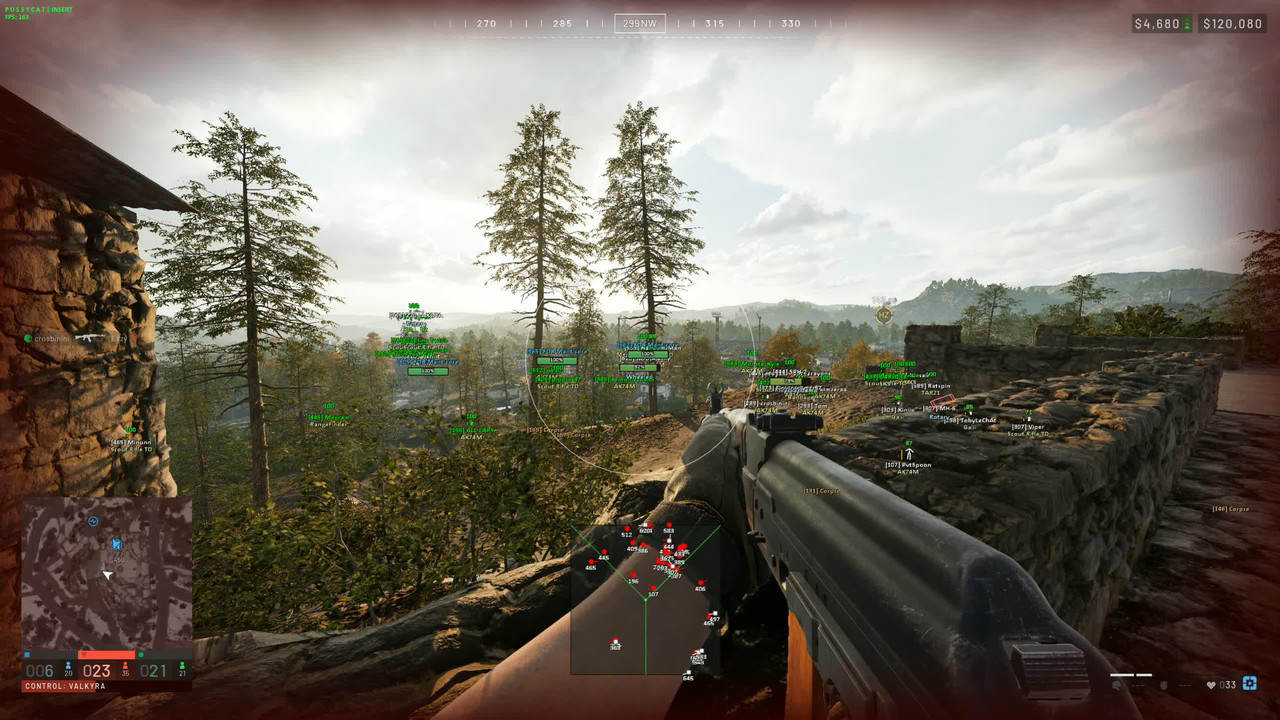
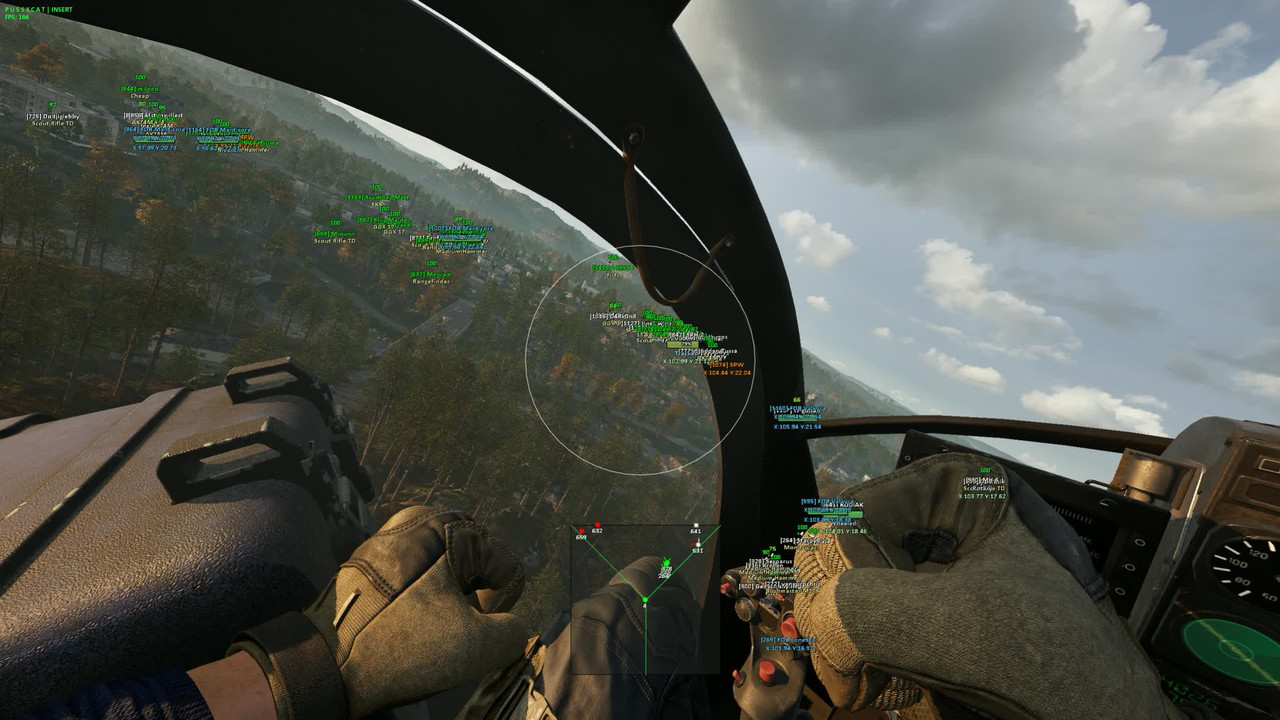
SCREENSHOTS
SOFTWARE INTERFACE, AIMBOT, PLAYER ESP, OBJECTS & VEHICLE VISUALIZATION
━━━━━━━━━━━━━━━━━━━━━━━━━━━━
SYSTEM REQUIREMENTS & COMPATIBILITY
- Game: WARDOGS
- Product: PussyCAT
- Developer: PussyCAT
- Software Type: ESP Overlay with Aimbot — exact Internal / External type unconfirmed
- Game Platform: Steam
- Operating System: Windows 10 / Windows 11
- Supported Windows Builds: 21H2 / 22H2 / 23H2 / 24H2 / 25H2
- Processor: Intel / AMD
- Graphics Card: NVIDIA / AMD
- Game Display Mode: Windowed
- Anti-Cheat: In-game
- USB Flash Drive: Not required
- Built-in HWID Spoofer: Not included
- Screenshot / Recording Concealment: Not included
- Virtualization / Hyper-V: Verify current setup requirements
- Secure Boot: Verify current setup requirements
- Product Status: Verify before purchasing and launching
IMPORTANT COMPATIBILITY INFORMATION
PussyCAT is designed for WARDOGS and includes Aimbot, Player ESP, Object ESP, Vehicle ESP, Radar and additional gameplay visualization features.
The listed requirements include Windows 10 / Windows 11, supported builds from 21H2 through 25H2, Intel / AMD processors and NVIDIA / AMD graphics cards.
The supported game display mode is Windowed.
The product does not include a built-in HWID Spoofer or screenshot / recording concealment.
A USB flash drive is not required.
Before purchasing, verify the current Windows build, hardware compatibility, supported game version and installation requirements on ShopHackGames.
Do not assume that requirements for PussyCAT Radar or other products also apply to this version.
Follow the latest installation and activation instructions supplied with your order.
━━━━━━━━━━━━━━━━━━━━━━━━━━━━
SUBSCRIPTION PRICES
1 DAY — ~€3.34 / 300 RUB
The starting price is an approximate EUR conversion. Additional subscription prices were not confirmed for this exact product. Check the product page for current 7-day and 30-day options, final exchange rates and payment fees.
━━━━━━━━━━━━━━━━━━━━━━━━━━━━
PURCHASE & INSTANT DELIVERY
AUTOMATIC DELIVERY • SETUP INSTRUCTIONS • CUSTOMER SUPPORT
Purchase PussyCAT for WARDOGS directly through ShopHackGames.
Select your preferred subscription duration and check the current product status, supported features and system compatibility.
Complete your order using one of the available payment methods.
Enter a valid email address during checkout.
After successful payment, the license information and purchase details are delivered automatically.
Order information is also sent to the email address provided during checkout.
If the purchase page is accidentally closed, order details may be recovered through the corresponding email or Oplata.info account.
Installation, activation and launch instructions are provided with the purchased product.
Customer support is available for ordering, activation, installation and troubleshooting.
➜ BUY PUSSYCAT FOR WARDOGS
━━━━━━━━━━━━━━━━━━━━━━━━━━━━
MORE WARDOGS SOFTWARE
ShopHackGames offers additional software products for WARDOGS.
Compare functionality, subscription options, current product status and system requirements before purchasing.
➜ VIEW ALL WARDOGS SOFTWARE
➜ BROWSE THE SHOPHACKGAMES CATALOG
━━━━━━━━━━━━━━━━━━━━━━━━━━━━
CONTACT & SUPPORT
Store: ShopHackGames
Telegram Support: @Creator_Mikhail
Store News: @shophackgames
Community: ShopHackGames Chat
Discord: ShopHackGames Server
━━━━━━━━━━━━━━━━━━━━━━━━━━━━


