Hello again!
Today, I'm releasing another DMA/Poor DMA cheat, but this time we're talking about Rust, I've spent the most time working on. It was actually the main game that got me interested in cheating in the first place, because of that there is very rich ESP with everything what you may ask for (This even includes the status of monument doors, showing whether they've been opened!) Thus, when it comes to overall quality, I'd say this is the best cheat in my series!
At first I would like to clarify that this is a DMA cheat, but it can be also used as an External cheat if we were to use my technology that I called Poor DMA on the same computer, but in such case there is risk of getting ban due to overlay on the game. Everything what you need to know regarding this approach is located under this link, a lot of reading but worth it, thus below link is about Poor DMA, for people without DMA cards.
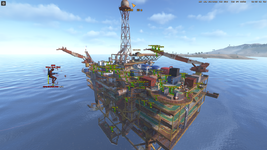
Screenshot from game showing Wallhack/ESP:
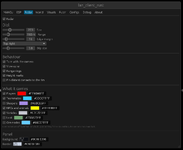
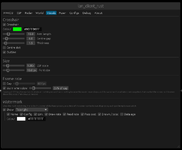
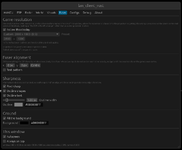
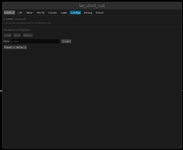
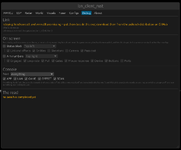
Menu showcase:
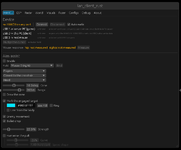
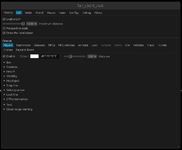
Features list:
Instruction:
Step 1 - On the Game PC:
Hardware Setup:
OFFSETS UPDATING!!!
Rust patches constantly, and I will not be updating the offsets for you -- the client reads every offset and every decryption program out of offsets.toml, so a patch day is a file edit, never a new build. You can update them yourself with this agentic dumper:
The only thing you need to do is ask AI to check one .md file --
IF YOU UPDATE THEM YOURSELF SHARE THEM HERE FOR OTHER PEOPLE AS REPLY BELOW WITH DATE!!!
Troubleshooting
In case of any bugs, or problems while using this cheat, don't forget to paste log in reply and additionally in details explain what is the issue, and if there is such possibility include image, in that case I can HELP, if you are going to write that there is SOME bug and you can't even clarify what it is, you will be ignored.
Today, I'm releasing another DMA/Poor DMA cheat, but this time we're talking about Rust, I've spent the most time working on. It was actually the main game that got me interested in cheating in the first place, because of that there is very rich ESP with everything what you may ask for (This even includes the status of monument doors, showing whether they've been opened!) Thus, when it comes to overall quality, I'd say this is the best cheat in my series!
At first I would like to clarify that this is a DMA cheat, but it can be also used as an External cheat if we were to use my technology that I called Poor DMA on the same computer, but in such case there is risk of getting ban due to overlay on the game. Everything what you need to know regarding this approach is located under this link, a lot of reading but worth it, thus below link is about Poor DMA, for people without DMA cards.
Description
Poor DMA can be seen as an alternative to real DMA cards where you do not need custom firmware to bypass anti-cheats. It is important to mention that Poor DMA in its current state primarily relies on reading physical memory, though it can also be expanded to read virtual memory. For the purpose of reading memory and performing initial kernel address translation via CR3, Poor DMA abuses a Windows driver namedKslD.sys, which is a legitimate component of Windows Defender. Specifically, this driver is used for low-level diagnostic operations such as arbitrary...- Plisskien
- Replies: 16
- Forum: DMA Cheats/Software

Screenshot from game showing Wallhack/ESP:
Menu showcase:
Features list:
1. Visuals & ESP
Target categories (36 groups, seven families, every row with its own switch, distance and colour):- Players
- Teammates
- Sleeping players
- NPCs (scientists and every other AI kind, routed separately from players)
- Animals and Corpses
- Ore, per kind - wood, stone, metal, sulfur, HQM.
- Loot, per crate - wooden, normal, military, elite, locked, food, medical, supply drop, dropped items, high-tier loot
- Vehicles, per kind - cars, boats, aircraft, trains, submarines, siege machines, NPC vehicles
- Pickups - wood, stone, metal, sulfur, hemp, food
- Traps - landmine, bear trap, shotgun trap, floor spikes, tesla coil
- Turrets - auto turret, NPC turret, SAM site, flame turret
- Drones, delivery drones, keycard doors
- Pose-true boxes - the box is drawn around the entity's own projected joints, so a body that is prone, crouched or leaning gets a box that is its pose, not its prefab's standing bounds
- Prefab-measured sizes - each prefab's bounds are measured once from the game, so a box is the size of the thing and not of a table entry
- Whole-rig tracking - fourteen named joints resolved through the model's bone table, in two spans per entity per pass
- Head marker on the rig's actual head joint
- Health bars and numbers
- Name, distance, team - and stance, plus speed and heading derived from position deltas (there is no readable velocity field on this build, so it is measured, not guessed)
- Snap lines (bottom, centre or top of screen)
- Velocity arrow (real movement heading and horizontal speed)
- Look line (the direction a body is actually facing)
- Off-screen direction arrows for anything outside your view
- Group colours and per-group maximum distance
- Every text element has its own placement, size and colour
- Damped between passes, so boxes and text do not twitch when a read is late
2. Threat Alerts
- Proximity warning: a line at the top of the screen plus an arrow pointing the way to turn, for the nearest player inside a chosen range, with its own size and colour. It answers a question a box cannot: is anyone within reach right now
3. Hardware Aimbot & Mouse Control (MAKCU)
- Hardware mouse emulation: physical USB/serial input through an external MAKCU microcontroller - zero software mouse events on the Game PC
- Hold button bound by pressing it on the real mouse, because the device is what sees it
- Target selection: the cone, the range and the strength, then what counts as a target and which one wins
- Aim joint: any of the rig's named joints, aimed in the same clip space the ESP draws through - so the box and the aim point cannot disagree
- Humanising: the smoothing that keeps a hold-for-aim assist looking like a hand
- On-screen block: the numbers that change while you play are drawn on screen, not buried in a panel over the game
- Test target and Measure so the device can be proven on this PC before a match
4. Display & Fuser
- Every attached display listed with its mode, "put the window here", and a mode switch for the fuser sizes it supports
- Game resolution matched to this display by default, or a preset, or custom - with the aspect ratio measured from the projection matrix, not assumed
- Alignment with a test pattern and X/Y offset, fullscreen, always-on-top
- Pixel-sharp drawing and a text outline with its own width and colour
5. Configs & Diagnostics
- Saved configs: Load, Save, Create, Delete
- Three destructive actions ask twice (delete, overwrite on save, reset everything)
- Link tab: entity and class counts, rigs resolved, pass time, snapshot age, camera age, frame rate, what was drawn
- Console mode for a log instead of a window
Keys:INS- show or hide the settings panelF11- toggle fullscreenEsc- leave fullscreen (it does not close the window)
Instruction:
Option 1: LAN Mode (Poor DMA - 2 PCs over Network)
Use this if you do not have a physical DMA card. Both computers must be connected to the same local network / subnet.Step 1 - On the Game PC:
- Launch Rust and join a server, spawned into the world.
- Open an Administrator Command Prompt or PowerShell.
- Run the server (must be launched after the game):
Code:poor_dma_server.exe
- Run the client:
Code:lan_client_rust.exe -lan - (Optional) If automatic network discovery fails to find the Game PC, point it at the address explicitly:
Code:set POOR_DMA_SERVER=192.168.1.xxx:39172 lan_client_rust.exe -lan
Option 2: Hardware DMA Mode (PCIe FPGA Card)
Use this if you have a physical FPGA PCIe card (e.g., Captain, Enigma, Lambda, LeechCore).Hardware Setup:
- Install the DMA card into a PCIe slot on the Game PC.
- Connect the USB 3.0 data cable from the DMA card to the Client PC.
- Place the PCILeech DLLs (
vmm.dll,leechcore.dll,FTD3XX.dll, anddbghelp.dll) directly in the same folder aslan_client_rust.exe(or inside aDMA DLLs\subfolder).
- Power on the system and launch Rust.
- Run the client with the
-dmaflag:
Code:lan_client_rust.exe -dma
Display & Hardware Mouse Setup (Both Modes)
- Video Fuser (Overlay): Plug the HDMI output from the Game PC and the HDMI output from the Client PC into an HDMI Video Fuser. The client renders as a transparent borderless fullscreen window keyed over the game.
- Aimbot Mouse (MAKCU - Optional): Plug the MAKCU device into the Game PC via USB, and connect its COM/serial data cable to the Client PC. Use the MAKCU tab to prove the device and bind the hold button on the real mouse.
OFFSETS UPDATING!!!
Rust patches constantly, and I will not be updating the offsets for you -- the client reads every offset and every decryption program out of offsets.toml, so a patch day is a file edit, never a new build. You can update them yourself with this agentic dumper:
Software Structure Thread 'Agentic Offsets Dumper for game Rust Offsets + Decrypts'
Hello forum,
This is part of my project, which is connected with Poor DMA, while the main objective of this project is to be used with the thread in question:
There is a fully free and working DMA/Poor DMA cheat for Rust.
Of course, in the case of any game update, there is a need to update the offsets. In that case, this dumper needs to be used. It can additionally be used to make your own cheat. It is also called an agentic...
This is part of my project, which is connected with Poor DMA, while the main objective of this project is to be used with the thread in question:
There is a fully free and working DMA/Poor DMA cheat for Rust.
Of course, in the case of any game update, there is a need to update the offsets. In that case, this dumper needs to be used. It can additionally be used to make your own cheat. It is also called an agentic...
- Plisskien
- Replies: 1
- Forum: Prompts for AI
dumper\UPDATE.md -- and it will update everything for you using DMA or Poor DMA. Offsets are in offsets.toml, the only thing you should do is to specify the method of reading memory and where the file with offsets to update is.IF YOU UPDATE THEM YOURSELF SHARE THEM HERE FOR OTHER PEOPLE AS REPLY BELOW WITH DATE!!!
Troubleshooting
In case of any bugs, or problems while using this cheat, don't forget to paste log in reply and additionally in details explain what is the issue, and if there is such possibility include image, in that case I can HELP, if you are going to write that there is SOME bug and you can't even clarify what it is, you will be ignored.
Password for .zip file is hvh.net
Last edited: