add me on discord Il explain , zeroluck val .
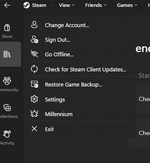
first install steambrew then from there go to the milenium option on steam here
also just unzip the folder i posted into
C:\Program Files (x86)\Steam\steamui\skins
add me on discord Il explain , zeroluck val .
first install steambrew then from there go to the milenium option on steam here
also just unzip the folder i posted into
C:\Program Files (x86)\Steam\steamui\skins
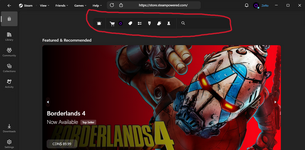
Be sure to install the official Millenium, it should be accessible within your Steam interface. Then extract the zip to C:\Program Files (x86)\Steam\steamui\skins\Fluenty or %your_steam_path%\steamui\skins\Fluenty. Make sure all files (skin.json and others) are directly under folder Fluenty. You may need to make those folders if ilt exist. The theme should be appeared on your Millenium Library Manager to enable. Restart.
This site uses cookies to help personalise content, tailor your experience and to keep you logged in if you register.
By continuing to use this site, you are consenting to our use of cookies.