Description
Poor DMA can be seen as an alternative to real DMA cards where you do not need custom firmware to bypass anti-cheats. It is important to mention that Poor DMA in its current state primarily relies on reading physical memory, though it can also be expanded to read virtual memory. For the purpose of reading memory and performing initial kernel address translation via CR3, Poor DMA abuses a Windows driver namedKslD.sys, which is a legitimate component of Windows Defender. Specifically, this driver is used for low-level diagnostic operations such as arbitrary reading of physical and virtual memory and DPC-based CPU register reads (including IDTR, GDTR, CR0, CR3, and CR4). These primitives allow for safe memory reading and seamless translation between virtual and physical addresses (and vice versa) making it essentially the perfect driver for our use case.While a purely physical read primitive would technically be sufficient, that approach would normally require scanning the Windows
LOW_STUB (the first 1MB of physical memory) to locate the initial kernel CR3 for EPROCESS translation. With raw kernel pointer dereferencing, reading through unmapped physical memory carries a constant risk of triggering a BSOD (PAGE_FAULT_IN_NONPAGED_AREA). However, because KslD.sys utilizes MmCopyMemory with the MM_COPY_MEMORY_PHYSICAL flag (via Sub-Command 0x0C), invalid or unpopulated physical addresses fail gracefully by returning an error status rather than bugchecking the system. This makes scanning physical memory including LOW_STUBmuch safer. Even so, our current approach of querying control registers directly via KslD.sys Sub-Command 0x02 remains the cleanest and most reliable method, completely avoiding brittle heuristics and hardcoded offsets that break across Windows updates. In the near future, I plan to expand Poor DMA to support additional BYOVD drivers. Because most public drivers only provide raw physical read primitives without a dedicated DPC register read to fetch CR3, future updates will introduce alternative bootstrap methods such as LOW_STUB scanning and Superfetch memory ranges (SystemSuperfetchInformation) to handle initial address translation for any kernel structure including EPROCESS across any driver.Here is full list of all IOCLT functions:
| Sub-Cmd | Virtual Address (Base 0x140000000) | RVA | Function Symbol | Functional Description |
|---|---|---|---|---|
| 0x00 | 0x14000553E | +0x553E | CCommand::Handle (inline) | Returns driver protocol version (0x0104 / 260). |
| 0x01 | 0x140005570 | +0x5570 | CCommand::kslIoctlGetPhysicalMemory | Maps \Device\PhysicalMemory into target process context via ZwMapViewOfSection and copies memory to buffer. |
| 0x02 | 0x140005830 / 0x140005F20 | +0x5830 / +0x5F20 | CCommand::kslIoctlGetCpuRegisters / CCommand::GET_IA32_REGISTERS_DPC | Dispatches DPC to read control registers (CR0, CR2, CR3, CR4), IDTR, GDTR, MSR 0x176, and RAM size. |
| 0x03 | 0x140006484 | +0x6484 | CCommandFile::kslIoctlReadFile | Direct kernel file read using asynchronous I/O request packets (IoBuildAsynchronousFsdRequest). |
| 0x04 | 0x1400062F0 | +0x62F0 | CCommandFile::kslIoctlFileSize | Queries file standard information and length via ZwQueryInformationFile. |
| 0x05 | 0x140006484 | +0x6484 | CCommandFile::kslIoctlReadFile (Mode 1) | Specialized kernel file read for pagefile paths (validated via isPagefile). |
| 0x06 | 0x1400062F0 | +0x62F0 | CCommandFile::kslIoctlFileSize (Mode 1) | Queries file length for pagefiles and locked system files. |
| 0x07 | 0x140005CB4 | +0x5CB4 | CCommand::kslIoctlGetRoutineAddr | Resolves kernel exported functions dynamically by string name using MmGetSystemRoutineAddress. |
| 0x08 | 0x140003E80 | +0x3E80 | CDeviceKsl::SetConnectionHelper | Opens process by PID via ZwOpenProcess and references EPROCESS object for subsequent mapping routines. |
| 0x09 | 0x14000664C | +0x664C | CCommandFile::kslIoctlFileRetrievalPointers | Retrieves disk cluster/LCN allocation map via ZwFsControlFile (FSCTL_GET_RETRIEVAL_POINTERS = 0x90073). |
| 0x0B | 0x140005426 | +0x5426 | CCommand::Handle (inline) | Queries connection readiness state and validity of the MmCopyMemory function pointer. |
| 0x0C | 0x140005DB8 | +0x5DB8 | CCommand::kslIoctlMmCopy | Wraps MmCopyMemory to transfer data across physical (flag 1) or virtual (flag 2) address spaces. |
| 0x0E | 0x1400079FC | +0x79FC | CCommandROM::kslIoctlIsFlashRomReadSupported | Verifies Intel LPC/eSPI controller configuration (Vendor ID 0x8086) for hardware flash read support. |
| 0x0F | 0x140007B60 | +0x7B60 | CCommandROM::kslIoctAcquireSpiBarPhysicalAddress | Reads PCI configuration space via port I/O (0xCF8/0xCFC) to obtain SPIBAR base physical address. |
| 0x10 | 0x140007F8C | +0x7F8C | CCommandROM::kslIoctlGetBiosFlashInfo | Maps SPIBAR MMIO registers via MmMapIoSpace and parses Intel BIOS flash descriptor regions. |
| 0x11 | 0x1400082B8 | +0x82B8 | CCommandROM::kslIoctlFlashRomRead | Executes hardware SPI read cycles via SpiSendSpiCycle on mapped SPI controller registers. |
| 0x12 | 0x140007CBC | +0x7CBC | CCommandROM::kslIoctlGetBiosFlashInfoForAmd | Reads AMD FCH PCI configuration space (Device 0x14, Function 3) to determine ROM decode range. |
| 0x13 | 0x1400081E0 | +0x81E0 | CCommandROM::kslIoctlFlashRomReadForAmd | Performs 4KB page-by-page physical memory reads via MmMapIoSpace over the mapped ROM window. |
Why is this such a powerful alternative to real DMA cards?
Firstly, this comes down to how kernel drivers are categorized by their trust level. As you may know, anti-cheats blacklist vulnerable drivers commonly abused for cheating, but they cannot do this indiscriminately for every driver out there.1. Low-Tier OEM Drivers:
If we were to use a vulnerable driver from some obscure company, we would receive a ban very quickly, both in terms of game bans and Microsoft blacklisting the certificate. This is because such drivers are rarely used, and why would an ordinary player be running a driver for a niche device they don't even have plugged into their machine? In that situation, it creates an obvious BYOVD (Bring Your Own Vulnerable Driver) signature. Combined with behavioral detection (like a sudden sharp increase in K/D) and multiple accounts sharing the exact same driver profile, anti-cheat developers can easily fingerprint and ban users while blacklisting the driver hash, in consequence even private cheats are being detectable.
2. Big-Tech Silicon Drivers (Intel, etc...):
Another tier of drivers comes from major tech giants other than Microsoft, such as Intel famous for shipping diagnostic drivers with exposed IOCTL functions. These drivers cannot be blacklisted easily because they are tied to real, legitimate hardware used by millions of everyday machines. If Windows were to blacklist them outright, countless legitimate network adapters and chipsets would stop working properly. A famous example of this is
You must be registered for see links
, which abuses an Intel network diagnostic driver via BYOVD under the name
You must be registered for see links
. It took years for Windows to finally block initial version of it. However, iqvw64e.sys also allows arbitrary kernel code execution, putting it on a completely different level of exploitation risk and giving security teams even more reason to eventually revoke it
You must be registered for see links
.3. First-Party Microsoft Drivers (KslD.sys):
Lastly, we have first-party Microsoft drivers, in our case
KslD.sys. Crucially, it does not provide arbitrary write or execute primitives, but only arbitrary read. In real-world cyberattacks, this read primitive can still be abused (for example, to dump cached credentials from lsasrv.dll inside the lsass.exe process, though that still requires administrator privileges).For our use case, we use it with a 2-PC DMA approach: we only read memory on the gaming PC where the game is running, while transferring all raw bytes over LAN to a secondary computer running the cheat. For visual overlays, you can use an hardware fuser, while for aimbot functionality you can use external hardware like a KMBox or Makcu (Makcu is preferred one, there is no emulation of device but pass-through, thus there is no need to spoof it!) to create a true DMA hybrid what I call Poor DMA. At the same time, this can also be run locally on a single machine as an external cheat, though running both on the same PC means your overlay window could be detected!
Microsoft's Security Boundary Reality
I would also like to clarify thatKslD.sys is a well-known and documented driver. The exact design philosophy behind it hasn't been publicly detailed by Microsoft, but since it can read anything on your system, Microsoft chose not to force it to run constantly. Instead, you can easily start, stop, and configure the driver service as you wish because there are no ObRegisterCallbacks or CmRegisterCallback routines preventing you from modifying its service parameters.You might ask: why would Microsoft expose such powerful IOCTLs in this driver in the first place? The answer is a fundamental, well-known principle of Windows security: to Microsoft, the boundary between Administrator and Kernel is not a security boundary. If you report a bug that allows an Administrator to talk to a driver or inspect kernel state, MSRC will give you nothing as bounty reward, because an Administrator is already assumed to hold full machine compromise.
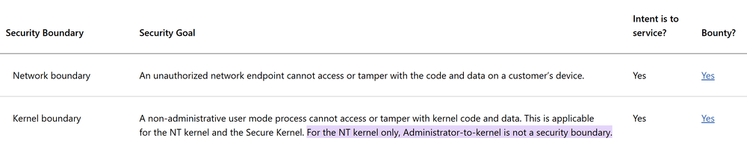
Because of this philosophy, Windows Defender was able to ship this driver. In a massive company like Microsoft, this wasn't the decision of one rogue engineer, rather it was reviewed and accepted by a dozen people who signed off on it. In other words, Microslop is just being Microslop... But on the bright side, this approach keeps our scene alive and creates jobs for kernel anti-cheat/EDR engineers and us cheaters. I'd call that a win-win situation.
Detection Vectors & Limitations
In summary, if you use this software as intended, reading strictly from a secondary PC and playing as legitimately as possible, there is very little chance of receiving a ban because the only driver running in Ring 0 is an official, signed Microsoft binary.However, there are still potential detection vectors to keep in mind:
- The
AllowedProcessNameRegistry Key: In order to open a handle to\\.\KslD, you have to add your executable's path toAllowedProcessNamein the registry. Anti-cheats could theoretically implement a hardcoded check on this key to see whether it points toMsMpEng.exeor an unknown third-party executable. - Open Handle Auditing: Anti-cheat drivers can walk the system handle table and flag an unsigned, non-PPL process holding an open handle to
\Device\KslD. Whether this happens depends on whether anti-cheat developers bother to push specific heuristics for it.
Screenshots:
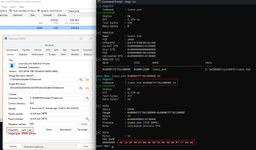
poor_dma_lan.exe reading MZ header of lsass.exe:
Explanation of Infrastructure:
Here is a breakdown of how the entire pipeline communicates between the two machines: [ GAMING PC (Target) ] [ RADAR / CHEAT PC ] ┌───────────────────────┐ ┌───────────────────────┐ │ Game.exe │ │ Cheat GUI / Radar │ │ │ │ │ ▲ │ │ [ Physical RAM ] │ │ │ │ │ ▲ │ │ poor_dma_client.exe │ │ │ MM_COPY │ └───────────┬───────────┘ │ KslD.sys │ │ │ ▲ │ TCP Socket │ │ │ IOCTL │ ◄─────────────────┘ │ poor_dma_server.exe │ (Port 39172) └───────────────────────┘Execution Flow:
- Driver Authorization & Handshake:
On startup,poor_dma_server.exedrops the signedKslD.sysintoSystem32\drivers\wd\, sets the service registry keyAllowedProcessNameto authorize its own NT binary path, and starts the service. This grants the server access to open a handle to\\.\KslDwithout triggering signature enforcement errors. - Control Register Bootstrap:
The server queriesKslD.sysSub-Command0x02(SUB_GET_CPU_REGISTERS), extracting the hardwareCR3and physical RAM bounds directly from CPU registers via kernel DPCs. This establishes the initial System PML4 root for page translations. - Network Discovery & Scatter Streaming:
The secondary machine runspoor_dma_client.exe, which automatically locates the server via UDP broadcast on port39171and establishes a persistent TCP stream on port39172. The client can send batched scatter-read requests to query hundreds of game pointers simultaneously in a single network round-trip. - Software 4-Level Page Walking:
When virtual memory is requested, the server walks the target's 4-level x64 paging structures (PML4 -> PDPT -> PD -> PT) cached in software. It translates target virtual addresses into raw physical offsets and fulfills reads usingKslD.sysphysical copies (DIR_PHYSICAL), returning pure raw bytes to the secondary machine. - Total Target PC Isolation:
Because all game logic parsing, entity lists, drawing loops, and overlays run exclusively on the secondary PC, the gaming PC remains completely clean: zero open handles to the game process, zero injected DLLs, and zero overlay windows, one of the most stealthy ways to read physical memory (in consequence cheat!!!).
Setup Guide:
IMPORTANT REQUIREMENTS & COMPATIBILITY:
1. Supported Windows Versions:
Poor DMA currently officially supports Windows 11 24H2 (Build 26100) and 25H2 (Build 26200). The server checks the OS build on startup and will actively halt execution on unsupported or older/newer Windows versions to prevent crashes caused by mismatchedEPROCESSoffset profiles.
2. Local Network (LAN):
Communication occurs strictly over your local network. Both machines must be on the exact same subnet / router, otherwise UDP broadcast discovery and TCP socket streaming will not connect.
- Host Machine (Gaming PC / Target):
Runpoor_dma_server.exeas Administrator.
(<Administrator elevation is required to manage the KslD service and registerAllowedProcessName>). - Secondary Machine (Radar / Cheat / Dumper PC):
Runpoor_dma_client.exe(or your custom reading tool / overlay).
The client will automatically broadcast on port39171, discover the server on your LAN, and begin streaming memory over TCP39172. - Done!
Your secondary machine is now reading the target system's memory without any cheat processes, overlays, or open handles existing on the gaming PC.
Usage:
1. Core Server & LAN Operationlan_server(<default / no arguments>)
Starts the headless TCP/UDP LAN server. Listens on TCP port39172(with UDP broadcast discovery on39171) to stream physical memory, translated virtual memory, and batched scatter-reads directly to your secondary machine over the local network.
lan_server system
Inspects the Windows kernel state viaKslD.sys. Dumps active CPUCR3, kernel DTB, total physical RAM size,ntoskrnl.exebase address, and the bootstrapPsInitialSystemProcessstructure.lan_server processes
Traversesntoskrnl!PsActiveProcessHeadand theActiveProcessLinksdouble-linked list to print all active processes, their PIDs,EPROCESSpointers, Kernel DTBs, and User DTBs (KVA Shadow).lan_server fixcr3 <name|pid:N>
Forces the standalone PFN scan (MmPfnDatabase) to recover the real PML4 / DTB for a protected process when anti-cheat CR3 shuffling wipes it fromEPROCESS, immediately verifying it against the target's loaded modules.
lan_server modules <name|pid:N>
TraversesPEB -> PEB_LDR_DATAusing the resolved process DTB to list all loaded.exeand.dllmodules, their virtual base addresses, and image sizes.lan_server <process>
Fast lookup to resolve and print only the main executable image base address (e.g.lan_server RustClient.exe).lan_server <process> <module>
Resolves and prints the base address of a specific loaded module inside the target process (e.g.lan_server RustClient.exe GameAssembly.dll).lan_server <process> all
Dumps the base addresses of all loaded modules for fast offset discovery.
lan_server read-process <name|pid:N> <va> [size](<or:lan_server <process> <va> [size]>)
Performs software 4-level x64 page-table walking against the target process's DTB to translate and read arbitrary user-mode virtual memory.lan_server read-kernel <va> [size](<or:lan_server <kernel-va> [size]>)
Reads raw Windows kernel virtual addresses directly viaKslD.sysand system CR3 translation.
Note on Memory Reading & CR3 Fix:
Poor DMA includes everything you need to easily read physical and translated virtual memory. For edge cases, it includes a dedicatedCR3fix that extracts theMmPfnDatabasebase address fromMmGetVirtualForPhysicaland scans physical page frames for the system's recursivePML4fingerprint to recover the true processDTBwhenever an anti-cheat scrambles or wipes it fromEPROCESS, rendering standard CR3 shuffling ineffective. Note that on newer Windows builds (starting from 24H2), in some games anti-cheats no longer utilize CR3 shuffling due to system instability issues, but this feature remains available as a fallback just in case, the implementation logic can be found in windows/dtb.rs.
Integration:
When it comes to reading memory viapoor_dma_client.exe, there are two primary workflows:- Standalone CLI Mode (No Coding Required)
You can use the client directly from the command line to inspect processes, dump module bases, and read raw virtual/kernel addresses. This is ideal for offset discovery, memory dumping, and quick analysis without needing to write or compile any custom code. - Direct Code Integration (Recommended for Real-Time Use)
For performance-critical applications like an ESP, radar, or aimbot overlay, integrating the client library directly into your project is strongly recommended. This gives you full access to low-latency streaming and batched scatter-reads over the TCP socket. Feel free to inspect the source code and adapt the LAN communication protocol into your own external or DMA cheat framework, source code is below on GitHub, on forum there are only BINs.
Disclaimer & Notes:
- Ban Risk:
I want to reiterate that there is always an inherent risk of being banned, even with a 2-PC setup. Nothing is truly "100% safe" forever, especially once techniques become public. - Accuracy & Experience Notice:
Please keep in mind that some of the information and technical observations shared here may be incomplete or inaccurate, as they are based strictly on my own hands-on experience, testing, and what others have shared with me. Do not take everything as 100% true and accurate. - Future Updates:
Expect future updates introducing support for additional vulnerable drivers, alternative memory translation methods, and expanded functionality, though updates will not be on a regular schedule! - Development & AI Assistance:
AI tooling was utilized during development, mainly for code refactoring, cleanup, and boilerplate generation. However, several core components had to be written manually due to automated AI refusals around BYOVD topics. The overall concept, architecture, and execution flow were designed by me. - Binaries & Source Code:
The forum attachment contains only pre-compiled binaries (poor_dma_server.exeandpoor_dma_client.exe). The full source code is open-source and hosted on GitHub at the link below. If you find this project useful, don't forget to drop a star on the repo, I'd really appreciate it!
You must be registered for see links
Current build 10.10.2026Compatible Projects:
Wardogs:Hello my people!
Today I would like to share one of my cheats that I vibe coded (there will be more ), at first I would like to clarify that this is DMA cheat, but it can be also used as External cheat if we were to use my technology that I called Poor DMA, everything what you need to know regarding this approach is located under this link:
While important things is that, there is no possibility to use write with Poor DMA, thus you can have...
Today I would like to share one of my cheats that I vibe coded (there will be more
), at first I would like to clarify that this is DMA cheat, but it can be also used as External cheat if we were to use my technology that I called Poor DMA, everything what you need to know regarding this approach is located under this link:While important things is that, there is no possibility to use write with Poor DMA, thus you can have...
- Plisskien
- Replies: 21
- Forum: DMA Cheats/Software

Hello again!
Today I'm release another DMA/Poor DMA cheat, but this time we are talking about Fortnite. But at first I would like to clarify that this is DMA cheat, but it can be also used as External cheat if we were to use my technology that I called Poor DMA on the same computer, but in such case there is risk of getting ban due to overlay on the game, everything what you need to know regarding this approach is located under this link, a lot of reading but worth it, thus below link is about Poor DMA, for people without DMA cards...
Today I'm release another DMA/Poor DMA cheat, but this time we are talking about Fortnite. But at first I would like to clarify that this is DMA cheat, but it can be also used as External cheat if we were to use my technology that I called Poor DMA on the same computer, but in such case there is risk of getting ban due to overlay on the game, everything what you need to know regarding this approach is located under this link, a lot of reading but worth it, thus below link is about Poor DMA, for people without DMA cards...
- Plisskien
- Replies: 28
- Forum: DMA Cheats/Software
Hello again!
Today, I'm releasing another DMA/Poor DMA cheat, but this time we're talking about Rust, I've spent the most time working on. It was actually the main game that got me interested in cheating in the first place, because of that there is very rich ESP with everything what you may ask for (This even includes the status of monument doors, showing whether they've been opened!) Thus, when it comes to overall quality, I'd say this is the best cheat in my series!
At first I would like to clarify that this is a DMA cheat, but it can be also used as an External cheat if we...
Today, I'm releasing another DMA/Poor DMA cheat, but this time we're talking about Rust, I've spent the most time working on. It was actually the main game that got me interested in cheating in the first place, because of that there is very rich ESP with everything what you may ask for (This even includes the status of monument doors, showing whether they've been opened!) Thus, when it comes to overall quality, I'd say this is the best cheat in my series!
At first I would like to clarify that this is a DMA cheat, but it can be also used as an External cheat if we...
- Plisskien
- Replies: 13
- Forum: DMA Cheats/Software
Password for .zip file is hvh.net
Last edited:

 +rep