Welcome to hackvshack.net Forum!
Download Free HvH CS2/CS:GO Cheats, CFG, LUA/JS Scripts, and More!
Register

Safe BlackBox DLL Injector 1.0.3 - Advanced Windows DLL Injector | 6 Injection Methods & Crash Triage | Open Source

ah, I see, in that case also which dll was that and game? So I'll try to recreate it, and I'll try to fix it in version 1.0.3
 
Last edited by a moderator:
I rmed dll file and linked it, so I'll test it on older win version and we will see, ty for report!
 
Last edited:
I tried it and it's perfect. It's a clean and working injector, and it's source and written in rust so what do you want more?
Ty a lot for feedback, but I guess there are a lot of bugs to fix, thus if you will find any feel free to report them here!
btw what is that cheat? Is it open source it looks sick to try it xd
In thread? It is ayyware from 2015 very old cheat, I had idea to fix it for cs2, but I abandoned this idea, and I removed src
 
Now it should be fixed in version 1.0.3, give it a try!
 
BlackBox DLL Injector 1.0.3
High-Performance Pure Rust DLL Loader with In-Memory Manual Mapping & Crash Triage
banner.webp
​
BlackBox Injector is a modern, lightweight Windows DLL injector engineered entirely in pure Rust with zero third-party dependencies. Built directly on top of native Win32 and undocumented NTAPI syscalls, it offers rock-solid stability on modern Windows 11 and Windows 10 systems across both native x64 and 32-bit (WOW64) architectures.

Supported Injection Methods
BlackBox gives you 6 different injection methods so you can always find the one that works best for your target:
  • Method 0: Standard (CreateRemoteThread)
    The classic, tried-and-true injection method. Simple, highly reliable, and works on almost all standard applications and DLLs.
  • Method 1: Native NT Loader (LdrLoadDll)
    Calls the low-level Windows loader directly inside ntdll.dll. It skips high-level kernel32 initialization, helping you bypass common user-mode API hooks.
  • Method 2: Manual Map (In-Memory PE Loader)
    Loads your DLL directly into target memory without registering it in the Windows module list. Unlike older manual mappers that crash complex DLLs, BlackBox fully handles:
    • Full C++ exception support (try / catch and SEH) so your DLL won't instantly crash when an exception is thrown.
    • Complete TLS support (both thread-local storage variables and TLS callbacks).
    • Proper section memory protections and automatic import resolution.
  • Method 3: Thread Hijacking
    Hijacks an existing, already-running thread inside the target process to load your DLL and immediately restores it. Creates zero new threads, avoiding detection from basic thread creation monitors.
  • Method 4: NtCreateThreadEx
    Uses direct native system calls to spawn an injection thread while applying the ThreadHideFromDebugger flag to keep it hidden from attached debuggers.
  • Method 5: Threadless APC (QueueUserAPC)
    Queues your DLL load onto an existing thread waiting in an alertable state. Completely threadless injection without spawning a single new thread.

Key Features & Compatibility
  • Instant Crash Diagnostics & Error Reports
    Tired of injectors closing silently or showing a useless "Injection Failed" error? If anything goes wrong or your game crashes, BlackBox immediately inspects the process, decodes the crash dump, and pops up a clear report telling you the exact reason (e.g. Access Violation 0xC0000005, missing DLL, or bad forwarder) with a 1-click Copy Report button for easy troubleshooting.
  • Automatic VC++ Dependency Detection
    Scans your DLL before injecting to check if you are missing required Visual C++ Redistributable runtimes (such as vcruntime140.dll or msvcp140.dll). Instead of letting your game crash silently, it tells you upfront exactly which runtime you need to install.
  • Windows 11 & Core Isolation Ready
    Old injectors built years ago regularly crash on modern systems. BlackBox is written from scratch in pure Rust with zero third-party dependencies, running smoothly on Windows 10 and modern Windows 11 even with Core Isolation / Memory Integrity (HVCI) turned on.
  • Full 64-bit (x64) and 32-bit (x86) Support
    Works seamlessly on both 64-bit and 32-bit (WOW64) applications. BlackBox automatically detects bitness mismatches so you never accidentally try to load a 32-bit DLL into a 64-bit process.
  • Built-In PE Cloaking & Scrambler
    Includes optional stealth options right in the UI: erase PE headers from memory (ErasePE), unlink modules from the active PEB list (HideModule), and scramble binary signatures before loading.

Showcase
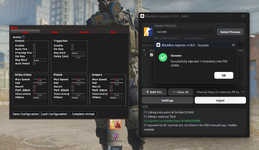
injection.webp

(Example: Injecting a 64-bit module (AyywareCS2.dll) into Counter-Strike 2 (cs2.exe) via Manual Map, successful injection YES MANUAL MAP IN BLACKBOX IS WORKING FOR CS2)
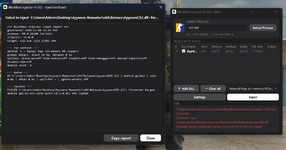
1793827463021.webp
(Example: Injecting a 64-bit module (AyywareCS2.dll) into Counter-Strike 2 (cs2.exe) generates an automated failure report via Manual Map because an API-set forwarder dependency (api-ms-win-core-synch-l1-2-0.dll) is not loaded in the remote process.)

Thread Scope & Support
This thread serves as the official release and discussion hub for BlackBox Injector:
  • Official Releases & Changelogs: All future version updates and latest pre-compiled standalone executables, will be posted directly here.
  • Troubleshooting & Help: If an injection fails or a target exits unexpectedly, hit "Copy report" on the BlackBox diagnostic popup and paste it into a reply. The report pinpointing missing DLLs, dependency forwarders, or access violations makes troubleshooting instant.
  • Feedback & Suggestions: Feel free to share feedback, feature requests, or compatibility reports with different DLL payloads.

Source Code & GitHub
What is covered on GitHub:
  • Full Source Code: Inspect the complete pure Rust codebase, review native Win32/NTAPI implementations, or audit the memory loaders yourself.
  • Issue Tracker & Reporting: Submit bug reports, request new features, or report compatibility issues with specific Windows builds.
BlackBox is 100% open-source with zero third-party dependencies. You can find the entire project hosted in one place here:

Changelog

1.0.3​

  • Fixed: drag-and-drop now works in the elevated build. The shell's WM_DROPFILES and WM_COPYGLOBALDATA messages are allowed through UIPI for the main window.
  • Fixed: Open File Location now selects the DLL in Explorer instead of opening Explorer's default folder. The /select argument is passed verbatim instead of being escaped by Rust's normal argument quoting.
  • Fixed: target cards and process-picker rows show nothing when no icon is available; the BlackBox logo, generic .exe icon and stale icon are no longer used as placeholders.
  • Fixed: a burst of manual-map progress lines no longer makes the UI lag. Log messages are coalesced into one repaint per burst, and only the visible log lines are wrapped and measured.

1.0.2​

  • Changed: manual-map static TLS now registers the mapped image directly with LdrpHandleTlsData; the loader-visible seed DLL fallback was removed. The internal function is resolved from the matching ntdll PDB, cached in %TEMP%\BlackBoxInjector\symbols.
  • Fixed: a target that is already gone, or a missing/undownloadable ntdll PDB, now uses the normal error dialog (E2003 TARGET_NOT_RUNNING / TLS-PDB-01) and no longer writes a failure report.

1.0.1​

  • Fixed: manual map static TLS now builds a real seed DLL sized exactly to the payload's TLS template. No fixed capacity, no unsafe manual thread-array fallback.
  • Fixed: Standard and NtCreateThreadEx capture the 64-bit HMODULE through a remote stub and verify the PE at that base. DLLs that unlink themselves no longer produce a false "not in the module list" error.
  • Fixed: crash reports map the WER exception code and fault offset correctly; the module timestamp is no longer shown as the exception code.
  • Fixed: --cli ... > log.txt and pipes keep the caller's standard handles.
  • Changed: one embedded TLS base seed instead of a size ladder; smaller binary and no 128 KB ceiling.
  • Added: the TLS seed source (seed/tls_seed.cpp) and rebuild script (seed/build.cmd), so the prebuilt base DLL is reproducible and auditable.

1.0.0​

  • Initial release: six injection methods, manual map with TLS and C++ exception support, cloaking, crash diagnostics, CLI.
Error code: TLS-PDB-01
Title: Symbols unavailable
Message: Static TLS needs the ntdll symbol file for this Windows build, but it is not cached and could not be downloaded.
Target name: cs2.exe
Target PID: 21628
Mode: Manual Map (in-memory PE loader)
Items in list: 2, checked: 1
Backend message: TLS-PDB-01: static TLS registration requires ntdll symbols: dbghelp could not resolve ntdll!LdrpHandleTlsData (PDB missing or mismatched; cache C:\Users\shado\AppData\Local\Temp\BlackBoxInjector\symbols). Connect to the internet (Microsoft symbol server) or place the matching ntdll.pdb in the BlackBox symbol cache, then retry
Time: 2026-11-17 16:26:38 UTC
Application version: 1.0.3
 
Error code: TLS-PDB-01
Title: Symbols unavailable
Message: Static TLS needs the ntdll symbol file for this Windows build, but it is not cached and could not be downloaded.
Target name: cs2.exe
Target PID: 21628
Mode: Manual Map (in-memory PE loader)
Items in list: 2, checked: 1
Backend message: TLS-PDB-01: static TLS registration requires ntdll symbols: dbghelp could not resolve ntdll!LdrpHandleTlsData (PDB missing or mismatched; cache C:\Users\shado\AppData\Local\Temp\BlackBoxInjector\symbols). Connect to the internet (Microsoft symbol server) or place the matching ntdll.pdb in the BlackBox symbol cache, then retry
Time: 2026-11-17 16:26:38 UTC
Application version: 1.0.3
This is not injector issue, rather you can't connect to Microsoft server to download PDB file that is necessary for manual map injection, in that case just try again, and if you still can't do it, then something is blocking access to server
 
BlackBox DLL Injector 1.0.3
High-Performance Pure Rust DLL Loader with In-Memory Manual Mapping & Crash Triage
banner.webp
​
BlackBox Injector is a modern, lightweight Windows DLL injector engineered entirely in pure Rust with zero third-party dependencies. Built directly on top of native Win32 and undocumented NTAPI syscalls, it offers rock-solid stability on modern Windows 11 and Windows 10 systems across both native x64 and 32-bit (WOW64) architectures.

Supported Injection Methods
BlackBox gives you 6 different injection methods so you can always find the one that works best for your target:
  • Method 0: Standard (CreateRemoteThread)
    The classic, tried-and-true injection method. Simple, highly reliable, and works on almost all standard applications and DLLs.
  • Method 1: Native NT Loader (LdrLoadDll)
    Calls the low-level Windows loader directly inside ntdll.dll. It skips high-level kernel32 initialization, helping you bypass common user-mode API hooks.
  • Method 2: Manual Map (In-Memory PE Loader)
    Loads your DLL directly into target memory without registering it in the Windows module list. Unlike older manual mappers that crash complex DLLs, BlackBox fully handles:
    • Full C++ exception support (try / catch and SEH) so your DLL won't instantly crash when an exception is thrown.
    • Complete TLS support (both thread-local storage variables and TLS callbacks).
    • Proper section memory protections and automatic import resolution.
  • Method 3: Thread Hijacking
    Hijacks an existing, already-running thread inside the target process to load your DLL and immediately restores it. Creates zero new threads, avoiding detection from basic thread creation monitors.
  • Method 4: NtCreateThreadEx
    Uses direct native system calls to spawn an injection thread while applying the ThreadHideFromDebugger flag to keep it hidden from attached debuggers.
  • Method 5: Threadless APC (QueueUserAPC)
    Queues your DLL load onto an existing thread waiting in an alertable state. Completely threadless injection without spawning a single new thread.

Key Features & Compatibility
  • Instant Crash Diagnostics & Error Reports
    Tired of injectors closing silently or showing a useless "Injection Failed" error? If anything goes wrong or your game crashes, BlackBox immediately inspects the process, decodes the crash dump, and pops up a clear report telling you the exact reason (e.g. Access Violation 0xC0000005, missing DLL, or bad forwarder) with a 1-click Copy Report button for easy troubleshooting.
  • Automatic VC++ Dependency Detection
    Scans your DLL before injecting to check if you are missing required Visual C++ Redistributable runtimes (such as vcruntime140.dll or msvcp140.dll). Instead of letting your game crash silently, it tells you upfront exactly which runtime you need to install.
  • Windows 11 & Core Isolation Ready
    Old injectors built years ago regularly crash on modern systems. BlackBox is written from scratch in pure Rust with zero third-party dependencies, running smoothly on Windows 10 and modern Windows 11 even with Core Isolation / Memory Integrity (HVCI) turned on.
  • Full 64-bit (x64) and 32-bit (x86) Support
    Works seamlessly on both 64-bit and 32-bit (WOW64) applications. BlackBox automatically detects bitness mismatches so you never accidentally try to load a 32-bit DLL into a 64-bit process.
  • Built-In PE Cloaking & Scrambler
    Includes optional stealth options right in the UI: erase PE headers from memory (ErasePE), unlink modules from the active PEB list (HideModule), and scramble binary signatures before loading.

Showcase
injection.webp

(Example: Injecting a 64-bit module (AyywareCS2.dll) into Counter-Strike 2 (cs2.exe) via Manual Map, successful injection YES MANUAL MAP IN BLACKBOX IS WORKING FOR CS2)

1793827463021.webp
(Example: Injecting a 64-bit module (AyywareCS2.dll) into Counter-Strike 2 (cs2.exe) generates an automated failure report via Manual Map because an API-set forwarder dependency (api-ms-win-core-synch-l1-2-0.dll) is not loaded in the remote process.)

Thread Scope & Support
This thread serves as the official release and discussion hub for BlackBox Injector:
  • Official Releases & Changelogs: All future version updates and latest pre-compiled standalone executables, will be posted directly here.
  • Troubleshooting & Help: If an injection fails or a target exits unexpectedly, hit "Copy report" on the BlackBox diagnostic popup and paste it into a reply. The report pinpointing missing DLLs, dependency forwarders, or access violations makes troubleshooting instant.
  • Feedback & Suggestions: Feel free to share feedback, feature requests, or compatibility reports with different DLL payloads.

Source Code & GitHub
What is covered on GitHub:
  • Full Source Code: Inspect the complete pure Rust codebase, review native Win32/NTAPI implementations, or audit the memory loaders yourself.
  • Issue Tracker & Reporting: Submit bug reports, request new features, or report compatibility issues with specific Windows builds.
BlackBox is 100% open-source with zero third-party dependencies. You can find the entire project hosted in one place here:

Changelog

1.0.3​

  • Fixed: drag-and-drop now works in the elevated build. The shell's WM_DROPFILES and WM_COPYGLOBALDATA messages are allowed through UIPI for the main window.
  • Fixed: Open File Location now selects the DLL in Explorer instead of opening Explorer's default folder. The /select argument is passed verbatim instead of being escaped by Rust's normal argument quoting.
  • Fixed: target cards and process-picker rows show nothing when no icon is available; the BlackBox logo, generic .exe icon and stale icon are no longer used as placeholders.
  • Fixed: a burst of manual-map progress lines no longer makes the UI lag. Log messages are coalesced into one repaint per burst, and only the visible log lines are wrapped and measured.

1.0.2​

  • Changed: manual-map static TLS now registers the mapped image directly with LdrpHandleTlsData; the loader-visible seed DLL fallback was removed. The internal function is resolved from the matching ntdll PDB, cached in %TEMP%\BlackBoxInjector\symbols.
  • Fixed: a target that is already gone, or a missing/undownloadable ntdll PDB, now uses the normal error dialog (E2003 TARGET_NOT_RUNNING / TLS-PDB-01) and no longer writes a failure report.

1.0.1​

  • Fixed: manual map static TLS now builds a real seed DLL sized exactly to the payload's TLS template. No fixed capacity, no unsafe manual thread-array fallback.
  • Fixed: Standard and NtCreateThreadEx capture the 64-bit HMODULE through a remote stub and verify the PE at that base. DLLs that unlink themselves no longer produce a false "not in the module list" error.
  • Fixed: crash reports map the WER exception code and fault offset correctly; the module timestamp is no longer shown as the exception code.
  • Fixed: --cli ... > log.txt and pipes keep the caller's standard handles.
  • Changed: one embedded TLS base seed instead of a size ladder; smaller binary and no 128 KB ceiling.
  • Added: the TLS seed source (seed/tls_seed.cpp) and rebuild script (seed/build.cmd), so the prebuilt base DLL is reproducible and auditable.

1.0.0​

  • Initial release: six injection methods, manual map with TLS and C++ exception support, cloaking, crash diagnostics, CLI.
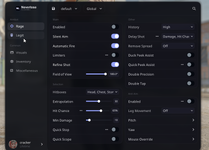
yo GOAT can i get the folder for the .dll ayyware or sum i cant find it anywhere i would really appreciated it
 
i need the dll file that you have it gives me a error if you can i would appreciate it i need the ayyware one
This ayyware was used just for testing, look at this injector there is info that dll is x32 while you named it as x64, and target process is CS2. You can't inject x32 dll to x64 process!!! also from where you have that dll, if you look for cs2 cheats visit this subforum:
 
This ayyware was used just for testing, look at this injector there is info that dll is x32 while you named it as x64, and target process is CS2. You can't inject x32 dll to x64 process!!! also from where you have that dll, if you look for cs2 cheats visit this subforum:
i didnt name it x64 when i downloaded it it came just like that and im confused asf i might just leave it im kind of dumb
 
Last edited: