Welcome to hackvshack.net Forum!
Download Free HvH CS2/CS:GO Cheats, CFG, LUA/JS Scripts, and More!
Register

Tutorial How to play Legacy CS:GO after Steam Update (21.12.2025)

imi-tat0r

Community Contributor
User ID:
70453
Messages:
21
Reactions:
31
Badges:
10
REP:
−0/11+
Level:
112
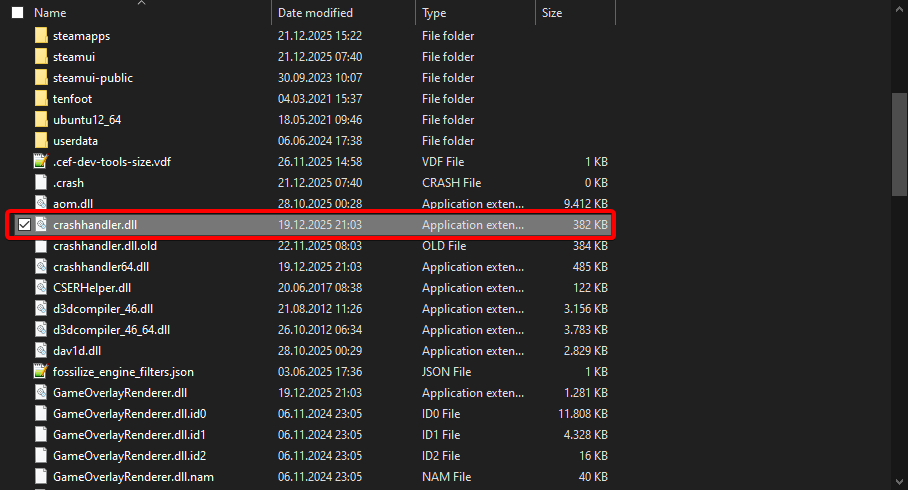
1. Go to your Steam folder - Default Location: C:\Program Files (x86)\Steam\
2. Rename or delete crashhandler.dll

yrsJ9d.png
 
u can use a fixed video.dll in csgo and u wont get issue
thats not like a full-fix, if u use that (video.dll) u cant use migi and a cheat at the same time. tested by me and some friends.
another solution that work for us is renaming the folder "videos" at "csgo/panorama", then u open the console do idk some map de_mirage for example and then disconnect and thats it.
 
thats not like a full-fix, if u use that (video.dll) u cant use migi and a cheat at the same time. tested by me and some friends.
another solution that work for us is renaming the folder "videos" at "csgo/panorama", then u open the console do idk some map de_mirage for example and then disconnect and thats it.
wtf is migi XD
 

Who has read this thread (Total: 0) in last 1 hours View details