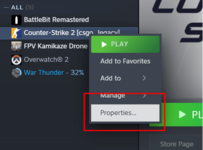
1. In Steam, go to Library, then press left button mouse on game e.g. cs2, and click on "Properties..."
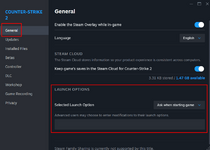
2. Then go to the "General" and look for "LAUNCH OPTIONS"
3. In the text box provide launch option e.g...
"-insecure" will disable VAC anti-cheat, but then you can't connect to VAC secured servers.
"-allow_third_party_software" will allow to use standard injection to inject unsigned DLLs files to game.
Also we can connect these arguments, by adding extra space between arguments e.g. "-insecure -allow_third_party_software"
Here game will be...
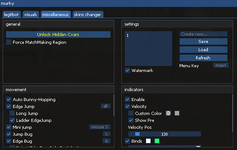
2. inject .dll file with standard injection to cs2.exe, with any working injector
3. open menu with key: INS
3. have fun!
1. In Steam, go to Library, then press left button mouse on game e.g. cs2, and click on "Properties..."
2. Then go to the "General" and look for "LAUNCH OPTIONS"
3. In the text box provide launch option e.g...
"-insecure" will disable VAC anti-cheat, but then you can't connect to VAC secured servers.
"-allow_third_party_software" will allow to use standard injection to inject unsigned DLLs files to game.
Also we can connect these arguments, by adding extra space between arguments e.g. "-insecure -allow_third_party_software"
Here game will be...
2. inject .dll file with standard injection to cs2.exe, with any working injector
3. open menu with key: INS
3. have fun!
using this on xplay and cybershoke as well as the new rush mode (vac isnt up for that) so far its good no admins have detected me and for rush in cs2 has been great. only issue is after like an hour of being in the same server on either xplay or cybershoke it crashes saying game particle: too many server commands. (something along those lines) but overall very nice.
This site uses cookies to help personalise content, tailor your experience and to keep you logged in if you register.
By continuing to use this site, you are consenting to our use of cookies.