
Virtual machine
If we suspect that the user is in a virtual machine, we have several guidelines that can be used to confirm thisRequired actions:
1)
WIN+R2) Type
Msinfo323) We will see the section:
System Model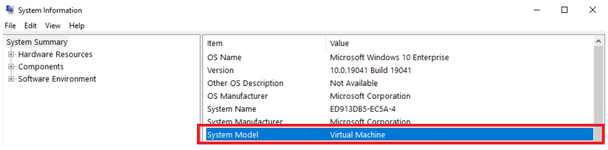
Indexed Locations
Indexed Locations are logs of changes and accesses to application files.We need to verify this in the Indexing Options to ensure the "Users" folder is selected. [Otherwise, indexed locations will not work in such folders].
1) Press
WIN+R2) Specify this path:
C:\Users\%username%\Searches\Indexed Locations.search-msUsageLogs
C# Application logs are generated when an application is closed.Windows has 4 usage log paths; I listed them below:
C:\Users\%username%\AppData\Local\Microsoft\CLR_v4.0\UsageLogs\ [64 BIT]C:\Users\%username%\AppData\Local\Microsoft\CLR_v4.0_32\UsageLogs\ [32 BIT]C:\WINDOWS\system32\config\systemprofile\AppData\Local\Microsoft\CLR_v4.0\UsageLogs\ [64 BIT]C:\WINDOWS\SysWOW64\config\systemprofile\AppData\Local\Microsoft\CLR_v4.0_32\UsageLogs\ [32 BIT]1) Press Win+R
2) Type:
C:\Users\%username%\AppData\Local\Microsoft and press EnterPrefetch
Prefetch is the preloading of applications for faster launch.This journal will contain loaded files that serve as traces of launches for various files.
1)
Press Win+R2)
Type Prefetch3)
Sort by 'Date Modified' for convenienceTemp
A path that allows us to see application temporary files.1)
Press Windows + R, type %temp%, and press Enter2)
We will search for filters such as: JNativeHook - Rar$ex - 7z7z = unpacked 7Zip archive
Rar$ex = Extracted archive created from WinRAR.
JNativeHook = autoclient remnant with JNA [Java] library
History
This will show recent applications or files.Warning - this may cause the Explorer.exe process to terminate unexpectedly, it is recommended not to use it.
1) Press Windows + R, type:
C:\Users\%USERNAME%\AppData\Local\Microsoft\Windows\History2) Select a date to analyze.
Recent
A path that will display recently used/modified items.1) Press
Windows + R, type Shell:recent2) Analyze the results.
CrashDumps
A Windows path responsible for storing dumps in case of an application crash.1) Press
Windows + R, type C:\Users%username%\AppData\Local\CrashDumpsAppwiz
A Control Panel section that allows us to view applications installed on our Windows.1) Press
Windows+R, type appwiz.cpl, and press Enter.2) Analyze the results.
Appsfolder
Another Control Panel section that allows us to view applications installed on our Windows.1. Press
Win+R2. Type
shell:appsfoldergpedit
gpedit.msc is the Local Group Policy Editor in Windows.It allows for fine-grained system configuration without editing the registry or using third-party programs.
Users can utilize it to restrict access to the Task Manager, Command Prompt, etc.
firewall.cpl
firewall.cpl is the classic Windows Firewall Control Panel.It allows for instant network protection management without searching through menus.
This panel can also help detect some rage clients like Nursultan, Celestial.
1) Press
Win+R2) Type
firewall.cpl and press Enter3) Click
Advanced settings4) Select
Inbound RulesControl folders
The path we can use to change folder settings, add and remove permissions, and it will be useful to view hidden elements.1) Press
Windows + R, then type Control folders and press Enter.2) Activate the option
Show hidden files, folders, and drives.3) Uncheck the option
Hide protected operating system files (recommended).4) Click
Apply.JavaLauncher.log
TheJavaLauncher.log file records instances of Java application launches.For quick access to this file, use the Win + R shortcut, then enter the path:
%LOCALAPPDATA%\Temp\JavaLauncher.log
Last edited by a moderator:


