
- OS Requirements
- Windows 10 / Windows 11 x64
- Hardware Requirements
- Intel / AMD 64-bit CPU; USB flash drive required. Windows reinstallation is not required.
- Type of Software
- External
PUSSYCAT — ARMA REFORGER CHEAT
VECTOR AIMBOT • PLAYER ESP • BOT ESP • ITEM ESP • MAP ESP • NOCLIP
ADVANCED AIMBOT & ESP SOFTWARE FOR ARMA REFORGER
PussyCAT for Arma Reforger is a multifunctional software solution combining Vector Aimbot, detailed Player ESP, Bot ESP, vehicle tracking, inventory visualization, weapon and equipment ESP, Map ESP and additional gameplay features.
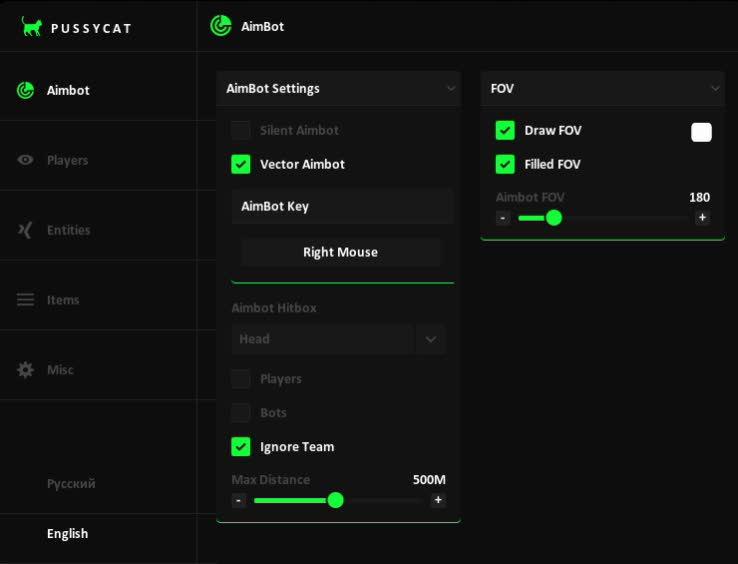
The software provides configurable targeting for players and bots, including individual hitbox selection, FOV customization, team filtering and maximum targeting distance.
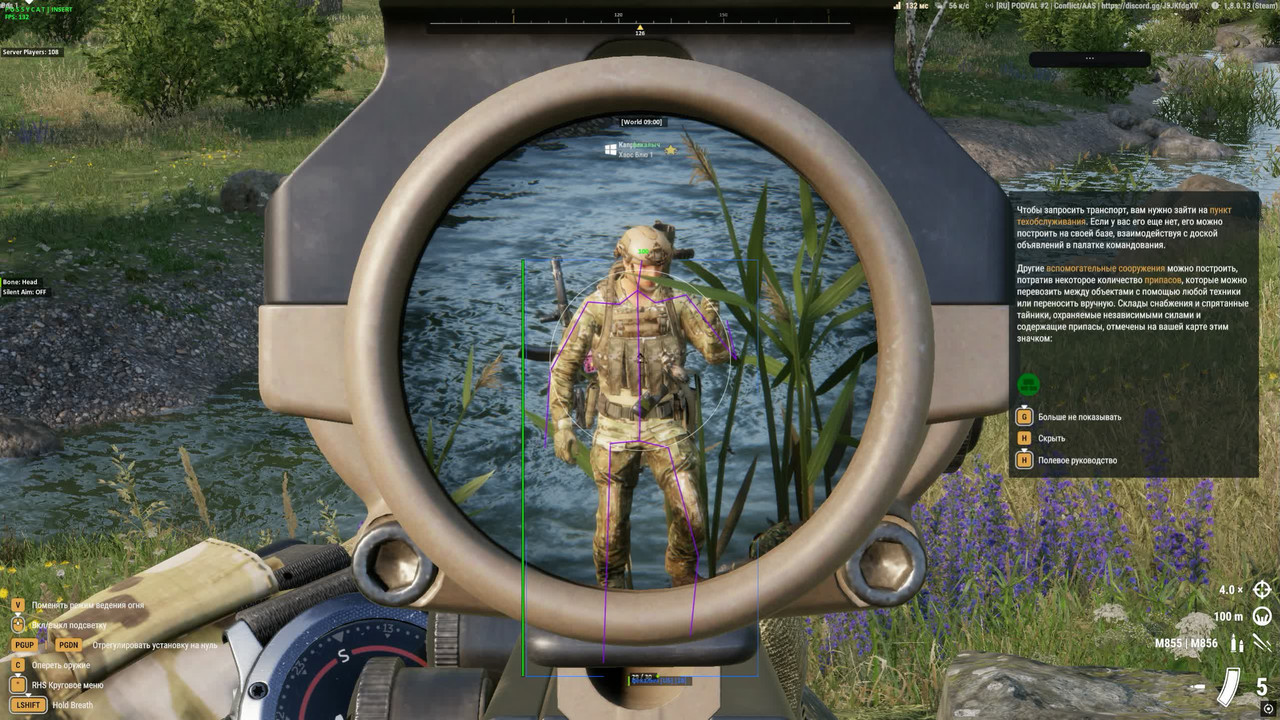
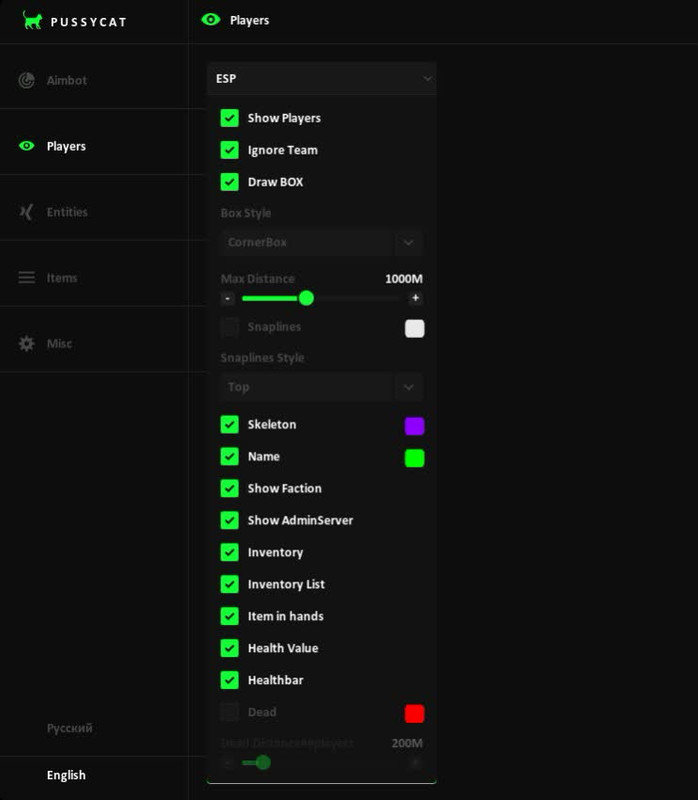
Player ESP displays character information, including skeletons, names, factions, inventory contents, equipped items, health and server administrator indicators.
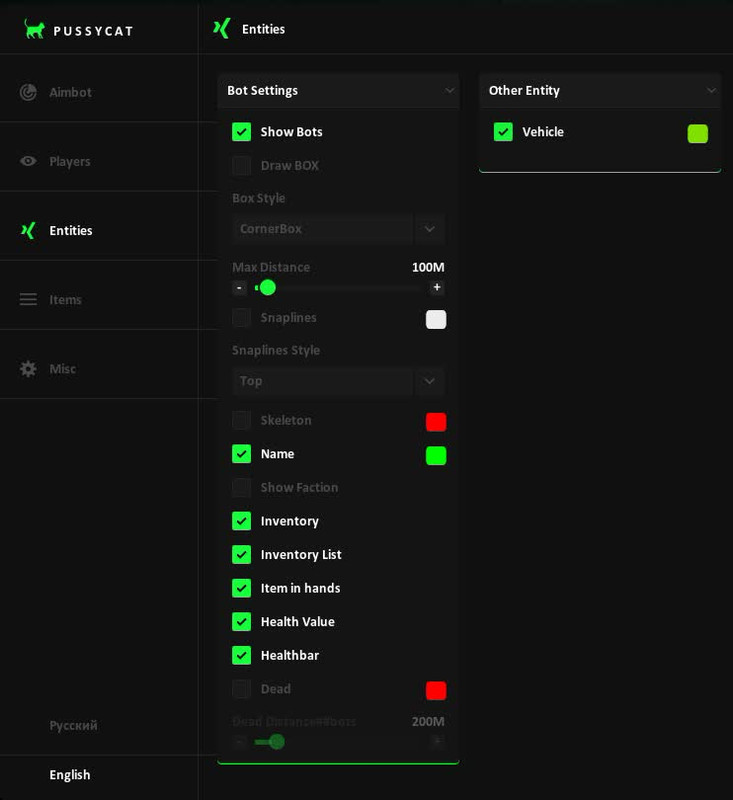
Bot ESP provides a separate visualization system with its own configurable settings, including boxes, skeletons, snaplines, inventory information and health indicators.
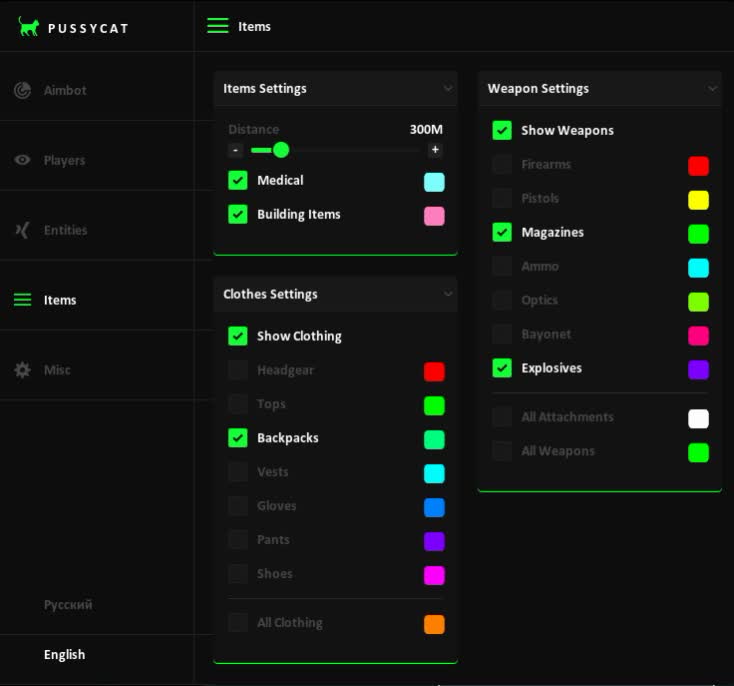
Item ESP includes medical supplies, building materials, clothing, backpacks, vests, firearms, ammunition, optics, explosives and weapon attachments.
Additional functionality includes No Recoil, No Sway, Infinite Stamina, ESP On Map, additional HUD elements, customizable Crosshair and experimental Noclip.
VECTOR TARGETING • INVENTORY ESP • WEAPON TRACKING • MAP VISUALS • INFINITE STAMINA
STARTING FROM ~€3.34 / 300 RUB
INSTANT DELIVERY • SETUP GUIDE • CUSTOMER SUPPORT
➜ BUY PUSSYCAT FOR ARMA REFORGER
━━━━━━━━━━━━━━━━━━━━━━━━━━━━
MAIN FEATURES
- Vector Aimbot — Configurable targeting with hitbox selection, Players / Bots filters and maximum distance.
- Customizable Aimbot FOV — Adjustable targeting area with Draw FOV, Filled FOV and color settings.
- Player ESP — Boxes, skeletons, snaplines, names, factions, health and equipped items.
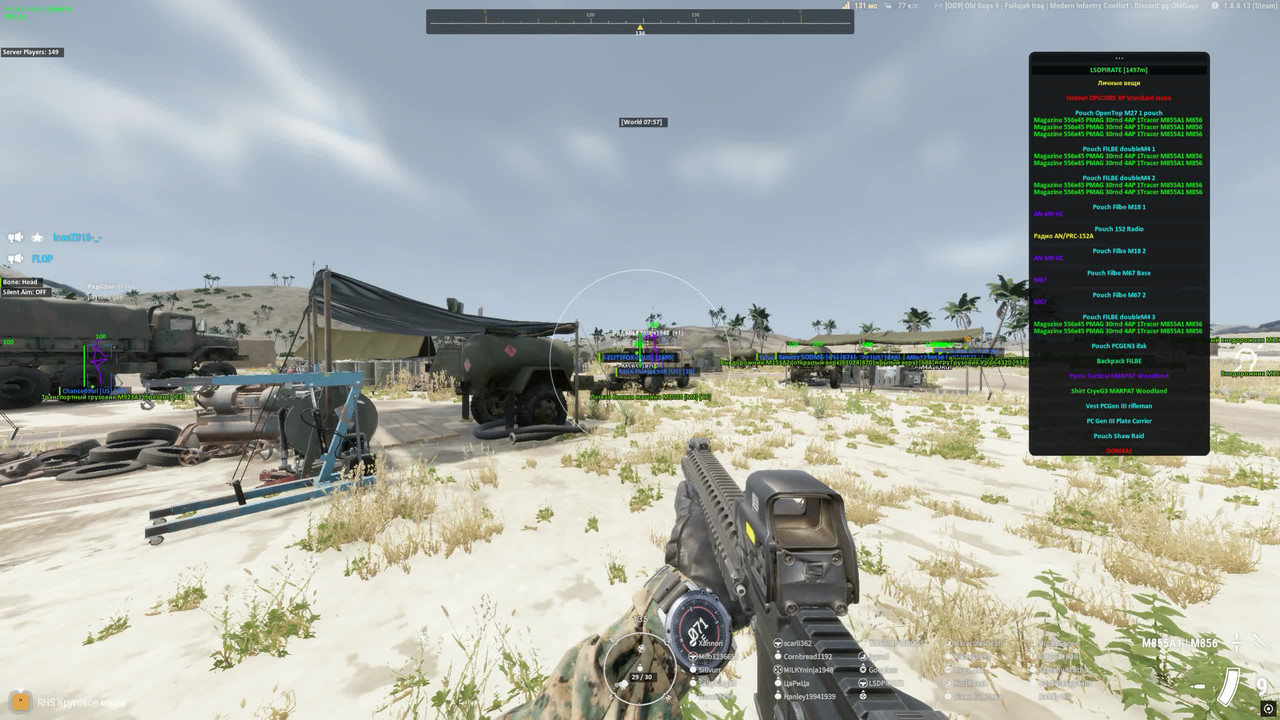
- Inventory ESP — Display supported player inventory information and item lists.
- Server Information — Available faction and server administrator indicators.
- Bot ESP — Separate visualization of bots with names, skeletons, inventory, health and faction information.
- Vehicle ESP — Display supported vehicles in the game world.
- Item ESP — Medical supplies and building-related items with configurable display distance.
- Clothing ESP — Headgear, Tops, Backpacks, Vests, Gloves, Pants and Shoes.
- Weapon ESP — Firearms, Pistols, Magazines, Ammo, Optics, Bayonets and Explosives.
- Weapon Attachments — Additional visualization of supported weapon attachments.
- No Recoil — Available weapon recoil removal functionality.
- No Sway — Supported weapon sway removal.
- Infinite Stamina — Additional stamina-related gameplay functionality.
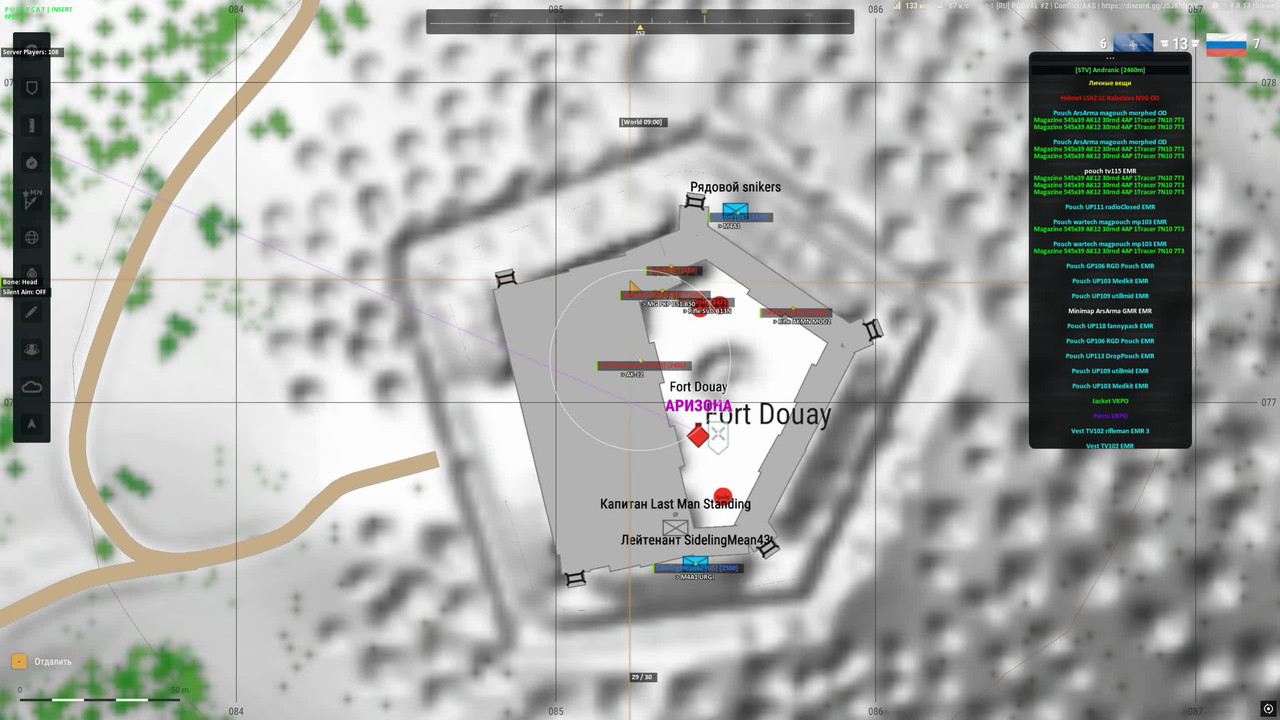
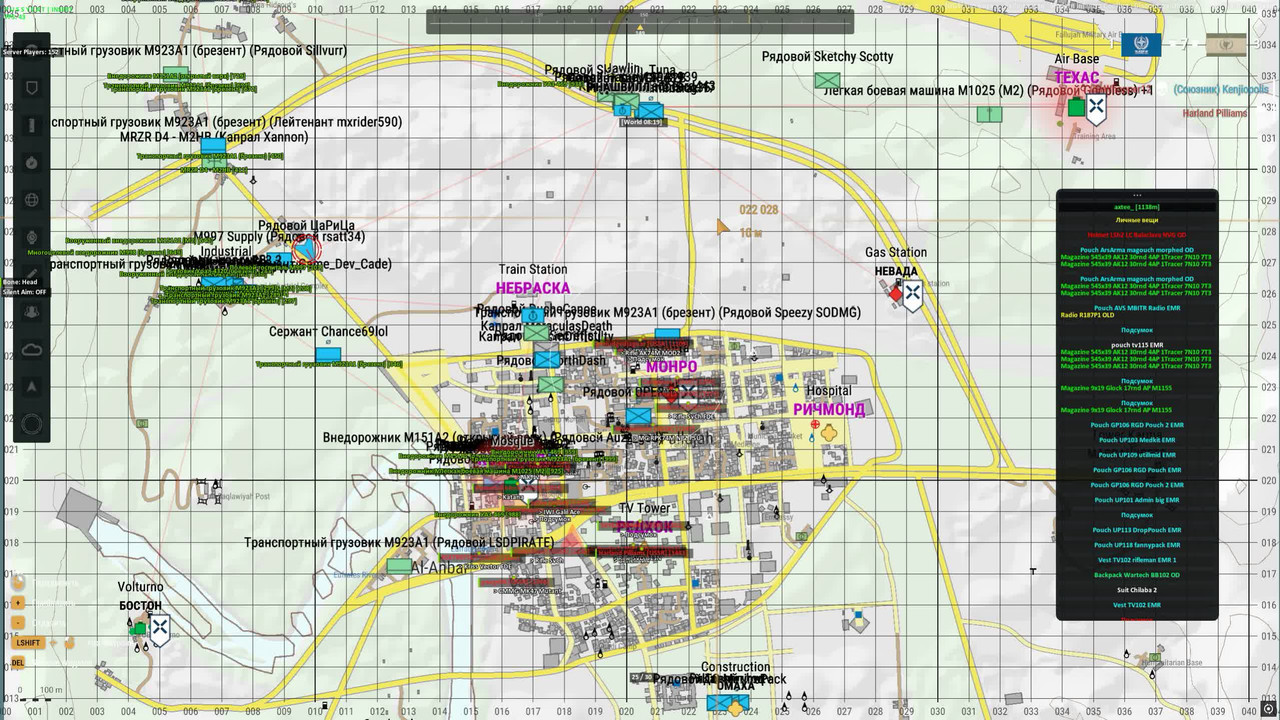
- Map ESP — Display compatible ESP information and map points directly on the game map.
- Additional HUD — Compass, Crosshair, Ammo HUD, HP HUD and player count.
- Experimental Noclip — Free-movement feature with configurable hotkey and speed, marked NOT STABLE.
- Configuration Management — Save and load settings, customize the menu key and configure overlay FPS.
━━━━━━━━━━━━━━━━━━━━━━━━━━━━
DETAILED FEATURE OVERVIEW
━━━━━━━━━━━━━━━━━━━━━━━━━━━━
SCREENSHOTS
━━━━━━━━━━━━━━━━━━━━━━━━━━━━
SYSTEM REQUIREMENTS & COMPATIBILITY
DETAILED FEATURE OVERVIEW
VECTOR AIMBOT — AUTOMATIC AIMING
Vector Aimbot — Enable the available vector-based targeting system.
Aimbot Key — Configure the activation hotkey.
Aimbot Hitbox — Select the preferred target body region.
Players — Enable player targeting.
Bots — Enable bot targeting.
Ignore Team — Exclude supported teammates.
Max Distance — Configure the maximum targeting distance.
VECTOR AIMBOT OVERVIEW
PussyCAT includes Vector Aimbot for Arma Reforger.
The targeting system supports both players and bots.
Players and Bots options allow the supported target categories to be selected separately.
Aimbot Hitbox provides control over the preferred targeting region.
Ignore Team can exclude compatible friendly characters.
Maximum Distance limits the targeting range.
Aimbot Key allows the system to be activated using the configured hotkey.
AIMBOT FOV — TARGETING AREA
Draw FOV — Display the targeting field of view.
Filled FOV — Enable filled targeting area visualization.
Aimbot FOV — Adjust the size of the active targeting area.
FOV Color — Customize the targeting indicator color.
FOV CUSTOMIZATION
The FOV system provides individual customization of the supported Aimbot targeting area.
Draw FOV displays the configured aiming region.
Filled FOV provides an alternative filled visualization style.
Aimbot FOV controls the active target acquisition area.
FOV Color adjusts the appearance of the corresponding visual indicator.
PLAYER ESP — CHARACTER VISUALIZATION
Show Players — Enable supported player visualization.
Ignore Team — Exclude compatible friendly characters.
Draw BOX — Display bounding boxes around players.
Box Style — Choose the available box appearance.
Max Distance — Configure the visualization range.
Snaplines — Draw directional lines to supported players.
Snaplines Style — Customize line appearance.
Skeleton — Display character skeleton structures.
Name — Show player names.
Show Faction — Display faction information.
Show AdminServer — Display available server administrator information.
Inventory — Enable inventory-related information.
Inventory List — Display supported inventory contents.
Item in Hands — Show equipped items or weapons.
Health Value — Display numerical health information.
Healthbar — Show player health bars.
Dead — Display supported dead characters.
PLAYER ESP OVERVIEW
Player ESP provides additional visual information about supported characters in Arma Reforger.
Box ESP highlights player positions with customizable bounding boxes.
Skeleton displays the available character bone structure.
Snaplines provide directional references.
Name and Show Faction supply identification information.
Inventory and Inventory List display supported player equipment contents.
Item in Hands shows the available currently equipped item or weapon.
Health Value and Healthbar provide information about character health.
Show AdminServer displays available server administrator information when supported.
Dead allows compatible dead characters to be displayed.
BOT ESP — AI CHARACTER VISUALIZATION
Show Bots — Enable supported bot visualization.
Draw BOX — Display boxes around bots.
Box Style — Configure the bot box appearance.
Max Distance — Set the maximum Bot ESP range.
Snaplines — Draw lines to supported bots.
Snaplines Style — Customize the line style.
Skeleton — Display bot skeleton structures.
Name — Show bot names.
Show Faction — Display supported faction information.
Inventory — Enable bot inventory visualization.
Inventory List — Show supported inventory contents.
Item in Hands — Display currently equipped bot items.
Health Value — Show numerical health information.
Healthbar — Display health bars.
Dead — Display supported dead bot entities.
BOT ESP OVERVIEW
Bot ESP provides a separate visualization system for supported AI-controlled characters.
The software allows boxes, skeletons, snaplines and names to be configured for bots independently.
Show Faction provides available faction information.
Inventory and Inventory List display supported equipment details.
Item in Hands identifies compatible equipped objects.
Health Value and Healthbar supply character health information.
The maximum visualization distance can be adjusted separately.
VEHICLE ESP — TRANSPORT VISUALIZATION
Vehicle — Enable visualization of supported vehicles.
VEHICLE ESP OVERVIEW
PussyCAT includes a dedicated option for displaying supported vehicle objects in Arma Reforger.
Vehicle visualization is included in the available entity-related features.
Additional vehicle-specific parameters are not detailed in the supplied feature list.
ITEM ESP — MEDICAL & BUILDING ITEMS
Distance — Configure the maximum item visualization range.
Medical — Display supported medical items.
Building Items — Show compatible building materials and objects.
ITEM ESP OVERVIEW
Item ESP provides additional visualization of supported objects and equipment.
Medical highlights compatible medical supplies.
Building Items displays supported construction-related materials.
The Distance setting controls the available item visualization range.
CLOTHING ESP — EQUIPMENT TRACKING
Show Clothing — Enable clothing visualization.
Headgear — Display supported headgear.
Tops — Show upper-body clothing.
Backpacks — Display backpacks.
Vests — Show tactical vests and load-bearing equipment.
Gloves — Display gloves.
Pants — Show trousers.
Shoes — Display footwear.
All Clothing — Enable all supported clothing categories.
CLOTHING VISUALIZATION OVERVIEW
PussyCAT includes separate ESP filters for different clothing and equipment categories.
Headgear and Tops display compatible head and upper-body equipment.
Backpacks and Vests provide visualization of supported carrying equipment.
Gloves, Pants and Shoes cover additional clothing categories.
All Clothing allows the available supported clothing groups to be displayed together.
WEAPON ESP — FIREARMS & AMMUNITION
Show Weapons — Enable weapon visualization.
Firearms — Display supported firearms.
Pistols — Show compatible handguns.
Magazines — Display weapon magazines.
Ammo — Show supported ammunition.
Optics — Display optical sights.
Bayonet — Show supported bayonets.
Explosives — Display compatible explosive objects.
All Attachments — Enable supported weapon attachment categories.
All Weapons — Display all compatible weapon groups.
WEAPON ESP OVERVIEW
Weapon ESP provides visualization of supported firearms and associated equipment.
Firearms and Pistols identify compatible weapon categories.
Magazines and Ammo highlight supported ammunition-related objects.
Optics adds visualization of available weapon sights.
Bayonet and Explosives provide additional equipment categories.
All Attachments enables supported weapon attachments.
All Weapons allows compatible weapon types to be displayed together.
WEAPON FEATURES — RECOIL & SWAY
No Recoil — Enable the available weapon recoil removal functionality.
No Sway — Disable supported weapon sway.
WEAPON CONTROL OVERVIEW
PussyCAT includes additional weapon-related functionality.
No Recoil provides the available recoil removal feature.
No Sway reduces or disables supported weapon sway effects.
The exact behavior depends on the current game and software version.
INFINITE STAMINA — GAMEPLAY FEATURE
Infinite Stamina — Enable the available stamina-related functionality.
STAMINA OVERVIEW
Infinite Stamina is included among the additional gameplay functions.
The available effect and compatibility may change following updates to Arma Reforger or the software.
MAP ESP — TACTICAL INFORMATION
ESP On Map — Display supported ESP information directly on the in-game map.
Show Map Points — Display available map points.
MAP VISUALIZATION OVERVIEW
PussyCAT includes additional map visualization features.
ESP On Map allows supported information to be displayed directly on the game map.
Show Map Points adds visualization of available map markers.
These options provide additional positional information alongside the standard ESP interface.
COMPASS & WORLD TIME
Show World Time — Display the current supported in-game time.
Compass — Enable additional compass-related information.
NAVIGATION INFORMATION
Show World Time adds a display of the available game time.
Compass provides additional directional information.
These features are included in the available miscellaneous visualization settings.
HUD — GAMEPLAY INFORMATION
Crosshair — Display an additional crosshair.
Ammo HUD — Show ammunition-related information.
HP HUD — Display health-related information.
Count Players — Show the available player count.
HUD OVERVIEW
PussyCAT includes additional HUD elements for supported gameplay information.
Crosshair provides an extra aiming reference.
Ammo HUD displays available ammunition information.
HP HUD provides a health-related display.
Count Players shows the number of supported player characters.
FONT SETTINGS — INTERFACE CUSTOMIZATION
Entity Font Size — Configure supported entity-related text size.
Item Font Size — Adjust the font size for supported items.
FONT CUSTOMIZATION
The software includes individual font size settings.
Entity Font Size adjusts supported player and entity labels.
Item Font Size controls compatible item-related text.
These options help adapt the ESP interface to different screen resolutions.
NOCLIP — EXPERIMENTAL MOVEMENT
Noclip [NOT STABLE] — Experimental free-movement functionality.
Noclip Key — Configure the activation hotkey.
Noclip Speed — Adjust the supported movement speed.
IMPORTANT: EXPERIMENTAL FEATURE
Noclip is explicitly marked as NOT STABLE in the PussyCAT interface.
The feature is experimental and should not be considered reliable or guaranteed to work.
Noclip Key allows the activation hotkey to be configured.
Noclip Speed provides control over the available movement speed.
Compatibility and stability may vary following game or software updates.
CONFIGURATION — MENU & OVERLAY SETTINGS
Lock Overlay FPS — Limit the supported overlay frame rate.
Save Config — Save the current configuration.
Load Config — Load a previously saved configuration.
Menu Key — Configure the menu activation hotkey.
CONFIGURATION MANAGEMENT
PussyCAT includes a configuration system for managing supported settings.
Save Config allows available preferences to be stored.
Load Config restores previously saved configurations.
Menu Key provides control over the software menu hotkey.
Lock Overlay FPS allows the supported overlay frame rate to be limited.
━━━━━━━━━━━━━━━━━━━━━━━━━━━━
SCREENSHOTS
GAMEPLAY, AIMBOT, PLAYER ESP & VISUALIZATION
SOFTWARE INTERFACE, BOT ESP, EQUIPMENT & CONFIGURATION
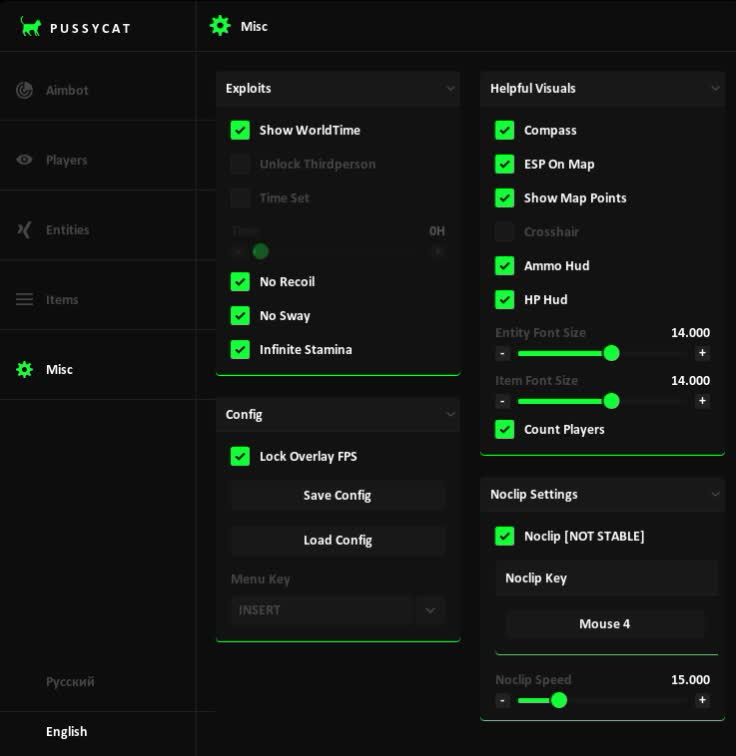
SOFTWARE INTERFACE, BOT ESP, EQUIPMENT & CONFIGURATION
━━━━━━━━━━━━━━━━━━━━━━━━━━━━
SYSTEM REQUIREMENTS & COMPATIBILITY
- Game: Arma Reforger
- Product: PussyCAT
- Developer: PussyCAT
- Software Type: ESP Overlay with Vector Aimbot — exact Internal / External type unconfirmed
- Game Platform: Steam
- Operating System: Windows 10 / Windows 11 x64
- Supported Windows Builds: Verify exact compatible versions before purchasing
- Processor: Intel / AMD
- Graphics Card: Confirm current GPU compatibility
- Game Display Mode: Windowed / Borderless
- USB Flash Drive: Not required
- Built-in HWID Spoofer: Not included
- Virtualization / Hyper-V: Verify current setup requirements
- Secure Boot: Verify current requirements
- Screenshot / Recording Concealment: Not confirmed
- Noclip: Experimental — NOT STABLE
- Product Status: Verify before purchasing and launching
IMPORTANT COMPATIBILITY INFORMATION
PussyCAT is designed for Arma Reforger and includes Vector Aimbot, Player ESP, Bot ESP, equipment visualization, Map ESP and additional gameplay features.
The listed compatibility information includes Steam, Windows 10 / Windows 11 x64, Intel / AMD processors and Windowed / Borderless display modes.
A USB flash drive is not required.
The product does not include a built-in HWID Spoofer.
Noclip is explicitly marked as NOT STABLE and should be considered experimental.
Before purchasing, verify the exact Windows build, current game version, hardware compatibility and additional installation requirements on ShopHackGames.
Follow the latest installation and activation instructions provided with your order.
━━━━━━━━━━━━━━━━━━━━━━━━━━━━
SUBSCRIPTION PRICES
1 DAY — ~€3.34 / 300 RUB
7 DAYS — ~€14.46 / 1,300 RUB
30 DAYS — ~€27.81 / 2,500 RUB
EUR prices are approximate conversions. Final subscription prices, exchange rates and payment fees may vary at checkout.
━━━━━━━━━━━━━━━━━━━━━━━━━━━━
PURCHASE & INSTANT DELIVERY
AUTOMATIC DELIVERY • SETUP INSTRUCTIONS • CUSTOMER SUPPORT
Purchase PussyCAT for Arma Reforger directly through ShopHackGames.
Choose your preferred subscription duration and verify the current product status, supported functionality and system compatibility.
Complete your order using one of the available payment methods.
Enter a valid email address during checkout.
After successful payment, license information and purchase details are delivered automatically.
The corresponding purchase information is also sent to the email address provided during checkout.
If the purchase page is accidentally closed, order information may be recovered through the corresponding email or Oplata.info account.
Installation, activation and launch instructions are provided with the purchased product.
Customer support is available for ordering, installation, activation and troubleshooting.
➜ BUY PUSSYCAT FOR ARMA REFORGER
━━━━━━━━━━━━━━━━━━━━━━━━━━━━
MORE ARMA REFORGER SOFTWARE
ShopHackGames offers additional software products for Arma Reforger.
Compare supported features, available license durations, system requirements and current product status before purchasing.
➜ VIEW ALL ARMA REFORGER SOFTWARE
➜ BROWSE THE SHOPHACKGAMES CATALOG
━━━━━━━━━━━━━━━━━━━━━━━━━━━━
CONTACT & SUPPORT
Store: ShopHackGames
Telegram Support: @Creator_Mikhail
Store News: @shophackgames
Community: ShopHackGames Chat
Discord: ShopHackGames Server
━━━━━━━━━━━━━━━━━━━━━━━━━━━━


