888 Osu - Advanced Gameplay Assistant
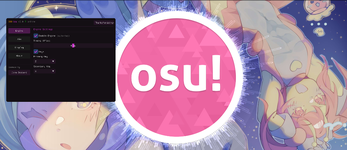
Overview
888 Osu is a modern gameplay assistant for osu! featuring advanced enhancement tools. Designed for players looking to optimize their gameplay or experiment with new techniques.
Engine System
- Auto-Tap Engine - Automatic key activation with adjustable timing offset (+/-50ms)
- Flexible Keybindings - Selectable primary and secondary keys (Z, X, C, A, S, D, Q, W)
- Alternate Key Mode - Support for alternative key configurations
Aim Assist
- Smart Auto-Aim - Automatic cursor guidance
- Two Activation Modes - Toggle (On/Off) or Hold (Press and hold)
- Adjustable Smoothing - Customizable aim smoothing (0-100%)
- Individually Assignable Hotkey
Display Features
- Real-Time FPS Counter - Live framerate monitoring
- Song Information - Current map title and artist display
- Custom Toggle Key - Show/hide menu with self-assigned key
- Uncap FPS Option - Unleashed overlay performance
Technical Details
- Overlay Technology: DirectX 11 based rendering
- Performance: Minimal resource usage, optimized for smooth gameplay
- Compatibility: Fully integrable with osu! in windowed and fullscreen modes
- Discrete: Transparent overlay that doesn't interfere with gameplay
Note: This tool is external and is not and will not be detected.

Overview
888 Osu is a modern gameplay assistant for osu! featuring advanced enhancement tools. Designed for players looking to optimize their gameplay or experiment with new techniques.
Engine System
- Auto-Tap Engine - Automatic key activation with adjustable timing offset (+/-50ms)
- Flexible Keybindings - Selectable primary and secondary keys (Z, X, C, A, S, D, Q, W)
- Alternate Key Mode - Support for alternative key configurations
Aim Assist
- Smart Auto-Aim - Automatic cursor guidance
- Two Activation Modes - Toggle (On/Off) or Hold (Press and hold)
- Adjustable Smoothing - Customizable aim smoothing (0-100%)
- Individually Assignable Hotkey
Display Features
- Real-Time FPS Counter - Live framerate monitoring
- Song Information - Current map title and artist display
- Custom Toggle Key - Show/hide menu with self-assigned key
- Uncap FPS Option - Unleashed overlay performance
Technical Details
- Overlay Technology: DirectX 11 based rendering
- Performance: Minimal resource usage, optimized for smooth gameplay
- Compatibility: Fully integrable with osu! in windowed and fullscreen modes
- Discrete: Transparent overlay that doesn't interfere with gameplay
Note: This tool is external and is not and will not be detected.
Password for .zip file is hvh.net
Content status reports:
-0/0+
Last edited by a moderator: