8/8/8 v2
Completely reworked. Cleaner than ever.
A modern gameplay assistant for osu!, new interface, new experience. Designed for players who want a clean and stable refined tool.
Old Version (still works): https://hackvshack.net/threads/osu-stable-cheat-relaxmode-aimassist.12883/
The toggle key can be changed at any time under SYSTEM → Interface key.
still use at your own risk.....
Version: 8/8/8 v2
Type: External
Build: x64 Release

Completely reworked. Cleaner than ever.
A modern gameplay assistant for osu!, new interface, new experience. Designed for players who want a clean and stable refined tool.
Overview
8/8/8 v2 is a full rewrite of the previous version. Every system has been redesigned — from the UI layout to the autoclick timing engine. The goal was simple: make everything cleaner, smoother, and more precise. No leftover design from the old tool, no cluttered menus, just a focused external assistant that does exactly what it should.Old Version (still works): https://hackvshack.net/threads/osu-stable-cheat-relaxmode-aimassist.12883/
What's New in v2
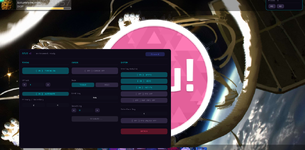
Fully Reworked Interface
- Brand new 3-column dashboard layout — no tabs, no clutter
- Modern dark purple / cyan theme that looks nothing like the old build
- Large toggle buttons instead of small checkboxes
- Direct key-bind buttons — click and press a key, done
- Cleaner spacing, cleaner separators, cleaner everything
New Autoclick / Relax Method
- Rewritten tap-timing engine for more consistent input
- Smoother cursor movement with refined smoothing curve
- More stable key registration — no missed or double taps
- Finely adjustable timing offset in milliseconds
New Overlay Features
- Live Stats Panel — combo counter and missed-object tracker
- Key Overlay — visual feedback for K1 / K2 presses
- Hit Feedback Ring — subtle visual pulse on every hit
- FPS Unlocker for a smoother overlay experience
Engine System
- Auto-Tap Engine — automatic key activation with adjustable timing offset (+/-50 ms)
- Flexible Keybindings — selectable primary and secondary keys (Z, X, C, A, S, D, Q, W)
- Alternate Key Mode — support for alternating key configurations
- Fully rebindable — every key can be reassigned at any time
Controls
| Key | Action |
|---|---|
| 8 | Open / close the menu |
| Mouse | Navigate the interface |
Technical Details
- Overlay Technology: DirectX 11 based rendering
- UI Framework: ImGui (custom themed)
- Performance: Minimal resource usage, optimized for smooth gameplay
- Compatibility: Fully integrable with osu! in windowed and fullscreen modes
- Discrete: Transparent overlay that doesn't interfere with gameplay
- Build: x64 Release, statically linked (runs without VC++ Redistributables)
Setup
- Start osu! first
- Launch 888 v2.exe
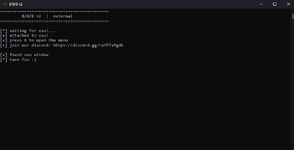
- Wait for the console to report "attached to osu!"
- Press 8 to open the menu
- Adjust settings to your liking
Note
This tool is external and is not and will not be detected.still use at your own risk.....
Version: 8/8/8 v2
Type: External
Build: x64 Release
Password for .zip file is hvh.net
Content status reports:
-0/0+
Last edited: