
use the build in our discord server, it has tb enabled/unlocked or wait until i updated the thread's dllwhy ı want the auto wall can u build for me?
You are using an out of date browser. It may not display this or other websites correctly.
You should upgrade or use an alternative browser.
You should upgrade or use an alternative browser.
Welcome to hackvshack.net Forum!
Download Free HvH CS2/CS:GO Cheats, CFG, LUA/JS Scripts, and More!
Register
- Status
- Thread closed. Topic resolved/outdated. For updates, start new thread. Files removed to save server space.

Im using standard injection and the launch option but still returned NULL
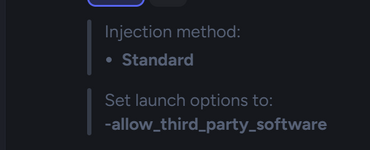

ok bro ım on discord where ı dowland enabled version or builduse the build in our discord server, it has tb enabled/unlocked or wait until i updated the thread's dll


cheat by satanaAbout
Kobalt is an internal cheat for Counter-Strike 2.
It is built for legit play and visual quality alongside other various features.
I tried my best to do it all and make it as stable as possible.
This is the public BETA. Features are fully working but I am still testing and taking feedback before the final release.
Full Feature List
1. LEGIT tab
Legitbot - per weapon category (Pistol, Rifle, SMG, Sniper, Shotgun, LMG).
Share one config across all or set each one by itself.
Triggerbot - also per weapon category. (Currently disabled - under-work)
- General: Enable, Aim Key (hold / toggle / always on)
- Targeting: FOV (1-100), Smoothing (1-100), Hitbox priority selector (Head, Chest, Stomach, Pelvis, Arms, Legs, Feet) with a 3D model popup
- FOV Circle: Show / Hide, color, Dynamic Mode (follows recoil), thickness
- Recoil Control (RCS): On / Off, scale 0.1-4.0
- Assisted Recoil: On / Off, scale 0.1-4.0
- Silent Aim: On / Off, hitchance (0-100%), dedicated Silent Aim Key
- Global: Conditions (Visible / No smoke / No flash / Behind walls), Target priority (FOV / Distance / Health), Smoothing type (Linear / Human), Reaction time (0-500 ms), Max distance (0-5000)
- Extras: Auto Stop
- Activation: Always / Hold / Toggle + Trigger Key
- Per-category: Hitchance, Delay (ms), Head Only
- Burst Fire: count 1-10, delay 50-500 ms
- Options: Require Scope, Aim Mode (None / Seed)
- Filters: Ignore Teammates, Smoke, Flash
- Auto Wall: Enable + Minimum Damage
2. VISUALS tab
World subtab
ESP subtab
- Environment: World Color, Light Scene, Lighting, Sun, Clouds, Sky colors, Exposure (0-200%)
- Tracers: Local Bullet Tracers + color + visibility
- Grenades: Prediction line (5 styles), Effect card, Molotov Area + Opacity, Molotov Fire Color, Smoke Color
- World ESP: Dropped Weapon Icon, World Hitmarker, 2D Hitmarker
Local subtab
- Identity: Name, 8 Font Styles, Font Size, Avatar
- Bounding: Box with 8 styles (Normal, Corners, Corners Animated, Glow, Segmented, 3D, Dashed Neon, Chamfer)
- Status: Health Bar (Classic / Gradient / Modern) + optional text
- Equipment: Weapon Name, Weapon Icon, Ammo Bar
- Indicators: Flashed Eye (Enemy / Team) with size, Flags (Money / Armor / Kit / Scoped / Defusing / Latency)
- Effects: Skeleton, OOF Arrows, Glow (Solid / Outline / Pulse), Head Lines
- Chams: Enemy Visible / Invisible, Glow Overlay + Pulse, Local / Weapon / Arms / Glove / C4 Chams, 15 materials (Latex, Bloom, Glow, Solid, Xray, Spectrum, Glitch, Clown, Pearlescent, Crystal, Obsidian, Hologram, Slate, Plasma, Ghost)
- View: Override FOV / Viewmodel FOV / Aspect Ratio, Removals, Flash Intensity, Force Second Zoom
- Scope & Recoil: Remove Recoil, Remove Scope (Default / Overlay / Gradient / All), custom scope colors, length, gap, center dot, show spread
- Camera: Viewmodel Changer (FOV, X, Y, Z)
- Third Person: Enable + Key, Distance, Scope Zoom, Zoom Factor
- HUD & Damage: Damage Indicator, Penetration Crosshair (shape, radius, thickness, damage, per-state colors)
- Crosshair: Custom Crosshair (5 styles: Classic / Dot / Circle / T-Shape / Sniper)
3. INVENTORY (Skin Changer)
Full CS2 inventory browser and editor.
- Categories: Weapons, Knives, Gloves, Cases, Keys, Agents
- Per-item: Wear, Pattern / Seed, StatTrak + count, Custom Name
- My Items: copy ID, equip to CT or T, remove, clear all
- Settings: Enable Skin Changer, Save / Load Inventory, Initialize DB
4. MISC tab
Utility
Throwable Helper (Disabled - under-work)
- Movement: Bunny Hop (disabled - under-work)
- Automation: Auto Accept Match, Auto Knife, Auto Zeus + Accuracy, Treat Teammates As Enemies
- Autobuy: Primary, Secondary, Additional (Armor / Taser / Grenades / Defuser), Grenades filter
- Region Selector: Auto (Best Ping) or any datacenter
- Audio: Hit Sound (Metallic / Light / Coin / Money / Whack) + volume
- Social: Vote Tracker, Hit Logs
- Identity: Kobalt Clan Tag + optional Custom username
Overlay
- Nade Helper with Show All Lineups, Activation Distance, Color, Nade Filter (All / Smoke / Flash / Molotov / HE), Side Filter (Both / T / CT)
- Aim Assist with Key + Tolerance (°)
Models
- Widgets: Indicators, Spectators, Watermark, Radar, Keybinds, Configs HUD, Grenade Panel, Scoreboard, FPS Profiler
- FPS Profiler popup: per-group toggles with filter and Select All / None / Invert
- Sizing: Watermark scale, Spectators scale, Spectators only when active
- Radar: Range, Size, show toggles for Grenades / Deaths / Names / C4
- Round Info: C4 ESP (Timer / Distance / Site / Defuse info / Size), Team Damage Indicator
- Custom Player Models (CT + T) from .vmdl_c files
- Drop into game/csgo/characters/models/<name>/<name>.vmdl_c
- Refresh + Open folder buttons
5. LUA tab
- Scripts library with search, author, description, enable/disable, reload, open folder
- Console with Info / Warn / Error / OK filters, auto-scroll, copy error
- Scripts can use print("..."), warn("...") and OnPaint callbacks
6. MENU tab
- Settings: Menu accent color, Menu Size (0.75x-1.50x), Transparency, Blur Strength, Background Darkness, Border Brightness, Darken Background, Glow, Flying Logos, Unload Cheat (confirm)
- Radio: Search / Favorites / Browse by country, Now Playing strip, volume, stop
- YouTube: optional YouTube player
7. CONFIG tab
- Local: Save / Load / Delete / Create, search, open folder
- Public: Browse and one-click download community configs from GitHub
Menu
- Global Search with Ctrl + F
- Keyboard Navigation (1-8 for tabs)
- 7 Languages (English, Español, Russian, Chinese, Deutsch, Português, Română) from the globe icon
- Every overlay widget is draggable
Default Keybinds
- INSERT - open / close menu
- DELETE - unload (panic)
- 1-8 - quick switch tabs
- Ctrl + F - global search
Requirements
Support
- Windows 10 / 11 (x64)
- Counter-Strike 2
- Visual C++ 2015-2022 Redistributable (x64)
Post your bug/issue here or in the official discord serverYou must be registered for see links
Already fixed, wait for the update here or download the updated DLL from discord.crash so lots

join the server and download the DLL build that is available there or wait until I update the thread's DLL.hi designer i have a problem i cant bind any button on aim and i cant select hitbox

Can you share the open source code?About
Kobalt is an internal cheat for Counter-Strike 2.
It is built for legit play and visual quality alongside other various features.
I tried my best to do it all and make it as stable as possible.
This is the public BETA. Features are fully working but I am still testing and taking feedback before the final release.
Full Feature List
1. LEGIT tab
Legitbot - per weapon category (Pistol, Rifle, SMG, Sniper, Shotgun, LMG).
Share one config across all or set each one by itself.
Triggerbot - also per weapon category. (Currently disabled - under-work)
- General: Enable, Aim Key (hold / toggle / always on)
- Targeting: FOV (1-100), Smoothing (1-100), Hitbox priority selector (Head, Chest, Stomach, Pelvis, Arms, Legs, Feet) with a 3D model popup
- FOV Circle: Show / Hide, color, Dynamic Mode (follows recoil), thickness
- Recoil Control (RCS): On / Off, scale 0.1-4.0
- Assisted Recoil: On / Off, scale 0.1-4.0
- Silent Aim: On / Off, hitchance (0-100%), dedicated Silent Aim Key
- Global: Conditions (Visible / No smoke / No flash / Behind walls), Target priority (FOV / Distance / Health), Smoothing type (Linear / Human), Reaction time (0-500 ms), Max distance (0-5000)
- Extras: Auto Stop
- Activation: Always / Hold / Toggle + Trigger Key
- Per-category: Hitchance, Delay (ms), Head Only
- Burst Fire: count 1-10, delay 50-500 ms
- Options: Require Scope, Aim Mode (None / Seed)
- Filters: Ignore Teammates, Smoke, Flash
- Auto Wall: Enable + Minimum Damage
2. VISUALS tab
World subtab
ESP subtab
- Environment: World Color, Light Scene, Lighting, Sun, Clouds, Sky colors, Exposure (0-200%)
- Tracers: Local Bullet Tracers + color + visibility
- Grenades: Prediction line (5 styles), Effect card, Molotov Area + Opacity, Molotov Fire Color, Smoke Color
- World ESP: Dropped Weapon Icon, World Hitmarker, 2D Hitmarker
Local subtab
- Identity: Name, 8 Font Styles, Font Size, Avatar
- Bounding: Box with 8 styles (Normal, Corners, Corners Animated, Glow, Segmented, 3D, Dashed Neon, Chamfer)
- Status: Health Bar (Classic / Gradient / Modern) + optional text
- Equipment: Weapon Name, Weapon Icon, Ammo Bar
- Indicators: Flashed Eye (Enemy / Team) with size, Flags (Money / Armor / Kit / Scoped / Defusing / Latency)
- Effects: Skeleton, OOF Arrows, Glow (Solid / Outline / Pulse), Head Lines
- Chams: Enemy Visible / Invisible, Glow Overlay + Pulse, Local / Weapon / Arms / Glove / C4 Chams, 15 materials (Latex, Bloom, Glow, Solid, Xray, Spectrum, Glitch, Clown, Pearlescent, Crystal, Obsidian, Hologram, Slate, Plasma, Ghost)
- View: Override FOV / Viewmodel FOV / Aspect Ratio, Removals, Flash Intensity, Force Second Zoom
- Scope & Recoil: Remove Recoil, Remove Scope (Default / Overlay / Gradient / All), custom scope colors, length, gap, center dot, show spread
- Camera: Viewmodel Changer (FOV, X, Y, Z)
- Third Person: Enable + Key, Distance, Scope Zoom, Zoom Factor
- HUD & Damage: Damage Indicator, Penetration Crosshair (shape, radius, thickness, damage, per-state colors)
- Crosshair: Custom Crosshair (5 styles: Classic / Dot / Circle / T-Shape / Sniper)
3. INVENTORY (Skin Changer)
Full CS2 inventory browser and editor.
- Categories: Weapons, Knives, Gloves, Cases, Keys, Agents
- Per-item: Wear, Pattern / Seed, StatTrak + count, Custom Name
- My Items: copy ID, equip to CT or T, remove, clear all
- Settings: Enable Skin Changer, Save / Load Inventory, Initialize DB
4. MISC tab
Utility
Throwable Helper (Disabled - under-work)
- Movement: Bunny Hop (disabled - under-work)
- Automation: Auto Accept Match, Auto Knife, Auto Zeus + Accuracy, Treat Teammates As Enemies
- Autobuy: Primary, Secondary, Additional (Armor / Taser / Grenades / Defuser), Grenades filter
- Region Selector: Auto (Best Ping) or any datacenter
- Audio: Hit Sound (Metallic / Light / Coin / Money / Whack) + volume
- Social: Vote Tracker, Hit Logs
- Identity: Kobalt Clan Tag + optional Custom username
Overlay
- Nade Helper with Show All Lineups, Activation Distance, Color, Nade Filter (All / Smoke / Flash / Molotov / HE), Side Filter (Both / T / CT)
- Aim Assist with Key + Tolerance (°)
Models
- Widgets: Indicators, Spectators, Watermark, Radar, Keybinds, Configs HUD, Grenade Panel, Scoreboard, FPS Profiler
- FPS Profiler popup: per-group toggles with filter and Select All / None / Invert
- Sizing: Watermark scale, Spectators scale, Spectators only when active
- Radar: Range, Size, show toggles for Grenades / Deaths / Names / C4
- Round Info: C4 ESP (Timer / Distance / Site / Defuse info / Size), Team Damage Indicator
- Custom Player Models (CT + T) from .vmdl_c files
- Drop into game/csgo/characters/models/<name>/<name>.vmdl_c
- Refresh + Open folder buttons
5. LUA tab
- Scripts library with search, author, description, enable/disable, reload, open folder
- Console with Info / Warn / Error / OK filters, auto-scroll, copy error
- Scripts can use print("..."), warn("...") and OnPaint callbacks
6. MENU tab
- Settings: Menu accent color, Menu Size (0.75x-1.50x), Transparency, Blur Strength, Background Darkness, Border Brightness, Darken Background, Glow, Flying Logos, Unload Cheat (confirm)
- Radio: Search / Favorites / Browse by country, Now Playing strip, volume, stop
- YouTube: optional YouTube player
7. CONFIG tab
- Local: Save / Load / Delete / Create, search, open folder
- Public: Browse and one-click download community configs from GitHub
Menu
- Global Search with Ctrl + F
- Keyboard Navigation (1-8 for tabs)
- 7 Languages (English, Español, Russian, Chinese, Deutsch, Português, Română) from the globe icon
- Every overlay widget is draggable
Default Keybinds
- INSERT - open / close menu
- DELETE - unload (panic)
- 1-8 - quick switch tabs
- Ctrl + F - global search
Requirements
Support
- Windows 10 / 11 (x64)
- Counter-Strike 2
- Visual C++ 2015-2022 Redistributable (x64)
Post your bug/issue here or in the official discord serverYou must be registered for see links
It's not open-source.Can you share the open source code?
can someone help me fix injections with extreme injector? i downloaded Visual C++ Redistributable both x64 and x32 and it still doesnt work

well whats the errorcan someone help me fix injections with extreme injector? i downloaded Visual C++ Redistributable both x64 and x32 and it still doesnt work

i need ur help i set a dedicated key for silent aim but the aimbot always works not the silent aim like how does the silent aim in this cheat work pls explain and the cheat overall is great waiting for triggerbotAbout
Kobalt is an internal cheat for Counter-Strike 2.
It is built for legit play and visual quality alongside other various features.
I tried my best to do it all and make it as stable as possible.
This is the public BETA. Features are fully working but I am still testing and taking feedback before the final release.
Full Feature List
1. LEGIT tab
Legitbot - per weapon category (Pistol, Rifle, SMG, Sniper, Shotgun, LMG).
Share one config across all or set each one by itself.
Triggerbot - also per weapon category. (Currently disabled - under-work)
- General: Enable, Aim Key (hold / toggle / always on)
- Targeting: FOV (1-100), Smoothing (1-100), Hitbox priority selector (Head, Chest, Stomach, Pelvis, Arms, Legs, Feet) with a 3D model popup
- FOV Circle: Show / Hide, color, Dynamic Mode (follows recoil), thickness
- Recoil Control (RCS): On / Off, scale 0.1-4.0
- Assisted Recoil: On / Off, scale 0.1-4.0
- Silent Aim: On / Off, hitchance (0-100%), dedicated Silent Aim Key
- Global: Conditions (Visible / No smoke / No flash / Behind walls), Target priority (FOV / Distance / Health), Smoothing type (Linear / Human), Reaction time (0-500 ms), Max distance (0-5000)
- Extras: Auto Stop
- Activation: Always / Hold / Toggle + Trigger Key
- Per-category: Hitchance, Delay (ms), Head Only
- Burst Fire: count 1-10, delay 50-500 ms
- Options: Require Scope, Aim Mode (None / Seed)
- Filters: Ignore Teammates, Smoke, Flash
- Auto Wall: Enable + Minimum Damage
2. VISUALS tab
World subtab
ESP subtab
- Environment: World Color, Light Scene, Lighting, Sun, Clouds, Sky colors, Exposure (0-200%)
- Tracers: Local Bullet Tracers + color + visibility
- Grenades: Prediction line (5 styles), Effect card, Molotov Area + Opacity, Molotov Fire Color, Smoke Color
- World ESP: Dropped Weapon Icon, World Hitmarker, 2D Hitmarker
Local subtab
- Identity: Name, 8 Font Styles, Font Size, Avatar
- Bounding: Box with 8 styles (Normal, Corners, Corners Animated, Glow, Segmented, 3D, Dashed Neon, Chamfer)
- Status: Health Bar (Classic / Gradient / Modern) + optional text
- Equipment: Weapon Name, Weapon Icon, Ammo Bar
- Indicators: Flashed Eye (Enemy / Team) with size, Flags (Money / Armor / Kit / Scoped / Defusing / Latency)
- Effects: Skeleton, OOF Arrows, Glow (Solid / Outline / Pulse), Head Lines
- Chams: Enemy Visible / Invisible, Glow Overlay + Pulse, Local / Weapon / Arms / Glove / C4 Chams, 15 materials (Latex, Bloom, Glow, Solid, Xray, Spectrum, Glitch, Clown, Pearlescent, Crystal, Obsidian, Hologram, Slate, Plasma, Ghost)
- View: Override FOV / Viewmodel FOV / Aspect Ratio, Removals, Flash Intensity, Force Second Zoom
- Scope & Recoil: Remove Recoil, Remove Scope (Default / Overlay / Gradient / All), custom scope colors, length, gap, center dot, show spread
- Camera: Viewmodel Changer (FOV, X, Y, Z)
- Third Person: Enable + Key, Distance, Scope Zoom, Zoom Factor
- HUD & Damage: Damage Indicator, Penetration Crosshair (shape, radius, thickness, damage, per-state colors)
- Crosshair: Custom Crosshair (5 styles: Classic / Dot / Circle / T-Shape / Sniper)
3. INVENTORY (Skin Changer)
Full CS2 inventory browser and editor.
- Categories: Weapons, Knives, Gloves, Cases, Keys, Agents
- Per-item: Wear, Pattern / Seed, StatTrak + count, Custom Name
- My Items: copy ID, equip to CT or T, remove, clear all
- Settings: Enable Skin Changer, Save / Load Inventory, Initialize DB
4. MISC tab
Utility
Throwable Helper (Disabled - under-work)
- Movement: Bunny Hop (disabled - under-work)
- Automation: Auto Accept Match, Auto Knife, Auto Zeus + Accuracy, Treat Teammates As Enemies
- Autobuy: Primary, Secondary, Additional (Armor / Taser / Grenades / Defuser), Grenades filter
- Region Selector: Auto (Best Ping) or any datacenter
- Audio: Hit Sound (Metallic / Light / Coin / Money / Whack) + volume
- Social: Vote Tracker, Hit Logs
- Identity: Kobalt Clan Tag + optional Custom username
Overlay
- Nade Helper with Show All Lineups, Activation Distance, Color, Nade Filter (All / Smoke / Flash / Molotov / HE), Side Filter (Both / T / CT)
- Aim Assist with Key + Tolerance (°)
Models
- Widgets: Indicators, Spectators, Watermark, Radar, Keybinds, Configs HUD, Grenade Panel, Scoreboard, FPS Profiler
- FPS Profiler popup: per-group toggles with filter and Select All / None / Invert
- Sizing: Watermark scale, Spectators scale, Spectators only when active
- Radar: Range, Size, show toggles for Grenades / Deaths / Names / C4
- Round Info: C4 ESP (Timer / Distance / Site / Defuse info / Size), Team Damage Indicator
- Custom Player Models (CT + T) from .vmdl_c files
- Drop into game/csgo/characters/models/<name>/<name>.vmdl_c
- Refresh + Open folder buttons
5. LUA tab
- Scripts library with search, author, description, enable/disable, reload, open folder
- Console with Info / Warn / Error / OK filters, auto-scroll, copy error
- Scripts can use print("..."), warn("...") and OnPaint callbacks
6. MENU tab
- Settings: Menu accent color, Menu Size (0.75x-1.50x), Transparency, Blur Strength, Background Darkness, Border Brightness, Darken Background, Glow, Flying Logos, Unload Cheat (confirm)
- Radio: Search / Favorites / Browse by country, Now Playing strip, volume, stop
- YouTube: optional YouTube player
7. CONFIG tab
- Local: Save / Load / Delete / Create, search, open folder
- Public: Browse and one-click download community configs from GitHub
Menu
- Global Search with Ctrl + F
- Keyboard Navigation (1-8 for tabs)
- 7 Languages (English, Español, Russian, Chinese, Deutsch, Português, Română) from the globe icon
- Every overlay widget is draggable
Default Keybinds
- INSERT - open / close menu
- DELETE - unload (panic)
- 1-8 - quick switch tabs
- Ctrl + F - global search
Requirements
Support
- Windows 10 / 11 (x64)
- Counter-Strike 2
- Visual C++ 2015-2022 Redistributable (x64)
Post your bug/issue here or in the official discord server [URL unfurl="true"https://]discord.gg/zmBjcWhu5r[/URL]
Last edited:

Its very good at visuals (I appreciate this have 10+ chams material) but slient aim doesnt work : 9.5/10!


it worksIts very good at visuals (I appreciate this have 10+ chams material) but slient aim doesnt work : 9.5/10!
Silent aim is set to work with aimbot. It has to be both toggled and active.Its very good at visuals (I appreciate this have 10+ chams material) but slient aim doesnt work : 9.5/10!
Silent aim is set to work with aimbot. It has to be both toggled and active.i need ur help i set a dedicated key for silent aim but the aimbot always works not the silent aim like how does the silent aim in this cheat work pls explain and the cheat overall is great waiting for triggerbot
- Status
- Thread closed. Topic resolved/outdated. For updates, start new thread. Files removed to save server space.
Similar threads


- Replies
- 32
- Views
- 6K
Status:
-0/0+


- Replies
- 135
- Views
- 20K
Status:
-0/0+

- Replies
- 7
- Views
- 666
Status:
-0/0+


- Replies
- 5
- Views
- 539
