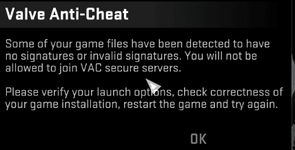
Once you click okay on that prompt it will close your game. heres some fixes;
- run connect na.2018hvh.com;disconnect and it will automatically disconnect you from the server and remove the prompt.
- downgrade your game using Dick Kickems tutorial.
Once you click okay on that prompt it will close your game. heres some fixes;
- run connect na.2018hvh.com;disconnect and it will automatically disconnect you from the server and remove the prompt.
- downgrade your game using Dick Kickems tutorial.
Once you click okay on that prompt it will close your game. heres some fixes;
- run connect na.2018hvh.com;disconnect and it will automatically disconnect you from the server and remove the prompt.
- downgrade your game using Dick Kickems tutorial.
Once you click okay on that prompt it will close your game. heres some fixes;
- run connect na.2018hvh.com;disconnect and it will automatically disconnect you from the server and remove the prompt.
- downgrade your game using Dick Kickems tutorial.
Once you click okay on that prompt it will close your game. heres some fixes;
- run connect na.2018hvh.com;disconnect and it will automatically disconnect you from the server and remove the prompt.
- downgrade your game using Dick Kickems tutorial.
This site uses cookies to help personalise content, tailor your experience and to keep you logged in if you register.
By continuing to use this site, you are consenting to our use of cookies.